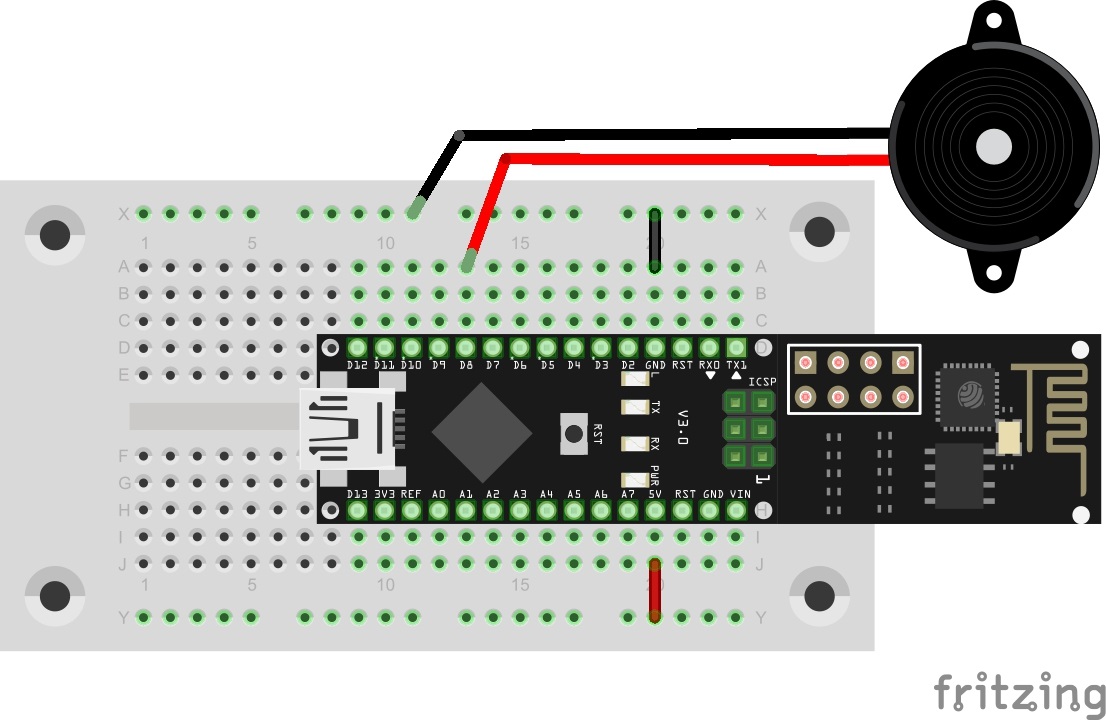
Behind today’s door is a piezo sound transducer. It’s possible to generate sounds with it, which will become clear in today’s test. Today you’re building a type of piano that can be used via a website. See the following picture for the layout:
The correct connection of the piezo sound transducer The sketch: A16_P16_WebserverPiano.ino /* TCP-Server Piano Change SSID and PASSWORD. */ #include <NanoESP.h> #include <NanoESP_HTTP.h> //special library for http-connection #include <SoftwareSerial.h> #include "Websites.h" //websites in a special file as progmem #define SSID "YourSSID" #define PASSWORD "YourPassword" #define LED_WLAN 13 NanoESP nanoesp = NanoESP(); NanoESP_HTTP http = NanoESP_HTTP(nanoesp); void setup() { Serial.begin(19200); nanoesp.init(); //! Only if you want to change the ACCESPOINT configuration //nanoesp.configWifi(ACCESSPOINT, "NanoESP", ""); //! Only if you use a new Network // nanoesp.configWifi(DUAL, SSID, PASSWORD); //Dual Mode nanoesp.configWifiMode(DUAL); //delay(1000); // Wait till Connected to WiFi if (nanoesp.wifiConnected())digitalWrite(LED_WLAN, HIGH); else Serial.println(F("Error WLAN Connect")); //Start TCP Server if (nanoesp.startTcpServer(80)) Serial.println(F("TCP Server Activ")); else Serial.println(F("TCP Server Error")); //Print IP in Terminal Serial.println(nanoesp.getIp()); } void loop() { String method, ressource, parameter; int id; if (http.recvRequest(id, method, ressource, parameter)) { //Incoming request, parameters by reference Serial.println("New Request from id :" + String(id) + ", method: " + method + ", ressource: " + ressource + " parameter: " + parameter); if (ressource == "/") { http.sendFromFlash(id, index, sizeof(index)); nanoesp.closeConnection(id); } else if (ressource == "/dataonly") { //only data is recieved on this url, no need to send a website nanoesp.closeConnection(id); } else { http.sendFromFlash(id, error404, sizeof(error404)); nanoesp.closeConnection(id); } if (parameter != "") //the request included parameters { String strTone; if (method == GET) strTone = parameter.substring(6); else strTone = parameter.substring(5); //get note values noTone(8); tone(8, strTone.toInt(), 200); //play note for 200ms } } } (The former Arduino Create embed is no longer available; the code is taken from the download of all sketches.)
...