Day 21: Alarm system

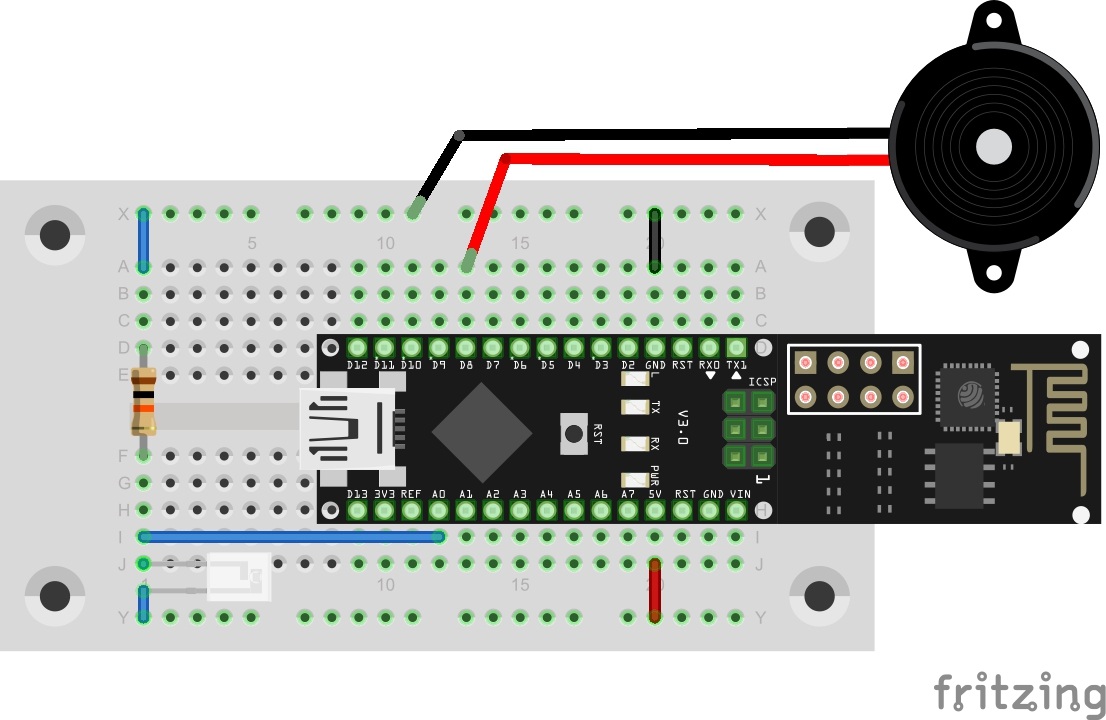
Today’s project is an alarm system with which you can, for example, check whether someone opens a drawer without permission. There is a continuous check for whether the connected light sensor is exposed to too much light. If this is the case, an alarm signal will sound and a message will be sent via Twitter. Lightsensor on A0 and Piezo on D8 Behind today’s door, there is a Piezo speaker that is used as alarm signal encoder. The structure of today’s experiment is shown in the figure. ...
21.12.2015 · 2 min · Fabian Kainka

Day 19: ThingSpeak

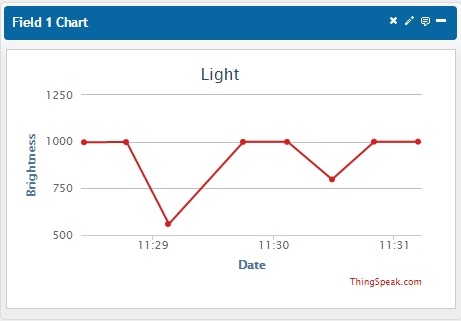
In the last days of the advent time, we will deal with an entirely new subject: the website ThingSpeak. This website has been specifically developed for the subject of Internet of Things and contains various practical functions for you. Before you tackle the setup and programme as usual, you need to set up an account on the website www.ThingSpeak.com Log in with your user data under the item Sign In. You can see a website that shows your channels. Since you have no channels yet, this site will look rather empty. Click New Channel and assign a name, e.g. Light. In this project, you will measure brightness. In the item Field1, you can now assign a name to the field, e.g. Brightness. All other fields can be left empty for now. ...

19.12.2015 · 2 min · Fabian Kainka

Day 15: Light sensor

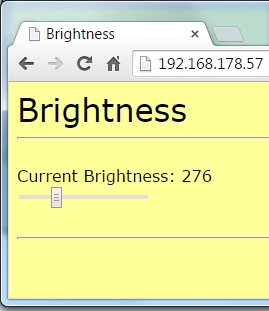
Today’s project does not use the web server’s website as a control interface, but as an output element. The brightness measured via a brightness sensor is displayed well-structuredly as a relative value. The fototranistor at Pin A0 Behind today’s door, there is another photo transistor that serves as a light sensor. The photo transistor looks like an LED, but should not be mistaken for one. The structure of today’s experiment is shown in the figure. The collector of the photo transistor is the shorter connection. It is applied to +5 V. ...

15.12.2015 · 2 min · Fabian Kainka