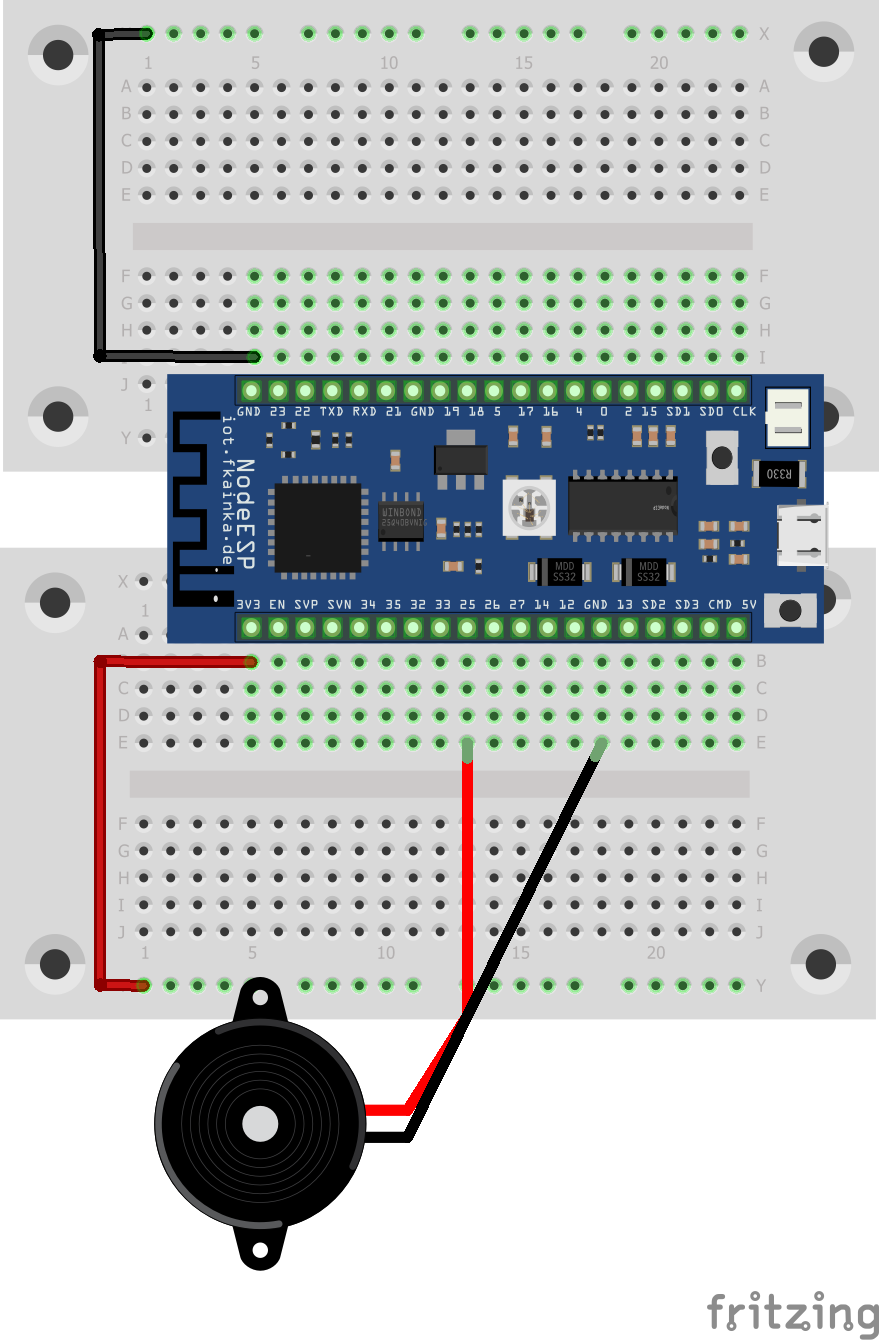
The door of day 21 reveals a loudspeaker. We will use it in our experiment today to play some music. We will need a very simple setup for this.

In our experiment we will connect the speaker to one of the board’s two DAC outputs. DAC means digital/analogue converter and with this we can generate an analogue signal using digital commands. In our experiment today, we will use it to produce sounds, and to be more precise, we are talking about piano sounds. The notes, pauses and keys are sent via UDP by means of an array of numbers.
Copy the Node-RED flow of today into your environment, but before using it, you must again disable previous ones. You also need to adjust the IP of the UDP node to reflect the broadcast IP of your board. Then choose the program of today and start the flow.
You will find already predefined songs that you can play via the user interface. But of course, you also have the option to translate or compose songs yourself. There is a text box for this purpose. Just copy your composition into it.
The notes follow the simple note scheme and are entered like this:
NOTE_C1, NOTE_CS1, NOTE_D1, NOTE_DS1, NOTE_E1, NOTE_F1, NOTE_FS1, NOTE_G1, NOTE_GS1, NOTE_A1, NOTE_AS1, NOTE_B1
The number following the note is the octave. You can replace 1 using any number from 1 to 7. You can also specify the note span with the prefix BEAT to make it a half, quarter or eighth note. The BEAT attribute always refers to the preceding note. BEAT_1 is the default, so you do not need to write this before each note. The following note spans are used:
BEAT_025, BEAT_05, BEAT_075, BEAT_1, BEAT_125, BEAT_15, BEAT_175, BEAT_2, BEAT_25, BEAT_3, BEAT_4, BEAT_5
For example, if you want to play the beginning of Beethoven’s famous 5th Symphony, enter the following text into the window:
NOTE_G5,BEAT_075,NOTE_G5,BEAT_075,NOTE_G5,BEAT_075,NOTE_E5,BEAT_5,
NOTE_F5,BEAT_075,NOTE_F5,BEAT_075,NOTE_F5,BEAT_075,NOTE_D5,BEAT_5
You don’t have to be a musical genius. Just try a few notes and note spansand compose your own song. Or convert a familiar song into this system.
Imagination has no limits.
18 comments
Comments are closed. These comments were posted on the former WordPress site (mostly in German).
scheint ein 'Fehler' in dem Code zu sein?
Kann man das Signal mit Boardmitteln verstärken?
Danke
Jetzt funktioniert es bei mir auch.
Wie bekommt man den Ton lauter.
We Wish You a Merry Christmas
sind Gleich?
Meine Erfahrungen:
-Es ist wohl ein Fehler im Source-Code, da bei "We Wish You a Merry Christmas" auch das Lied für "Twinkle Twinkle Star" hinterlegt war. Falls jemand den Code für "We Wish You a Merry Christmas" braucht, hier ist er:
NOTE_G4,NOTE_C5,NOTE_C5,BEAT_05,NOTE_D5,BEAT_05,NOTE_C5,BEAT_05,NOTE_B4,BEAT_05,NOTE_A4,NOTE_A4,NOTE_A4,NOTE_D5,NOTE_D5,BEAT_05,NOTE_E5,BEAT_05,NOTE_D5,BEAT_05,NOTE_C5,BEAT_05,NOTE_B4,NOTE_G4,NOTE_G4,NOTE_E5,NOTE_E5,BEAT_05,NOTE_F5,BEAT_05,NOTE_E5,BEAT_05,NOTE_D5,BEAT_05,NOTE_C5,NOTE_A4,NOTE_G4,BEAT_05,NOTE_G4,BEAT_05,NOTE_A4,NOTE_D5,NOTE_B4,NOTE_C5,BEAT_2,NOTE_SILENCE,BEAT_5,SCORE_END
Woher kommen die Reboots? Dürfen wir endlich die Quelltexte der Board-Applikationen einsehen?
kriegst du noch unsere Nachrichten mit? Kannst du uns deinen Flow zukommen lassen? Bitte!
/Äd.
NOTE_C5,NOTE_C5,NOTE_G5,NOTE_G5,NOTE_A5,NOTE_A5,NOTE_G5,BEAT_2,NOTE_F5,NOTE_F5,NOTE_E5,NOTE_E5,NOTE_D5,BEAT_2,NOTE_C5,BEAT_2,NOTE_G5,NOTE_G5,NOTE_F5,NOTE_F5,NOTE_E5,NOTE_E5,NOTE_D5,BEAT_2,NOTE_G5,NOTE_G5,NOTE_F5,NOTE_F5,NOTE_E5,NOTE_E5,NOTE_D5,BEAT_2,NOTE_C5,NOTE_C5,NOTE_G5,NOTE_G5,NOTE_A5,NOTE_A5,NOTE_G5,BEAT_2,NOTE_F5,NOTE_F5,NOTE_E5,NOTE_E5,NOTE_D5,BEAT_2,NOTE_C5,BEAT_2,SCORE_END