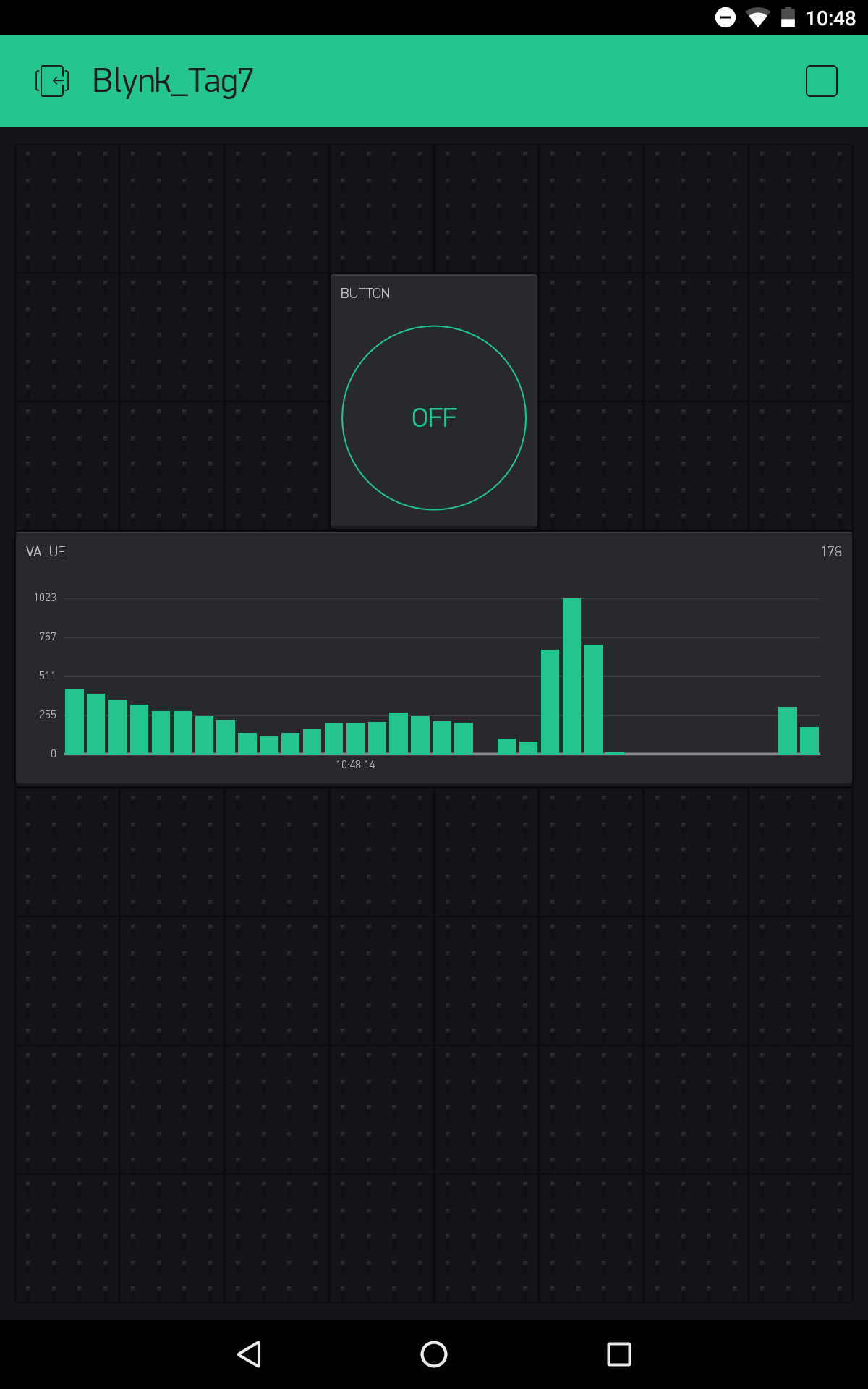
Behind today’s door is a potentiometer. You can use it to transfer analogue messages to the Blynk app. To do this, you need to build the circuit according to the picture.
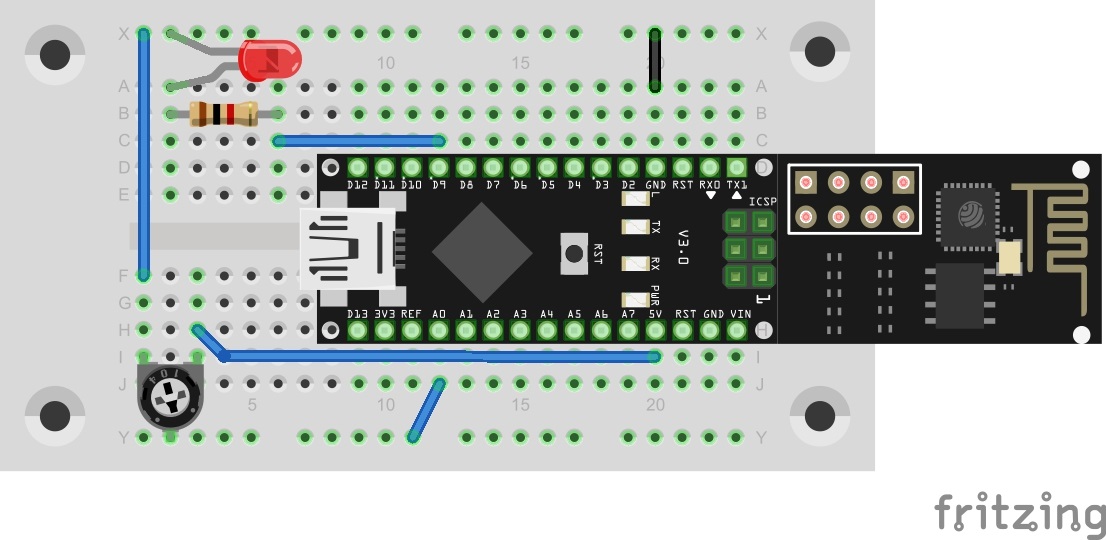
Things can get a bit tight when constructing with the MicroUSB cable. So that everything connects, you first have to disconnect the board from the cable and place the jumpers to be as flat as possible. You also need to be aware that this time the VCC is not applied to the track at the bottom of the image; instead, the track is intended for the connection at Pin A0.
The sketch: A16_P07_Blynk3_AnalogIn.ino
/*
Blynk3: AnalogIn

Change ssid, password and token
*/

char ssid[] = "YourSSID";
char password[] = "YourPassword";
char token[] = "YourToken";

//#define BLYNK_DEBUG
#define BLYNK_PRINT Serial    // Comment this out to disable prints and save space
#include <ESP8266_SoftSer.h>
#include <BlynkSimpleShieldEsp8266_SoftSer.h>

// Set ESP8266 Serial object
#include <SoftwareSerial.h>
SoftwareSerial EspSerial(11, 12); // RX, TX

ESP8266 wifi(EspSerial);

void setup()
{
  // Set console baud rate
  Serial.begin(19200);
  EspSerial.begin(19200);

  Blynk.begin(token, wifi, ssid, password);
}

void loop()
{
  //Analog read and LED toogle are done here automatically by Blynk
  //No need for special programming

  Blynk.run();
}
(The former Arduino Create embed is no longer available; the code is taken from the download of all sketches.)
You can import the Blynk interface as usual with the QR code. You’ll find the programme above. Don’t forget to enter the new token and your WLAN data before you upload the programme to the NanoESP board.
 The measured data are now received approx. once a second and shown in the graph widget. You can affect the measured values by turning the potentiometer. Note that the maximum value is 1023. The reason is that the NanoESP reads the voltage with a resolution of 10 bits. These are formed from a voltage range between 0 and +5 V. The potentiometer acts as a voltage divider in this process, so that voltages between 0 and 5 V can be adjusted at the centre pin.

70 comments
Comments are closed. These comments were posted on the former WordPress site (mostly in German).
Empfehlung: die Biegung der Beinchen mit einer Zange vorsichtig gerade biegen, die Löcher in der Platine vorweiten und das Poti mit "viel Gefühl" einstecken.
Das Poti geht bei mir bis Lochreihe "H" und ist von solcher Qualität, daß beim Stecken der eine Kontakt oben abgerissen ist (ich glaube für Steckbords nicht geeignet).
Mir würde auch schon der Typ reichen, dann kaufe ich mir irgendwo eine neuen..
MfG
Dustin
Soll der LED in diesem setup licht geben?
Die Anleitung auf der "Blynk" Seite sagt dazu leider gar nichts
Ein anderes Poti aus meinem Fundus (mit 75 KΩ) schafft keine durchgehende Regelung der Balken, aber wenigstens eine Anzeige in Blynk. Programm funktioniert also, nur die Hardware mag nicht :-(
Wo krieg ich ein neues her?
mmhhh… falls jemand auch statt eines Cloud-Services lieber die Teststellung innerhalb des eigenen geschützten Netzes ausprobieren möchte ("'S' in IoT stands for security" ;-), ein paar Hinweise:
Alles ohne Gewähr und nur meine eigene Erfahrung, wie es geklappt hat.
Mal sehen, wie es weitergeht. Aber nun habe ich bei einer Testumgebung außerhalb des Internets doch ein etwas besseres Gewissen…
Bei mir ist übrigens auch das Breadboard sehr schwer zu nutzen. Conrad sollte doch einmal auf den Lieferanten zugehen. Das Stecken der Bauteile ist eine Qual.
Yes - at least for control reasons to check the connection to the board, if the poti won't work, as with me :-(
C:\Users\yamah\AppData\Local\Temp\arduino_modified_sketch_34879\sketch_dec07a.ino:12:29: fatal error: ESP8266_SoftSer.h: No such file or directory
Wie kann ich das beheben?
Übrigens passt mein Poti nicht fest ins Steckbrett (während alle anderen Teile kaum in die Löscher passen), dadurch bekomme ich keine vernünftigen Messwerte da sich bei jedem Berühren die Kontaktfläche verändert.
Ich habe die Datei schon mehrmals in den Libraries Ordner kopiert :-(
Vermutlich die falsche Library Version erwischt?
Bei drücken des D9 Knopfes leuchtet die LED und im Graphen wird 17 angezeigt.
Ein Beinchen vom Poti ist auch extrem locker.
Mach ich da was falsch oder soll das so?
Bei mir zeigt der Graph munter lustig unterschiedliche Werte an, auch wenn ich den Poti gar nicht verändere. Was mag da falsch laufen?
http://iot.fkainka.de/der-conrad-iot-adventskalender
Dort findet man u.a. eine "CONRAD Einkaufsliste" unter "Day 0: Alternative zum ausverkauften Adventskalender (Spoiler Alert)" mit den damals benötigten Bauteilen.
http://iot.fkainka.de/wp-content/uploads/2015/11/Conrad-Einkaufliste.pdf
Möglicherweise sind die Bauteile im IoT-Adventskalender 2016 weitestgehend identisch zu der 2015-Version.
(Ja, ich habe die Schaltung mehrmals abgeglichen und ja, der Token stimmt auch.)
Habt ihr eure Potis zerlegt weil ihr sie in Zeile I gepresst habt?
Ich hab nur noch Fragen zum Sinn.
Beim Drehen am Poti ändert sich die Messung in der Blynk-app. Hurra Experiment funktioniert.
Aber soll sich an der LED auch etwas ändern (Leuchtstärke) oder ist das nur noch die Funktion der letzten Tage?
Zum Glück hatte ich noch einen 10k-Poti im Bestand.
Inzwischen gibt es den Adventskalender 2016 bei Conrad Hannover deutlich reduziert!
bei mir steht auf dem Handy, dass das NanoESP Board nicht im Network ist, eigentlich habe ich alles so gemacht, wie es dort steht
Mir wurde schon folgendes geraten:
Mach mal am Anfang nach
Serial.begin(19200);
ein
Serial.println(F(„Starte NanoESP\n“));
und zwischen die zeilen jeweils ein Serial.println(F(„nächster Befehle\n“));
(Danke an "sumero")
Jetzt zeigt er das an:
Starte NanoESP/n
nächster Befehle
nächster Befehle
nächster Befehle
„qXÑzÂC!É1±ÿ)ÓCCa*ó “I!a5 )‘I™Ca5 Jr0KN ‘K!ÑCÊ !“÷þ•rô
ready
aber das ist ja immer noch nicht, was er machen soll. Hat jemand eine Idee?
Das ist ärgerlich. Da gibt es andere kleine Potis die stabiler sind. Musste mir auch mit Ersatz behelfen.
Ein Tipp aber: In Türchen 17 ist der Ersatzpoti :-)
Ich konnte den Fehler zwar nicht lokalisieren. Aber nachdem ich das Programm erneut hochgeladen habe, ging es.
Serial.println(analogRead(0));
eingefügt.
Die ausgegebenen Werte sind in Ordnung … bis die Ping-Meldung kommt, danach ist die Skalierung des Poti irgendwie falsch.
Sie geht dann von z.B. 489 auf 2 runter. Max-Wert ist dann nicht mehr 1023 sondern 928 …
delay(30);
und alles läuft wie erwartet.
:-)
Für den preis des Kalenders, ist es für mich unverständlich warum man solch mangelhafte Komponenten einfügt.
bisher haben die Versuche immer funktioniert.
Aber heute kann ich nach ca. 1s mit der App nichts mehr schalten und im seriellen Monitor kommt folgende Meldung:
OK
[5664] Connected to WiFi
[10909] Ready (ping: 23ms).
[27226] Login timeout
Kann da jemand weiterhelfen?
Schon mal Danke im vorraus.
Und in die passenden Kontakte stecken nicht wie auf der Anleitung.
Bei mir funktioniert es. Ich habe alles sehr vorsichtig montiert.
Aber der Bereich, in dem das Poti veränderliche Werte im Graphen produziert ist extrem gering bei mir. Ganz schnell bin ich beim Maximum von rund 970 und beim Minimum von 0. Zwischenwerte sind ganz schwierig einzustellen. Ich habe aber das Poti durchgemessen und es liefert relativ konstant veränderte Widerstandswerte.
Ist der im Graph sichtbare Regelbereich wirklich so extrem schmal?
Gruß, Conrad
Thema Poti: Ich habe die Anschlüsse mit einer Flachzange um 45° verdreht, dadurch erhalte ich in beide Richtungen am Klemmbrett eine mittlere Dicke der Anschlüsse, und das funktioniert dann bei mir super!
Habt ihr beachtet, dass die 5V aus Tag6 ja auf die untere "Außenleitung" vom Steckboard geführt war. Ab Tag 7 ist dieser Weg anders und diese "Außenleitung" repräsentiert den sich verändernden Mittelwert des Potis.
Wenn das App-Projekt noch nicht gestartet ist, sehe ich auf dem seriellen Monitor die korrekten Werte zwischen 0 und 1023 beim Drehen des Potis. Sobald ich das App-Projekt starte, bleibt der Wert knapp über 0 bis das Poti knapp vor dem Anschlag ist, dann gehen die Werte abrupt auf 860 und dann schnell auf 1023 hoch. Rückwärts gedreht fallen die Werte schnell wieder ab. Das bleibt so, selbst wenn ich das App-Projekt stoppe. Erst nach einem Reset und nicht gestartetem App-Projekt kommen die Werte wieder ordentlich raus. Beim Starten der App geht es wieder in den "Sprung-Modus".
Bei mir hilft leider die Delay-Zeile nicht.
das Poti ist Schrott - beide Lötpunkte abgehoben! Muss mir ersatz beschaffen!
Grüße, Michael
Ich habe hier mehrere Steckbretter, die zum Teil auch genau so aussehen wie das aus dem Kalender, aber so ein mieses ist mir noch nicht untergekommen.
Vielleicht hattest Du Glück und hast ein besseres erwischt.
Ich glaub ich trag' meins zum Conrad zurück.