Behind today’s door is a 1-kohm resistor. We’re not going to do much with it today, but tomorrow it becomes important. In today’s test, we want to set up an initial connection to your home WLAN network. For this purpose, you need, as you will on many days to come, to enter your WLAN data in the programme.

But first you need to download today’s programme. You can download it via the right button on the from the Arduino Create Iframe.
.
The sketch: A16_P04_WiFiConnect.ino
/*
  Test for Wifi connection and ping-time
  Change SSID and PASSWORD.
*/

#include <NanoESP.h>
#include <SoftwareSerial.h>

//Change SSID and PASSWORD here:
#define SSID "YourSSID"
#define PASSWORD "YourPassword"

#define LED_WLAN 13

NanoESP nanoesp = NanoESP();

void setup() {
  Serial.begin(19200);
  nanoesp.init();

  //Station Mode, Connect to WiFi
  if (!nanoesp.configWifi(STATION, SSID, PASSWORD)) {
    Serial.println(F("Error: WLAN not Connected\n"));
  }
  else {
    Serial.println(F("WLAN Connected\n"));
    digitalWrite(LED_WLAN, HIGH);
  }

 //Print IP in Terminal
  Serial.println(nanoesp.getIp());

  //Time for Ping
  int vTime = nanoesp.ping("www.google.de");

  if (vTime > 0 ){
    Serial.println("Internet Connection OK\nPing: " + String(vTime) + "ms");
  }
  else {
    Serial.println(F("Error: Internet Connection"));
  }
}

void loop() {

}
(The former Arduino Create embed is no longer available; the code is taken from the download of all sketches.)
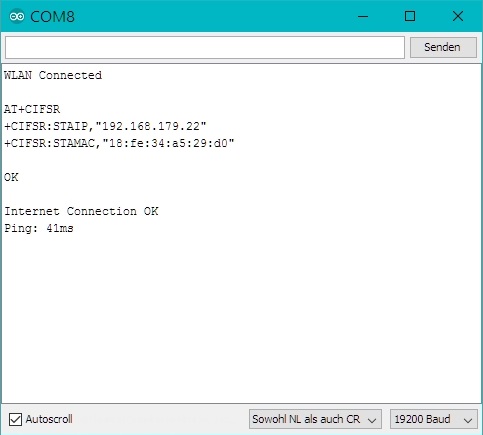
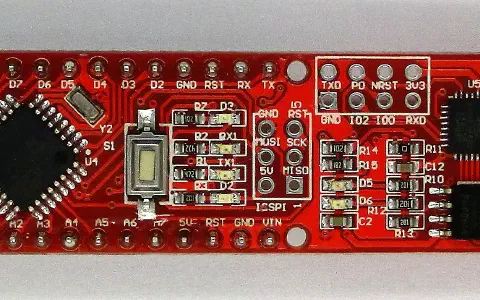
When you’ve opened the programme in the Arduino IDE, you will see at the very first two DEFINES. This is where you have to enter your WLAN name and the password. Only then can you upload the programme. You can now check the status of the WLAN connection on the serial monitor. In the ideal case, you’ll see “WLAN Connected” there. The LED D3 also lights up. If you run into problems, you’ll find help in the commentary section.
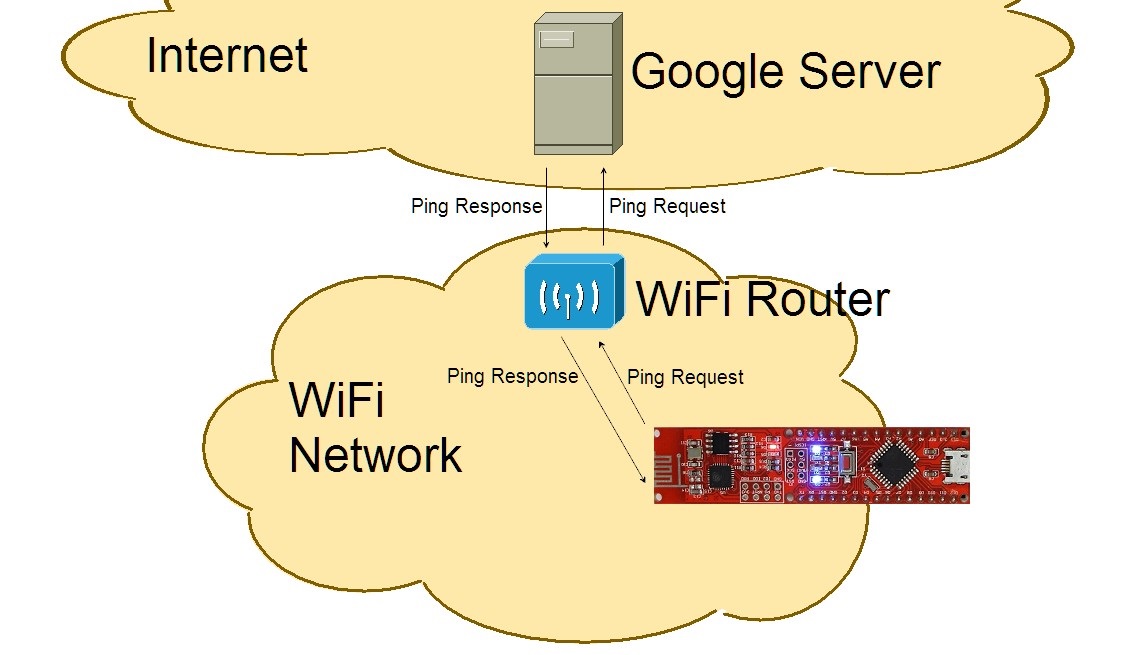
After the connection, yet more messages appear on the serial monitor. First, the IP address of the board is given once. It was assigned to the NanoESP by the router and is the board’s address in the local network. After that, the board pings a server on the Internet to test whether it is connected to the Internet. If everything functions, a suitable message appears on the serial monitor and the answer time in milliseconds that passed from the sending of the ping to reception of the answer. You may recognise this ping value from online games. The connection to the Internet now exists, and you are ready to take larger steps with the board.
193 comments
Comments are closed. These comments were posted on the former WordPress site (mostly in German).
https://create.arduino.cc/editor/FKainka/e3f5d20e-0178-4ce8-a1f7-270fc17b87b9/preview
Naja, aber es funzt. :-)
Und wer 1.7.x IDE einsetzt muss (wie von @Hudde an Tag 2 geschrieben) den Code ändern:
//nanoesp.init(); // Init nicht nutzen
nanoesp.begin(19200); // Baud Rate esp einstellen
Aber immerhin scheint das mit dem nur 2.4GHz WLAN zu stimmen.
Es zeigt das gestern erzeugte WIFI nicht mehr an und gespeichert wurden die gestern eingestellten Dinge auch nicht, trotz mehrmaligem uploaden….
hmm, die Ausgabe am Monitor stimmt mit dem Beispiel überein, also auch Internet Connection OK und Ping wird auch angezeigt. Einzig in der ersten Zeile steht Error: WLAN not connected.
Hat wer Ideen?
Danke,
LG Stefan
Sie mussten ihr eigenes WLAN von zuhause schonn bei Zeile 10 und 11 eingeben?
Weil wenn ich dies mache, passiert genau nichts :(
ich habe Zeile 10 und 11 auf meine Zugangsdatn (SSID und Passwort) geändert und dann auf das Board hochgeladen.
Leider erscheint "ERROR WLAN not connected"
Wer kann mir helfen? Woran liegt es
(Inhalt:
"{"cpu":{"fqbn":"arduino:avr:nano","name":"Arduino Nano","com_name":"COM4","network":false},"included_libs":null}") ?
Habe das Programm in der Arduino Browser Version geöffnet und die DEFINES (Name, Passwort) auf mein "NanoESP-WLAN" geändert.
Wollte das Programm hochladen, da kommt eine Fehlermeldung für Code-Zeile 6 (#include ):
"No such file or directory"
Ich kenne mich in C/C++ nicht aus, habe nach kurzer Recherche lediglich folgendes über den "include-Befehl gefunden:
Die Form spezifiziert eine der Standard-Include-Dateien. Es wird nacheinander in jedem der Include-Verzeichnisse (in der Reihenfolge, in der diese definiert worden sind) gesucht. Wenn die Datei in keinem der Standard-Verzeichnisse gefunden wird, erfolgt eine Fehlermeldung.
Ich glaube, dass ist ziemlich genau das Problem, jedoch weiß ich nicht wie/wo diese Verzeichnisse definiert sind.
Ich kann außerdem nicht in den seriellen Monitor wechseln ("Serial Port Temporarily Busy").
Kann mir jemand sagen, was ich da übersehen habe?
Hat einer schon gefunden wo und wie die MAC Adresse gesetzt wird?
Den ich sicher meine Wlan über eine MAC filter und würde das gerne auch wehrend der versuche fortführen und dazu brauche ich eine Statische MAC Adresse.
Vielen dank für eure Hilfe
Was ich mit Sicherheit nicht machen werde, ist die SSID und das Passwort meines WLANs in irgendeiner Cloud hinterlegen, und schon gar nicht im Klartext. Eine bessere Einladung zum Datendiebstahl gibt es wohl nicht.
Alternative:
In der Arduino IDE einen neuen Sketch anlegen. Den Namen dazu muss man leider von Hand abtippen. Dann in dem Fenster den ganzen Code markieren, mit Strg+C kopieren und mit Strg+V in die Arduino IDE kopieren. Dort kann man dann SSID und Passwort eintragen und diese Information verlässt nicht den lokalen Rechner. Und wenn den einer gehackt hat, ist er eh schon drin :-(
Wenn ich es auf COM4 betreibe, funktioniert es vom Desktop aber immer noch nicht vom Browser - gleicher Fehler.
Eine Verbindung mit dem Internet bekommme ich nie.
Die Varialbeln SSID und PASSWORD habe ich heraus kommentiert und die Werte direkt eingetrgen.
Ich habe keine Ahnung woran es liegt.
Bitte , bitte helten.
Vielen Dank im Voraus.
Ich habe das Problem, dass bei circa jedem zweiten kompilieren des Programms "Error: Internet Connection" ausgegeben wird. Aber manchmal funktioniert es, und mir wird ein Ping ausgegeben. Woran könnte dies liegen?
Ich habe wie Tommi den Code kopiert und in die IDE auf meinem Rechner gepastet.
Wenn ich den Sketch hochladen möchte bekomme ich immer folgende Fehlermedung:
/tmp/991050744/A16_P04_WiFiConnect/A16_P04_WiFiConnect.ino:6:21: fatal error: NanoESP.h: No such file or directory
#include
^
compilation terminated.
exit status 1
Habe eigentlich alles richtig eingegeben. Kann mir jemand helfen?
MFG
byLS
Klappt bei mir aber noch nicht :(
Wie wo was soll ich das Hochladen?!
Also entweder ich bin nicht richtig wach oder zu blöd für alles!
Wie wo was soll ich das Hochladen?!
Also entweder ich bin nicht richtig wach oder zu blöd für alles!
ich habe das jetzt "fast" geschafft.
Ich kann zu meinem WLAN connecten und auch einen ping absetzen.
Aber:
Der ping auf den www.google.de schlägt fehl.
Der ping auf dessen IP 216.58.209.163 ist aber erfolgreich.
Woran kann das nur liegen?
Es scheint, dass die Namensauflösung per DNS nicht funktioniert. Hat jemand Vorschläge zur weiteren Diagnose?
Komisch ist auch die lange Pint-Zeit von 216 ms zur IP von goolge. Schon ein ping zu meinem Rooter dauert 192 ms. Da hat sich doch etwas am WLAN verklemmt.
habe einen mac und der sagt mir installation erfolgreich, zeigt mir aber dieses zeichen oben in der leiste nicht an
jemand eine Ahnung?
danke, anna
Ich habe mir den Quellcode über den Download-Button neben "OpenCode" heruntergeladen. Dann habe ich mir diese .zip-Datei entpackt und diese "Arduino-Datei" einfach geöffnet.
So konnte ich ohne Probleme die gewünschten Veränderungen vornehmen.
Viel Erfolg!
Ich kann mich mit einem Handy HotSpot verbinden, aber mit meiner FritzBox nicht. Im Monitor erscheint immer die Meldung "Error WLAN not connected". Hat jemand eine Idee?
hast Du - wie unter Tag 2 beschrieben - die Bibiliothek http://iot.fkainka.de/library runtergeladen und das ZIP-File als Bibliothek in die Arduino-IDE eingebunden?
Dann findet er auch die Include-Dateien.
Beliebte weitere Fehlerquellen:
in der IDE nicht das richtige Board, Prozessor und COM-Schnittstelle einstellen. Und die Baud-Raute im Seriellen Monitor nicht auf 19.200 baud stellen.
Grüße
jozmuc
mann muss nicht die Cloud IDE bentutzen. Gedacht war eigentlich das Programm mit dem Button neben OPEN SKETCH runterzuladen und dann auf dem Rechner lokal zu öffnen. Dann muss man auch keinen Code kopieren.
mir geht es ähnlich. Es gibt immer die Fehlermeldung "Error: WLAN not Connected" aus, aber es führt den Ping Test erfolgreich durch! Ich vermute es liegt daran, dass in meinem SSID Namen ein Leerzeichen ist und damit nicht umgegangen werden kann. Nur warum funktioniert dann der Ping Test?
Viele Grüße, iotNerd
ich habe ein kleines Programm geschrieben, dass dir die MAC-Adresse des deines Boards ausgibt. Diese ist vom Werk aus statisch und kann nicht verändert werden.
Link: https://create.arduino.cc/editor/FKainka/887f2269-65ee-46e0-84d1-89643b863767/preview
exit status 1
redefinition of 'void setup()'
Was´n da los?
Im Ordner "eigene Dokumente" bzw. (C:\Users\DeinBenutzername\Documents oder in deutsch C:\Benutzer\DeinBenutzername\eigene Dokumente) sollte es einen Ordner "Arduino" geben. Kopiere den Ordner A16_P04_WiFiConnect mit dem File A16_P04_WiFiConnect.ino dort hinein. Starte die Arduino-IDE neu und schau unter Datei –> Sketchbook nach. Da sollte nun A16_P04_WiFiConnect existieren. Das kannst Du laden.
Des weiteren sollte es im oben erwähnten Ordner "Aruino" auch einen Ordner "libraries" geben in dem einen Ordner
"NanoESP" oder so ähnlich geben sollte.
Wenn Du jetzt kompelierst, dürfte es keine Fehler geben
hier nochmal die Struktur
eigene Dokumente
|
-> Arduino
|
|-> A16_P04_WiFiConnect
|
-> libraries
|
-> NanoESP-1.1
bei mir ging es dann doch irgendwann mal, nachdem ich den SSID Broadcast im WLAN-Router aktiviert bzw. das USB-Kabel ab- und danach wieder angesteckt habe.
Aber ob das wirklich die Ursache war, weiß ich nicht, denn so ganz zuverlässig scheint es bei mir nicht zu funktionieren.
Ein bisschen gibt mir zu denken, dass der WLAN-Chip recht warm wird.
MfG,
Ferdinand
Kleine Hilfe für diejenigen, bei denen keine Verbindung aufgebaut werden kann:
Ich kann mich interessanter weise auch nicht direkt mit meinen Router verbinden. Versuch ichs dagegen über die Repeater gehts wunder bar.
Ich hoffe mal das es nur irgendeine Einstellungssache am Router ist. Hab aber bisher nix gefunden.
Der Verbindungsaufbau und der Ping werden nacheinander seperat abgehandelt. Da müsste man sich mal durch die Library durcharbeiten, um zu sehen, wo was klemmt…
es hat den Anschein, dass es zuverlässiger funktioniert, wenn man den WLAN-Chip herunterkühlt, denn ohne Kühlung ging bei mir nicht mal die Verbindung mit dem WLAN-HotSpot auf dem Smartphone.
MfG,
Ferdinand
Ich denke das die Anmeldung ans WLan einfach etwas zu lange dauert.
ich bin etwas ratlos, denn manchmal funktioniert es, aber meistens nicht.
Interessanterweise wird manchmal "WLAN not Connected" angezeigt, obwohl eine IP-Adresse angezeigt wird bzw. der Ping funktioniert hat.
MfG,
Ferdinand
viel glück
wenn ich es richtig verstanden habe, soll delay(2000); nach nanoesp.init(); eingefügt werden?
Bei mir hat es zunächst den Anschein erweckt, dass es was hilft, aber nun funktioniert es bei mir doch nur so zufällig wie mit allen anderen Maßnahmen zuvor.
Ich bin weiterhin ratlos, was meinen Fall betrifft.
MfG,
Ferdinand
bei bei verschiedenen Versuchen hat google.com funktioniert
dann hatte ich auch nur eine ping von 36ms
2000 = 2 Sekunden
3000 = 3 Sekunden
4000 = 4 Sekunden
etc ..
bei mir funktioniert es zuverlässig nachdem ich die Verzögerung eingefügt habe.
VG
VG
bei mir wird der Iframe nicht angezeigt. Funktioniert die Einbindung auch bei Firefox?
ich sehe nur ein "arduino-Grünes" Feld.
(in einem eigenem Fenster/tab kann ich den frame sehen)
entsprechend hab ich auch keinen Ping
Mit anderen Worten, ich bin noch nicht im Internet, was nun?
Aber ich hab das mit Name und Passwort missverstanden - habe anstatt mein Heimnetz die Daten vom Nano eingegeben.
Das was weiter oben diskutiert wurde (Zugangsdaten in Browserprogrammen mit Cloudspeicher eingeben is so eine Sache) hab ich mir auch zu Herzen genommen und mit der lokalen Arduino IDE-Programmversion gearbeitet.
Hat zuerst auch nicht funktioniert, weil die Dateiendungen nicht übereinstimmen (evtl. Desktop und Browserversion unterschiedlich), habe dann händisch ein neues Programm angelegt und den Code einfach reinkopiert. Speichern. Hochladen. Passt.
Vermutlich hätt ich gar nicht kopieren müssen, sondern einfach den ZIP-Ordner entpacken, bevor ichs öffne…
Aber jetzt gehts jedenfalls :)
ich habe eine Fritzbox 7490 und betreibe mein WLAN mit WPA2. Ich konnte (deswegen ?) keine Verbindung vom NanoESP aufbauen. Nun habe ich mein Gäste-WLAN aktiviert mit WPA (TKIP) –> WLAN Connected ;-)
>> Komisch ist auch die lange Pint-Zeit von 216 ms zur IP von goolge. Schon ein ping zu meinem Rooter dauert 192 ms.
Das liegt daran, dass auch das Pingen auf IPs nicht "wirklich" geht: Der Rückgabe ist immer der erste Block der IP - als 216 für google.de mit der IP "216.58.211.3" und 192, weil dein Router sicher im IP-Bereich 192 steht.
Stand bei mir: Connect funktioniert, ping auf Domain gibt immer "0" zurück, ping auf IP immer den ersten Block der IP. Merkwürdig…
bei mir kommt beim Hochladen eine Fehlermeldung, dass die Datei zu groß ist oder so
Dann habe ich vor die Zeile 34
int vTime = nanoesp.ping("www.google.de");
den Befehl
delay(5000);
eingefügt was aber nich geholfen hat.
Danach habe ich noch die 2 Zeilen
vTime = nanoesp.ping("192.168.x.x");
Serial.println("Router Ping: " + String(vTime) + "ms");
eingefügt (x.x durch Router IP ersetzen) und set dem funktioniert es.
Hat jemand eine Idee warum ?
Hab schon die API-Beschreibung der Library quer gelesen und mal in den Quelltext geschaut. Hab die Vermutung, dass es nicht drin ist oder hab's überlesen. Aber mit den AT-Befehlen für den ESP-Chip müsste es eigentlich gehen. Nur weiss ich nicht wie.
Kann jemand helfen?
ich erhalte immer nur folgendes Ergebnis, egal, was ich für eine IP-Adresse eingebe (also auch bei "999.999.999.999"
Hat sonst jemand noch dieses Problem, obwohl die WLAN-Verbindung zur Fritzbox ja funktioniert ?
WLAN Connected
AT+CIFSR
+CIFSR:STAIP,"192.168.179.31"
+CIFSR:STAMAC,"18:fe:34:cf:a4:05"
OK
Error: Internet Connection
Grüße
HP
/Users/xxxxxx/Documents/Arduino/sketch_dec04a/A16_P04_WiFiConnect.ino: In function 'void loop()':
A16_P04_WiFiConnect:44: error: redefinition of 'void loop()'
void loop() {
^
/Users/xxxxxx/Documents/Arduino/sketch_dec04a/sketch_dec04a.ino:6:6: note: 'void loop()' previously defined here
void loop() {
^
exit status 1
redefinition of 'void setup()'
Vielleicht kann jemand helfen.
Danke!
Sind die Dienste vielleicht auf Surfrn und Mailen beschränkt. Hab es temp. so eingestellt.
ich habe das gleiche Problem. Da ich ebenfalls kein gutes Gefuehl dabei habe mein WLAN Passwort im Klartext bei Amazon zu speichern habe ich den code in meine lokale Arduino App per copy & paste kopiert und von dort aus auf das Board hochgeladen. Funktioniert wunderbar.
Mit besten Grüßen,
Sven
nanoesp.sendCom("AT+CWDHCP=0");
nanoesp.sendCom("AT+CIPSTA=192.168.43.64");
Versteh ich das richtig, dass ich meine WLAN-Daten eingebe, die schon auf meinem Router existieren?
Das hier ist für komplettes Neuland, daher manchmal schwer nachvollziehbar, aber ich will lernen………
Folgender Text erschein:
Der Sketch verwendet 444 Bytes (1%) des Programmspeicherplatzes. Das Maximum sind 30.720 Bytes.
Globale Variablen verwenden 9 Bytes (0%) des dynamischen Speichers, 2.039 Bytes für lokale Variablen verbleiben. Das Maximum sind 2.048 Bytes.
der WLAN-Chip scheint die Ursache zu sein, weil - wenn ich das Board frisch anschließe, dann klappt Alles, aber nach einiger Zeit, wenn der Chip dann warm ist, geht nix mehr, dann sind die Fehler zufällig!! - mal keine Netzverbindung, aber Ping geht, mal geht gar nix, mal klappt es … auch kurz abziehen und damit Neustart hilft wenig, nur abkühlen lassen und dann neu verbinden läßt den ersten Versuch sicher funzen
Ich packe da jetzt einen Kühler drauf (vom Raspi über) und hoffe, dass es dann stabil wird
Es kann sich nur mehr um eine Kleinigkeit handeln. Ich habe jetzt auch eine Spezifikation zum ESP8266 gefunden. Sobald es bei mir läuft, gebe ich eine Rückmeldung hier im Forum. Nochmals Danke.
"Error: Could not program the board"
Hat jemand einen Tip für mich ?
Martin Klein
kein Ping
… und auch irgendwie keine Lust mehr, wenn man 10 Stunden einem Experiment hinterher jagd.
Die Temperatur des WLAN Chips scheint hier nicht das Problem zu sein. Die Versuche bis Tag drei funktionieren immer wieder
nanoesp.sendCom("AT+CWDHCP_CUR=1,0");
Mit diesem Kommando sendet man ein serielles Kommando an den ESP8266, wobei man das WLAN in den "Stations-Modus" schaltet (dies ist der erste Parameter 1) und den DHCP disabled (das ist der Parameter 0 nach dem Komma).
Mit dem folgenden Kommando setzt man die statische IP-Adresse des Boards (erster Wert), dann das Gateway (zweiter Wert) und zu guter Letzt die Subnetmask (dritter Wert):
nanoesp.sendCom("AT+CIPSTA_CUR="192.168.1.10","192.168.1.1","255.255.255.0"");
Die Werte werden nicht im Flash gespeichert, daher die Verwendung von "_CUR". Die alten Parameter sind laut Spezifikation als "deprecated" eingestuft.
Und jetzt läuft es auch bei mir.
Hab ne Fritz Box mit nem 8-Stelligem Zahlencode.
Bis jetzt hat alles super geklappt aber seit heute…
NanoESP.h: No such file or directory
Woran liegt das
void setup() {
Serial.begin(19200);
nanoesp.init();
//Station Mode, Connect to WiFi
if (!nanoesp.configWifi(STATION, SSID, PASSWORD)) {
Serial.println(F("Error: WLAN not Connected\n"));
}
else {
Serial.println(F("WLAN Connected\n"));
digitalWrite(LED_WLAN, HIGH);
}
Serial.println(nanoesp.sendCom("AT+CWDHCP_CUR=1,0"));
Serial.println(nanoesp.sendCom("AT+CWDHCP_CUR?"));
Serial.println(nanoesp.sendCom("AT+CIPSTA_CUR="192.168.179.30","192.168.179.1","255.255.255.0""));
Serial.println(nanoesp.sendCom("AT+CIPSTA_CUR?"));
//Print IP in Terminal
//Serial.println(nanoesp.getIp());
//Time for Ping
int vTime = nanoesp.ping("www.google.de");
Wenn sich jemand für die ausführliche Doku der AT-Befhle interessiert kann hier eine finden:
https://cdn.sparkfun.com/assets/learn_tutorials/4/0/3/4A-ESP8266__AT_Instruction_Set__EN_v0.30.pdf
Zuerst hatte ich den nanoESP mit meinem Haus-WLAN verbunden. Das war ziemlich instabil.
Dann habe ich den Gast-Zugang aktiviert mit neuer SSID und WPA statt WPA2. Seither habe ich eine stabile Verbindung mit Ping-Zeiten um die 30 ms. Mit Auto (WPA or WPA2) hatte ich Ping-Zeiten um die 400 ms und teilweise bis zu 800 ms. Irgendwas war da wohl ziemlich lahm. Entweder mein Router oder der nanoESP.
Ab morgen werde ich wohl nur noch mit dem Gast-Zugang mit WPA in mein WLAN gehen. Vielleicht funktionieren so die kommenden Experimente stabiler.
Gut, dass heute Sonntag war. Abends nach dem G'schäft hätte das nicht funktioniert!!
PS: Wer macht denn da die Verschlüsselung? Dauert das bei WPA2 so lange, dass da Ping-Zeiten von 400 MS zusammen kommen und dann irgendwelche Timeouts zuschlage?
Versuche daher mal alles doppelt zu escapen.
Also:
" -> \"
\ -> \\
void loop() {
int vTime;
vTime = nanoesp.ping(F("www.google.de"));
Serial.println("Ping: " + String(vTime) + "ms");
delay (1000);
}
So kann ich die Stabilität der Verbindung überwachen. Leider habe ich immer wieder Aussetzer zwischen 10 und 20 s. Vielleicht wird der ESP8266 doch zu heiß.
Mal sehen, was die nächsten Tage so bringen…
Nach einer Änderung in NanoESP.cpp scheint es jetzt zu funktionieren. Ich habe den Suchstring "+" in "\r\n+" geändert.
int NanoESP::ping(String address) {
// boolean success = true;
this->println("AT+PING="" + address +""");
this->find("\r\n+");
int time = this->parseInt();
this->find(ok);
return time;
}
VG
Das hat bei mir auch funktioniert!
Gruß,
Tom
Was läuft falsch bei mir ?
Alles deinstallieren und neu ?
Wenig Spaß :(
Kann bitte jemand helfen ?
<>
kann mir bitte bitte jmd. helfen
cool bleiben.
Wenn nix geht, alles von anfang an prüfen:
Wenn das funktioniert, kannst du dich an das nächste Programm und damit an das nächste Problem rantasten.
Ansonsten beschreibe doch bitte nachvollziehbar wie sich dein Problem darstellt.
Serial.begin(19200);
ein
Serial.println(F("Starte NanoESP\n"));
und zwischen die zeilen jeweils ein Serial.println(F("nächster Befehle\n"));
schau ob sich was tut.
Ansonsten bekommst du eine Fehlermedlung?
Ich benutze den Gastzugang an einer Fritzbox
Im Protokoll der Fritzbox sehe ich aber:
1:13:05 WLAN-Gerät über Gastzugang angemeldet (2,4 GHz), 72 Mbit/s
1:13:19 WLAN-Gerät hat sich vom Gastzugang abgemeldet (2,4 GHz)
Es schein als würde sich das Board kurz verbinden und gleich wieder trennen
Grüße PH
Dann
Error: wlan connected
At+cfsr
…., o.o.o.o
….., 18:fe:34:cf:9e:1b
Ok
Error: internet connection.
Das wars. Hab des richtige progamm geladen, diebeiden defines ergänzt wie empfohlen und in dem Monitor erscheint danch obige anzeige.
Tag 4 funktioniert :-)
Er zeigt mir jetzt folgendes an:
Starte NanoESP/n
nächster Befehle
nächster Befehle
nächster Befehle
"qXÑzÂC!É1±ÿ)ÓCCa*ó “I!a5 )‘I™Ca5 Jr0KN ‘K!ÑCÊ !“÷þ•rô
ready
Das ist zwar schon mal etwas, allerdings noch nicht das, was es sein soll. Liegt es vielleicht am WLAN, dass er es nicht findet? Allerdings zeigt er ja nicht einmal die Firmware an.
Vorher hat er nur " oder dieses Kreuz, was man hinmacht, wenn jemand tot ist…
da kommt immer
Ungültige Bibliothek C:\Users\P*******\Documents\Arduino\libraries\AccesPoint in C:\Users\P*******\Documents\Arduino\libraries\AccesPoint gefunden
Die beiden Rechner zu Hause wollen nicht wirklich mit dem Arduino arbeiten. Ein Rechner überhaupt gar nicht, er erkennt ihn nicht einmal und der andere nur wenn er Lust drauf hat.
Grundsätzlich nicht schlimm habe ja ne Mittagspause.
Jetzt ab Tag vier muss man sich mit dem vorhanden WLAN Verbinden nur weiß ich nicht wie/ob ich das Firmen-WLAN einbinden kann.
Um es nutzen zu können muss man nicht nur ein Passwort angeben sondern auch eine Nutzer-ID.
Wie kann ich die Nutzer-ID in dem Programm mit hinterlegen?
Für Hilfe wäre ich mehr als dankbar, sonst ist wohl schon mit dem 4. Tag dieser Adventskalender nicht mehr für mich machbar.
MfG bibikati
Ich berichte ob es geklappt hat.
Ob der Arduino auch damit läuft kann ich noch nicht sagen, hab ihn zu Hause gelassen um Herzleid zu vermeiden. Aber morgen dann…
hab jetzt meinen Fimenrechner mal mit nach Hause genommen und so wie du und fk gesagt haben über einen Hotspot den Arduino angesprochen. Scheint so weit zu gehen. Ich habe eine Umleitung vom Heim-WLAN mit dem Hotspot eingerichtet so kostet es dein SP Datenvolumen. ich nutze dafür die App Portable WiFi Hotspot von Core Technology für Android.
Hoffe es hilft.
Mit dem Hotspot hat zu Hause auf jeden Fall funktioniert. Wohl nicht im Sinne des IT Spezialisten das ich hoffentlich so das Firmen WLAN nutze. Aber hätte er mir keine Adminrechte für den Rechner gegeben wäre ich nie so weit gekommen ;). So auf zu Tag 5 hoffentlich klappt es.
leider stecke ich auch noch in Tag 4 fest. Ich versuche das Board mit einer EasyBox 803 A zu verbinden. Zunächst war der Erfolg der WLAN Verbindung sehr unzuverlässig. Die war meinen Rechner neben dem Router mit dem Board aufzubauen. Die WLAN Verbindung ist jetzt zuverlässig.
Dafür geht der Ping an Google nicht. Ok, es wurde schon gesagt, dass evtl. die Router Firewall blockiert. Selbst ohne dieser funktionert der Ping nicht.
Hat jemand noch eine Idee, wo das Problem liegen könnte?
Der Hotspot Ansatz mit Handy funktioniert zwar bei mir, aber den Router zu umgehen, ist wohl nicht der IoT Gedanke des Kalenders.
Ich suche auf jeden Fall weiter Lösungsansätze.
So es geht und zwar mit folgenden Einstellungen
Wer Probleme hat sollte also erst mal alles vereinfachen um andere Fehler auszuschließen. Dann kann man nach und zur sicheren Seite hin ändern.
Güße in die Runde Matthias
Da ich das mache u m zu lernen Dank an alle Kommentatoren!
Matthias
ich werd blöd :D Heute geht es. Hab beim Router WPA2 Verschlüsselung und 802.11b Methode eingestellt.
Ergebnis: Bei der WLAN Verbindung sagt der Monitor zwar Error, dafür kann ich Google anpingen.
Kann man evtl. am Board eine Wifi Antennen Verlängerung anlöten? Hab nämlich gemerkt, dass die Verbindung stabiler wird, wenn ich meinen Finger auf das Ende der Antenne halte :-)
Ursache: ich hatte die Libraries NanoESP vom letzten Jahr und die NanoESP 1.1 von heuer gleichzeitig installiert. Hat den Compiler offenbar „überlistet“.
Die "alte" NanoESP gelöscht -> funkt.
Hallo,
ich habe lange probiert das Board mit meiner Fritz!Box 7490 zu verbinden. Erfolgreich war ich nur mit folgendem Weg, der für mich akteptabel ist:
Viele Grüße! - Tino
ich habe meinen Conrad-Adventskalender erst am Wochenende erhalten. Un nun stecke ich im Tag 4 fest. Die kopillation bricht mit der Fehlermeldung
C:\Dokumente und Einstellungen\joschi\Desktop\Conrad_Adventskalender\A16_P04_WiFiConnect_JU\A16_P04_WiFiConnect_JU.ino:6:21: fatal error: NanoESP.h: No such file or directory
ab. Ich habe leider keinerlei Ahnung, wie und wo ich die einzelnen Dateien positionieren muss. Für mich ist diesbezüglich die online-Anleitung als auch das Begleitheft absolut keine Hilfe. Ich schaffe es ja nicht mal, das heruntergeladene Programm "A16_P04_WiFiConnect" in die library von ADRUINO einzubinden.
Völlig ratlos - Jürgen
Das klingt im ersten Moment für mich so, als ob die nanoESP bibliothek nicht oder nicht richtig installiert sei.
Findest in der Arduino Entwicklungsumgebung unter
Datei->Beispiele->
Das Menu namens 'nanoESP' ?
Und sind darin einige Beispiel Programme enthalten?
habe das gleiche Problem
WLAN OK, Internet Error
Es funktioniert immer dann, wenn ich den Finger auf die Antenne (das Meandermuster auf dem Board) lege.
Ohne Finger gibt's WLAN aber kein Internet.
ich sitze 2m neben dem Router 7490.
hahaha
Finger auf die Antenne (Meandermuster auf dem Board) legen, dann klappts
ich habe auch Fritz!Box 7490. Nach rumprobieren (Hotspot vom Handy usw.) habe ich auch den Gastzugang gelegt und von WPA 2 auf WPA umgeschalten. Trotzdem zeigt es mir nun an WIFI connected IP-Adresse des Boardes steht da, aber kein Ping.
Was kann ich noch tun?
Sowohl an verschiedenen WLAN Routern und auch mit dem Z3compact als Hotspot funktioniert es mit WPA2. Hast du mal geschaut ob die SSID gesendet wird. Beim Z3 ist das in den Hotspot-Einstellungen "Erkennbar" "Das Gerät ist sichtbar". Was beim Z3 manchmal ein Problem sein kann ist der extrem gute Stromsparmodus. Schalte den Stamina-Modus mal testweise ab.
hier meine Lösung für meinen nanoESP
Ich hatte Probleme am Tag 4. Zuerst funktionierte das Einloggen ins Heimnetz, dann auf einmal nicht mehr.
Nach einigem probieren und viel lesen habe ich dann an den Anschlußpins des WLAN-Moduls ( 8er Block Löcher ) einen 220 uF Kondensator von 3V3 nach GND geschaltet.
Seitdem läuft der nanoESP zuverlässig.
Im Internet findet man auf vielen Seiten die Aussage, dass die Stromversorgung kritisch ist, das war anscheinend auch bei mir das Problem.
Gruss
Kurti
Wie kann ich denn den Empfang dauerhaft hinkriegen?
Will ja nicht immer meinen Finger auflegen müssen!
Vielen Dank!