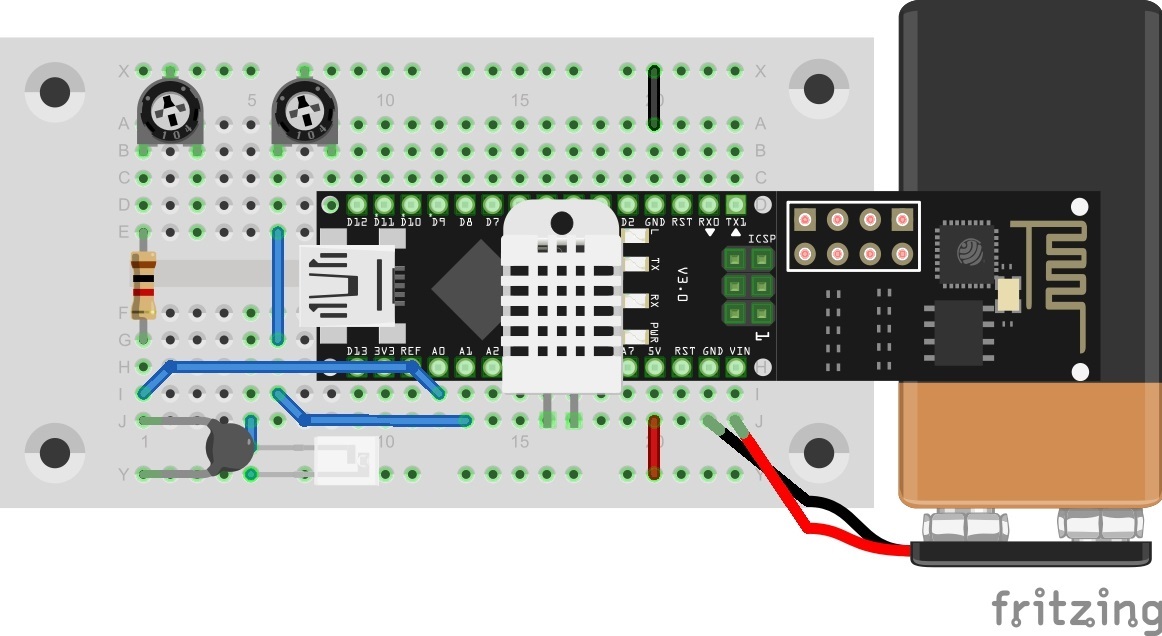
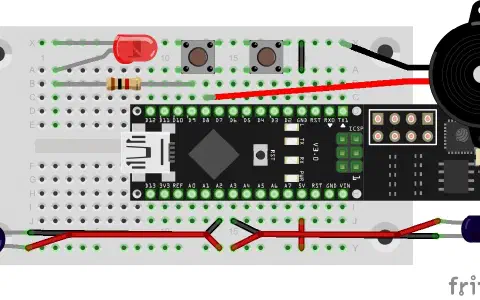
Behind the door for today is a battery clip for a 9 V block, with which you can make the entire system moveable. An alternative to a battery is a power bank (a rechargeable battery pack, normally for mobile phones). You can see in today’s layout picture how to connect a 9 V battery correctly.

Climate data should be captured again today. But this time they are published through the MQTT broker and are thus accessible worldwide. The data could thus be called up via a plug-in and stored in a database.
The sketch: A16_P23_MQTT_Climate.ino
/*
  MQTT Basic functions
  Change SSID and PASSWORD.
*/

#include <NanoESP.h>
#include <NanoESP_MQTT.h>
#include <SoftwareSerial.h>

#define SSID "YourSSID"
#define PASSWORD "YourPassword"

#define LED_WLAN 13

#define TEMP A0
#define LIGHT A1
#define HUMIDITY A4
#define GND A5


NanoESP nanoesp = NanoESP();
NanoESP_MQTT mqtt = NanoESP_MQTT(nanoesp);

mqtt_msg newTemp;
mqtt_msg newLight;
mqtt_msg newHum;

String ip, mqttId;

void setup() {
  Serial.begin(19200);

  nanoesp.init();

  nanoesp.configWifiStation(SSID, PASSWORD);

  if (nanoesp.wifiConnected()) {
    Serial.println(F("Wifi Connected"));
    digitalWrite(LED_WLAN, HIGH);
  }
  else {
    Serial.println(F("Wifi not Connected"));
  }


  //Print IP in Terminal
  nanoesp.getIpMac( ip,  mqttId);
  Serial.println("My IP: " + ip);

  //Print MQTTid in Terminal
  mqttId.replace(":", "");
  Serial.println("My MQTT ID: " + mqttId+"\n");

  newTemp = {"NanoESP/" + mqttId + "/climate/temp", "0", 0, true};
  newLight = {"NanoESP/" + mqttId + "/climate/light", "0", 0, true};
  newHum = {"NanoESP/" + mqttId + "/climate/hum", "0", 0, true};

  //topic,                                value,    QOS, retain
  mqtt_msg lastWill = {"NanoESP/" + mqttId + "/climate/status", "offline", 0, true};

  //ConnectionID, Brooker, Port, Clean Session, Keep alive Time (def. 120s), Pointer to lastWill MSG, Username, Password
  if (mqtt.connect(0, "broker.fkainka.de", 1883, mqttId, true, 10, &lastWill, "", "")) {

    Serial.println(F("Connected to Broker"));

    //Change msg
    lastWill.value = "online";
    mqtt.publish(0, &lastWill);

  }
  else {
    Serial.println(F("error connecting"));
  }
}


void loop() {
  int id, len;

  if (nanoesp.recvData(id, len)) {
    mqtt.recvMQTT(id, len); //auto hanlder mit Funktionen
  }

  mqtt.stayConnected(0);
  sendValues();
}

void sendValues() {
  newTemp.value = String(getTemp());
  newLight.value = String(getLight());
  newHum.value = String(getRF());

  mqtt.publish(0, &newTemp);
  mqtt.publish(0, &newLight);
  mqtt.publish(0, &newHum);

  //delay(250);
}

//--------------------------------Sensors----------------------------------------------------

int getRF() {
  long U, R;
  double F;

  pinMode(HUMIDITY, INPUT);       //  Ddrb.3 = 0      'Eingang
  digitalWrite(HUMIDITY, HIGH);   //  Portb.3 = 1     'Pullup ein
  U = analogRead(HUMIDITY);       //  U = Getadc(3)
  digitalWrite(HUMIDITY, LOW);    //  Portb.3 = 0     'Pullup Aus
  pinMode(HUMIDITY, OUTPUT);      //  Ddrb.3 = 1 'Nierohmig

  pinMode(GND, INPUT);            //  Ddrb.4 = 0      'Eingang
  digitalWrite(GND, HIGH);        //  Portb.4 = 1     'Pullup ein
  U += analogRead(GND);           //   U = U + Getadc(2)
  digitalWrite(GND, LOW);         //  Portb.4 = 0     'Pullup Aus
  pinMode(GND, OUTPUT);           //  Ddrb.4 = 1 'Nierohmig. entladen

  U = U / 2;
  R = 3500 * U;                 //'R=35k*(U/1023-U)
  U = 1023 - U;
  R = (U > 0) ? R / U : 999999;     //alternativ writing to: if(U>0) R = R/U; else R=999999;
  R = R - 450;                      //- interner Bahnwiderstand 0,45 k

  //Calculate Humidity
  F = R / 280;
  F = log(F);                                                //ln f !!!
  F = F * 8.9;
  F = 100 - F;
  F = round(F);

  // Serial.println(String(R) + "Ohm     " + String(F) + "%");
  //delay(500);
  return F;
}

double getTemp() {
  //Source: http://playground.arduino.cc/ComponentLib/Thermistor2
  double Temp;
  int RawADC = analogRead(TEMP);
  Temp = log(10000.0 * ((1024.0 / RawADC - 1)));
  //         =log(10000.0/(1024.0/RawADC-1)) // for pull-up configuration
  Temp = 1 / (0.001129148 + (0.000234125 + (0.0000000876741 * Temp * Temp )) * Temp );
  Temp = Temp - 273.15;            // Convert Kelvin to Celcius
  // Temp = (Temp * 9.0)/ 4.7 + 32.0; // Convert Celcius to Fahrenheit

  Temp = round(Temp * 10);
  Temp = Temp / 10;
  return Temp;
}

int getLight() {
  int vLight = analogRead(LIGHT);
  return vLight;
}
(The former Arduino Create embed is no longer available; the code is taken from the download of all sketches.)
Download today’s programme and program your NanoESP with it. After a short time, the board is connected to the WLAN and the broker and begins to send the measurement data. Now go to thehttp://www.hivemq.com/try-out/ page and connect to the broker. Subscribe to these topics:
NanoESP/MyMQTTiD/climate/temp
NanoESP/MyMQTTiD/climate/light
NanoESP/MyMQTTiD/climate/hum
As always, replace MyMQTTiD with your personal ID. You now see in the browser how the data arrive in quick succession. Next subscribe to the following topic:
NanoESP/MyMQTTiD/climate/status
You ought to receive the message “online.” Now disconnect the board from the power. Logically, you should now no longer receive any new temperature data. However, after approx. 10 seconds, the status changes from “online” to “offline.” How is that possible if the board can’t send any messages at all anymore?
The trick lies in the last will message that was defined upon connection to the broker. This message is sent when the connection is suddenly broken. But it takes a while for the broker to notice the interruption of the connection. How long it takes is likewise defined when the connection is established, with the keep-alive time. If no message is sent from the board to the broker within the time given there, the broker assumes that the connection was broken. This time is defined in the library as standard at 120 seconds. For today’s test, however, it is 10 seconds. So that the connection is not cut off only because the NanoESP currently has nothing to report, there is the stayConnected command. Here, if not stated otherwise, a ping is sent to the broker after half of the keep-alive time as a sign that the connection is still active.
Auch der Helligkeitssensor ist im Bild oben überhaupt nicht angeschlossen. Ich glaub ich schalte das Heft.