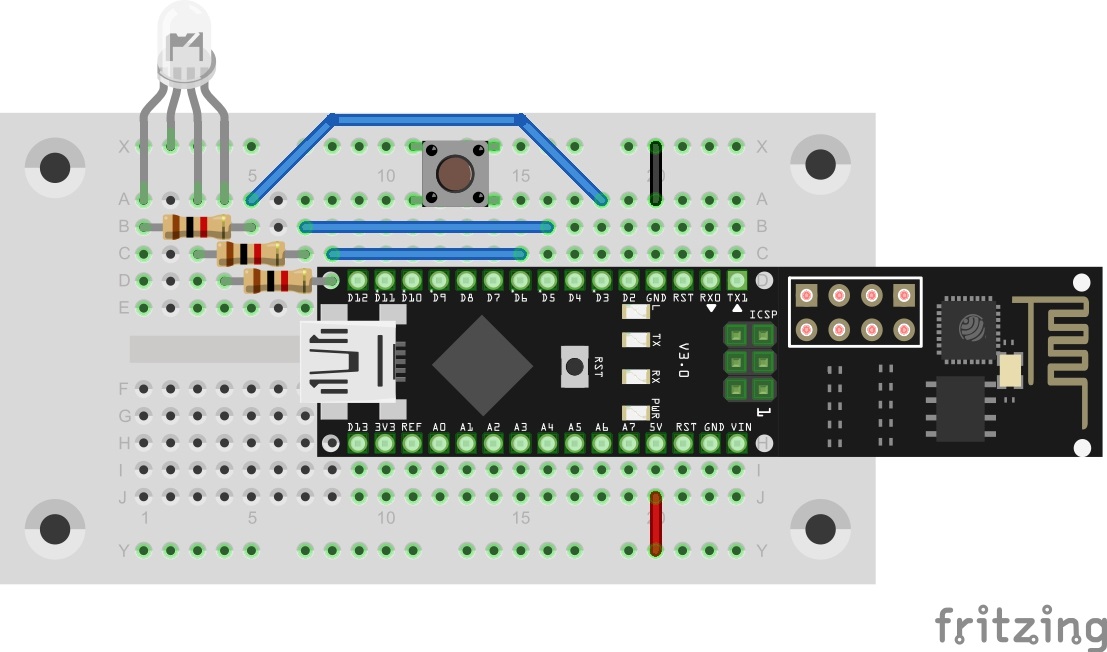
Today’s trial is about MQTT and a global project that was presented last year: the Cheerlights Project by Hans Schaaler. For everyone who doesn’t know the project: It’s about globally networked coloured lights that can be simultaneously controlled through Twitter commands. Another version of this project was part of last year’s Advent calendar. This year we have the version with MQTT and expanded functions.
Behind today’s door is a 1-kohm resistor. The layout consists of the RGB LED with series resistors and a button.

Download today’s programme. Before you can transfer the programme to the NanoESP, you have to install a library. This is the Crossfade library by Radek Wierzbicki (source: https://github.com/radekw/Arduino/tree/5f24ce7c8db9dfbb5252b59824c3217d851b3a3c). For practical reasons, a copy of the library version used is contained as a ZIP file in the Sketch folder. You can easily add integrate this through the Library Manager in the Arduino IDE by selecting the ZIP directory in the Sketch folder Sketch > Integrate library > Integrate .ZIP library. Now the programme compiles, and you can upload it to the NanoESP
The sketch: A16_P22_MQTT_Cheerlights.ino
/*
  MQTT Cheerlights
  Change SSID and PASSWORD.
*/

#include <NanoESP.h>
#include <NanoESP_MQTT.h>
#include <SoftwareSerial.h>
#include <RGBLED.h>
#include <RGBColor.h>

//#define SSID "YourSSID"
//#define PASSWORD "YourPassword"

#define LED_WLAN 13

#define RED 3
#define GREEN 5
#define BLUE 6
#define GND 4

#define BUTTON 7

NanoESP nanoesp = NanoESP();
NanoESP_MQTT mqtt = NanoESP_MQTT(nanoesp);

RGBLED rgbLED = RGBLED(RED, GREEN, BLUE, 0, 3, 0);

RGBColor red   = RGBColor(100, 0, 0);
RGBColor green = RGBColor(0, 100, 0);
RGBColor blue  = RGBColor(0, 0, 100);

RGBColor cyan   = RGBColor(0, 100, 100);
RGBColor white = RGBColor(100, 100, 100);
RGBColor warmwhite  = RGBColor(100, 87, 87);
RGBColor purple = RGBColor(50, 0, 50);
RGBColor magenta = RGBColor(100, 0, 100);

RGBColor yellow = RGBColor(100, 100 , 0);
RGBColor orange = RGBColor(100, 65 , 0);

RGBColor pink = RGBColor(100, 75 , 100);

String ip, mqttId;

void setup() {
  pinMode(RED, OUTPUT);
  pinMode(GREEN, OUTPUT);
  pinMode(BLUE, OUTPUT);

  pinMode(GND, OUTPUT);
  digitalWrite(GND, LOW);

  pinMode(BUTTON, INPUT_PULLUP);

  Serial.begin(19200);

  nanoesp.init();


  //! Only if you use a new Network
  // nanoesp.configWifi(STATION, SSID, PASSWORD);

  //Station Mode
  nanoesp.configWifiMode(STATION);
  //delay(1000);

  // Wait till Connected to WiFi
  if (nanoesp.wifiConnected())digitalWrite(LED_WLAN, HIGH); else Serial.println(F("Error WLAN Connect"));

  //Print IP in Terminal
  nanoesp.getIpMac( ip,  mqttId);
  Serial.println("My IP: " + ip);

  //Print MQTTid in Terminal
  mqttId.replace(":", "");
  Serial.println("My MQTT ID: " + mqttId + "\n");

  //if (mqtt.connect(0, "broker.hivemq.com", 1883, mqttId)) {  //connect to alternative broker
  if (mqtt.connect(0, "broker.fkainka.de", 1883, mqttId)) {  //connect to broker
    Serial.println(F("Connected to Broker"));

    Serial.println(F("My personal Topic is:"));
    Serial.println("NanoESP/" + mqttId + "/\n");

    if (mqtt.subscribe(0, "NanoESP/" + mqttId + "/rgb/mode", 2, changeMode)) Serial.println("Subscribed to:\nNanoESP/" + mqttId + "/rgb/mode"); else Serial.println(F("Error Subscribe to rgb Mode"));
  }
  else {
    Serial.println(F("error connecting"));
  }
}

bool cheerlightsMode;

void loop() {
  int id, len;

  if (nanoesp.recvData(id, len)) {
    mqtt.recvMQTT(id, len); //auto handle recieved data by defined functions
  }
  mqtt.stayConnected(0);

  if (!digitalRead(BUTTON)) { //change cheerlights mode

    mqtt_msg msgMode = {"NanoESP/" + mqttId + "/rgb/mode", String(!cheerlightsMode), 0, true};  //type: mqtt_msg (topic, msg, qos, retain)
    if (mqtt.publish(0, &msgMode)) Serial.println(F("Changed mode\n"));
    msgMode.value = "1";
    while (!digitalRead(BUTTON)) {};
  }

}

void changeMode(String value) {

  if (value == "1") {
    Serial.println("Cheerlights mode\n");
    if (mqtt.unsubscribe(0, "NanoESP/" + mqttId + "/rgb/color")) Serial.println("Unsubscribed from: NanoESP/" + mqttId + "/rgb/color");
    if (mqtt.subscribe(0, "Info/Cheerlights", 2, changeCheerlights)) Serial.println(F("Subscribed to Cheerlights"));
    cheerlightsMode = true;
  }
  else {
    Serial.println("Personal light mode\n");
    if (mqtt.unsubscribe(0, "Info/Cheerlights"))  Serial.println(F("Unsubscribed from Cheerlights")); else Serial.println(F("Error"));
    if (mqtt.subscribe(0, "NanoESP/" + mqttId + "/rgb/color", 2, changeColor)) Serial.println("Subscribed to: NanoESP/" + mqttId + "/rgb/color");
    cheerlightsMode = false;
  }

}

void changeCheerlights(String color) {
  Serial.println("New Cheerlights color : " + color);

  if (color == "red") rgbLED.crossfade(red);
  else if (color == "green") rgbLED.crossfade(green);
  else if (color == "blue") rgbLED.crossfade(blue);
  else if (color == "cyan") rgbLED.crossfade(cyan);
  else if (color == "white") rgbLED.crossfade(white);
  else if (color == "warmwhite") rgbLED.crossfade(warmwhite);
  else if (color == "purple") rgbLED.crossfade(purple);
  else if (color == "magenta") rgbLED.crossfade(magenta);
  else if (color == "yellow") rgbLED.crossfade(yellow);
  else if (color == "orange") rgbLED.crossfade(orange);
}

void changeColor(String value) {
  Serial.println("New color: " + value);
  //rgb(255,23,226)
  value = value.substring(value.indexOf('(') + 1); //255,23,226)
  int red = value.substring(0, value.indexOf(',')).toInt();

  value = value.substring(value.indexOf(',' ) + 1); //23,226)
  int green = value.substring(0, value.indexOf(',')).toInt();

  value = value.substring(value.indexOf(',') + 1); //226)
  int blue = value.substring(0, value.indexOf(')')).toInt();

  RGBColor vColor   = RGBColor(red, green, blue);
  rgbLED.crossfade(vColor);
  //for direct change
  //analogWrite(RED, red); analogWrite(GREEN, green); analogWrite(BLUE, blue);
}
(The former Arduino Create embed is no longer available; the code is taken from the download of all sketches.)
After uploading the programme, now go back to the site www.hivemq.com/try-out/ and establish a connection to the broker.fkainka.de broker. There, with the topic
NanoESP/MyMQTTiD/rgb/mode
you can switch the mode between Cheerlights and personal colours by publishing a 1 or a 0. It’s important that for all messages you activate the Retain check box before you send the message with the Publish button next to it on the right. Retain means something like Save because the broker stores the message. Now, as soon as a device subscribes to the topic, the saved message is sent in its entirety to the device. You can thus save states. Incidentally, the button on the breadboard likewise switches the mode using a message with Retain flag. So later on, you don’t always have to go to the Try Out site to switch the mode.
In personal mode (mode 0), you can give the RGB LED a colour by publishing a message in the topic
NanoESP/MyMQTTiD/rgb/color
in the form
rgb(X,X,X)
The X stands here respectively for a PWM value between 0 and 255. The sequence of colours is red, green, blue. So for a green colour with maximum brightness, you have to publish
rgb(0,255,0)
Don’t forget to check the Retain box.
In Cheerlights mode (mode 1), the board subscribes to a topic to which the current Cheerlights colour is published. You can change this colour by composing a Twitter message and thereby changing your colour and also the colour of all other Cheerlights users. First, the message must contain #Cheerlights, @Cheerlights or simply the keyword Cheerlights; second, one of the predefined colours must come after the keyword. The predefined colours include:
red, green, blue, cyan, white, warmwhite, purple, magenta, yellow, orange, pink
A potential tweet thus looks like this:
Testing my #cheerlights #MQTT project on my #NanoESP with the color blue
You thereby give yourself and the whole world a new colour. But if you prefer your personal colours without someone else butting in, simply switch back to the personal mode, and now the LED changes back to your predefined colour.
Zitat "Es geht um die Crossfade-Library von Radek Wierzbicki (Quelle: https://github.com/radekw/Arduino/tree/5f24ce7c8db9dfbb5252b59824c3217d851b3a3c). Aus praktischen Gründen ist eine Kopie der verwendeten Library-Version als Zip-Datei im Sketchordner enthalten. "
hab weder eine passende .zip im gesamten Arduino Verzeichnis gefunden noch bei ardekw das passende Teil. Es gibt nix mit Namensteilen wie github, ardek w oder crossfade…
wie heisst denn die Library genau? wo kann ich sie finden?