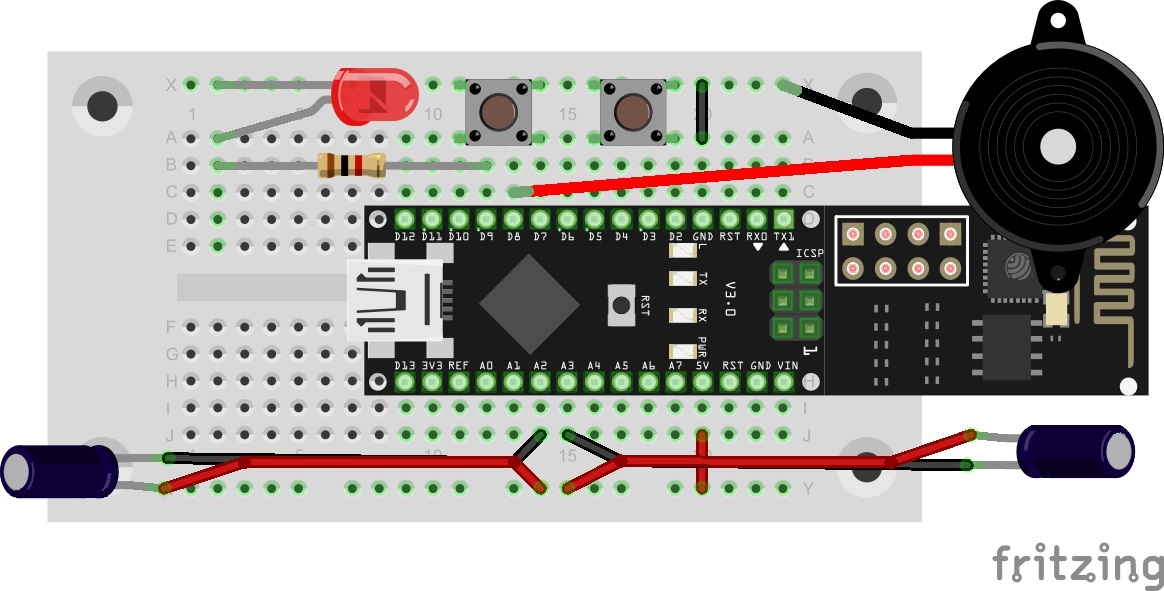
In today’s test, we’ll illuminate the characteristics and possibilities of MQTT in more detail by creating a practical scenario. In the example, there is a building with two rooms, each of which has a light switch, a light and an alarm sensor. The light switch switches the light of the respective room on or off. The alarm sensors activate a building-wide alarm.
Normally, seven different devices would be used here, which are all connected to each other through an MQTT broker. But since we probably have only one NanoESP, this will simulate all devices. For this reason, today’s layout looks somewhat complicated. The LED D3 is used today as the second light. Therefore, today it won’t show you whether you’re connected to the WLAN. The tilt sensors are used on the extension cables as alarm sensors. A person could, for example, attach them to doors or windows so that they trigger an alarm if the entry opens. Behind today’s door is the second sensor.

The sketch: A16_P21_MQTT_Rooms.ino
/*
  MQTT Roons
  Change SSID and PASSWORD.
*/

#include <NanoESP.h>
#include <NanoESP_MQTT.h>
#include <SoftwareSerial.h>

#define SSID "YourSSID"
#define PASSWORD "YourPassword"

NanoESP nanoesp = NanoESP();
NanoESP_MQTT mqtt = NanoESP_MQTT(nanoesp);

String ip, mqttId;

#define SWITCH_ROOM_1 5
#define SWITCH_ROOM_2 7
#define ALARMSENSOR_ROOM_1 A3
#define ALARMSENSOR_ROOM_2 A2

#define LIGHT_ROOM_1 9
#define LIGHT_ROOM_2 13
#define PIEZO 8

unsigned long previousMillisAlarm = 0;
unsigned long intervalAlarm = 1000;
int durationAlarm;
bool alarmActive = false;
bool alarmToggle;

bool alarm_status_v;
bool room1_light_stauts_v;
bool room2_light_stauts_v;

void setup() {
  pinMode(SWITCH_ROOM_1, INPUT_PULLUP);
  pinMode(SWITCH_ROOM_2, INPUT_PULLUP);
  pinMode(ALARMSENSOR_ROOM_1, INPUT);
  pinMode(ALARMSENSOR_ROOM_2, INPUT);

  pinMode(LIGHT_ROOM_1, OUTPUT);
  pinMode(LIGHT_ROOM_2, OUTPUT);

  pinMode(A1, OUTPUT); pinMode(A1, OUTPUT); digitalWrite(A1, HIGH); digitalWrite(A1, HIGH);

  Serial.begin(19200);
  nanoesp.init();

  //! Only if you want to change the ACCESPOINT configuration
  //nanoesp.configWifi(ACCESSPOINT, "NanoESP", "");

  //! Only if you use a new Network
  // nanoesp.configWifi(DUAL, SSID, PASSWORD);

  //Station Mode
  nanoesp.configWifiMode(STATION);
  //delay(1000);

  // Wait till Connected to WiFi
  if (nanoesp.wifiConnected())Serial.println(F("WLAN Connected")); else Serial.println(F("Error WLAN Connect"));

  //Print IP in Terminal
  nanoesp.getIpMac( ip,  mqttId);
  Serial.println("My IP: " + ip);

  //Print MQTTid in Terminal
  mqttId.replace(":", "");
  Serial.println("My MQTT ID: " + mqttId + "\n");

  //if (mqtt.connect(0, "broker.hivemq.com", 1883, mqttId)) {  //connect to alternative broker
  if (mqtt.connect(0, "broker.fkainka.de", 1883, mqttId)) {  //connect to broker
    Serial.println(F("Connected to Broker"));

    Serial.println(F("My personal Topic is:"));
    Serial.println("NanoESP/" + mqttId + "/\n");

    //subcribe: Connection ID, Topic, Max Qualitiy of Service, Function to call when msg recieved
    if (mqtt.subscribe(0, "NanoESP/" + mqttId + "/room1/light", 2, room1_light_status)) Serial.println(F("Subscribed to /room1/light"));
    if (mqtt.subscribe(0, "NanoESP/" + mqttId + "/room1/light", 2,  room1_light)) Serial.println(F("Subscribed to /room1/light"));
    if (mqtt.subscribe(0, "NanoESP/" + mqttId + "/room2/light", 2,  room2_light_status)) Serial.println(F("Subscribed to /room2/light"));
    if (mqtt.subscribe(0, "NanoESP/" + mqttId + "/room2/light", 2,  room2_light)) Serial.println(F("Subscribed to /room2/light"));
    if (mqtt.subscribe(0, "NanoESP/" + mqttId + "/+/alarm", 2,  alarm_status)) Serial.println(F("Subscribed to alarm"));
  }
  else {
    Serial.println(F("error connecting"));
  }
}


void loop() {
  int id, len;

  if (nanoesp.recvData(id, len)) {
    mqtt.recvMQTT(id, len); //auto handle recieved data by defined functions
  }

  checkConditions();
  mqtt.stayConnected(0);
  if (alarm_status_v) alarm();
}

void checkConditions() {
  room1_alarmsensor_check();
  room2_alarmsensor_check();
  room1_button_check();
  room2_button_check();
}


//----------------------------Room1---------------------------------------------
//____________________________Switch__________________________________________

//Switch knows about the light status so it can toggle the light
void room1_light_status (String value) {
  Serial.println("Light status Room 1 :" + value);
  if (value == "1") {
    room1_light_stauts_v = true;
  }
  else if (value == "0") {
    room1_light_stauts_v = false;
  }

}

void room1_button_check () {
  if (!digitalRead(SWITCH_ROOM_1)) {
    if (mqtt.publish(0, "NanoESP/" + mqttId + "/room1/light", String(!room1_light_stauts_v))) Serial.println(F("Button 1 pressed\n"));
    while (!digitalRead(SWITCH_ROOM_1)) {};
  }
}

//____________________________Light___________________________________________
void room1_light (String value) {
  if (value == "1") {
    Serial.println(F("Light on"));
    digitalWrite(LIGHT_ROOM_1, HIGH);
  }
  else if (value == "0") {
    Serial.println(F("Light off"));
    digitalWrite(LIGHT_ROOM_1, LOW);
  }
}

//____________________________Alarmsensor___________________________________________
void room1_alarmsensor_check () {
  if (!digitalRead(ALARMSENSOR_ROOM_1)) {
    if (mqtt.publish(0, "NanoESP/" + mqttId + "/room1/alarm", "1")) Serial.println(F("Alarm Room 1\n"));
    while (!digitalRead(ALARMSENSOR_ROOM_1)) {};
  }
}

//----------------------------Room2---------------------------------------------


//____________________________Switch__________________________________________

//Switch knows about the light status so it can toggle the light
void room2_light_status (String value) {
  Serial.println("Light status Room 2 :" + value);
  if (value == "1") {
    room2_light_stauts_v = true;
  }
  else if (value == "0") {
    room2_light_stauts_v = false;
  }
}

void room2_button_check () {
  if (!digitalRead(SWITCH_ROOM_2)) {
    if (mqtt.publish(0, "NanoESP/" + mqttId + "/room2/light", String(!room2_light_stauts_v))) Serial.println(F("Button 2 pressed\n"));
    while (!digitalRead(SWITCH_ROOM_2)) {};
  }
}


//____________________________Light___________________________________________

void room2_light (String value) {
  if (value == "1") {
    Serial.println(F("Light on"));
    digitalWrite(LIGHT_ROOM_2, HIGH);
  }
  else if (value == "0") {
    Serial.println(F("Light off"));
    digitalWrite(LIGHT_ROOM_2, LOW);
  }

}

//____________________________Alarmsensor___________________________________________

void room2_alarmsensor_check () {
  if (!digitalRead(ALARMSENSOR_ROOM_2)) {
    if (mqtt.publish(0, "NanoESP/" + mqttId + "/room2/alarm", "1")) Serial.println(F("Alarm Room 2\n"));
    while (!digitalRead(ALARMSENSOR_ROOM_2)) {};
  }
}


//----------------------------ALARM---------------------------------------------
void alarm_status (String value) {
  if (value == "1") {
    Serial.println(F("ALARM"));
    durationAlarm = 20;
    alarm_status_v = true;
  }
  if (value == "0") {
    Serial.println(F("ALARM DEACTIVATED"));
    durationAlarm = 20;
    alarm_status_v = false;
  }
}


void alarm() {
  if (millis() - previousMillisAlarm >= intervalAlarm) {
    alarmToggle != alarmToggle;
    if (alarmToggle) tone(PIEZO, 400, 500); else tone(PIEZO, 800, 500);
    previousMillisAlarm = millis(); //Reset time till AlarmToggle;
    durationAlarm--;
    if (durationAlarm <= 0) alarmActive = false;
  }
}
(The former Arduino Create embed is no longer available; the code is taken from the download of all sketches.)
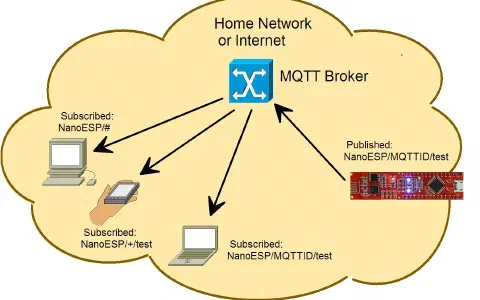
The programme now subscribes to the following topics, where MyMQTTiD is replaced with your ID:
NanoESP/MyMQTTiD/room1/light
NanoESP/MyMQTTiD/room2/light
NanoESP/MyMQTTiD/+/alarm
You can now use the buttons to activate the light in the respective room. If you tip a tilt sensor, the alarm is triggered. It is deactivated either after 20 seconds or if you send a 0 to the alarm topic, e.g. through the http://www.hivemq.com/try-out/ webpage. You are also informed of all changes through the serial monitor.
19 comments
Comments are closed. These comments were posted on the former WordPress site (mostly in German).
ansonsten geht es wohl im princip - abgesehen vom dauernden gepiepe, das bei mir nur aufhört solange man einen der Taster gedrückt hält. Wenn man die sensoren bewegt kommen nachrichten zum MQTT und auch wenn die taster gedrückt werden. Ich finde die LED geht nur in einem der Räume an/ aus auch wenn der ser. printer und die message was anderes sagen. vielleicht auch noch kontaktprobleme mit dem 2. taster (11-14), an den hab ich nämlich noch keine längeren Beine gelötet.
Wenn ich versuche 0 an topic: NanoESP/18fe34cfa972/+/alarm zu schicken werde ich in MQTT disconnected (piepen geht weiter, keine nachricht im printer).
Zwar kann ich die LEDs schalten, aber mehr nicht.
Es hat einmal funktioniert,dann nicht mehr, habe den Sketch schon x mal neu auf Board geladen und die Daten bei http://www.hivemq.com/ eingegeben, aber weder Alarm noch Schalter noch Messages kommen auf meinem Rechner an.
Ich kann nur Jedem raten sich das Video anzuschauen, der Mann spricht mir aus der Seele.
Ich stimme bei allen Dingen nicht immer 100% zu aber Recht hat er schon.
https://www.youtube.com/watch?v=wzRdraG1Cks
Noch einen schönen Advent, ein schönes Weihnachtsfest, einen guten Rutsch.
Die in anderen Beiträgen genannten Probleme mit Wackelkontakten habe ich ebenso.
Das Prinzip ist gut, das Board auch, leider hapert es an der Stimmigikeit zwischen den gelieferten Bauteilen.
Wenn es keine Tücken gäbe, wäre es arg langweilig, meine ich.
PS: Der Video-Onkel ist langweilig.
Danach habe ich nicht mehr versucht die Kabel zu nutzen, sondern zwei separate Steckbretter, die ich hatte.
Mit dem "+" als Wildcard funktioniert es nicht.
Aber soft- und hardware probleme machen, dass es reichlich dauert, die projekte hinzukriegen. Wenn ich nicht Rentner wäre, hätte ich gar keine Zeit dafür.
apropo Blogg typ: Jemand der Linux als system hat sollte eigentlich besser mit programmen umgehen können.
Wie send ich eine 0 oder 1 um Licht an und aus zu schalten, das wird nirgends erklärt…. was muss hinter die Meldung NanoESP/MyMQTTiD/room1/light??
kommt die 0 direkt dahinter, mit einem / oder : oder ; oder wie, ich bekomme es nicht hin :-(