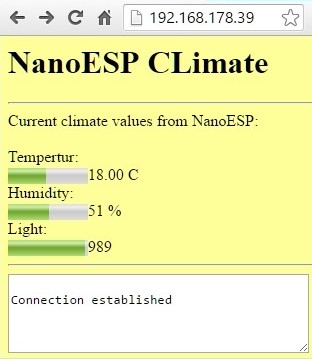
Behind today’s door is a very special component, namely a humidity sensor. Together with the phototransistor and the NTC, it creates a weather station for at-home use. The following layout is necessary for this purpose:
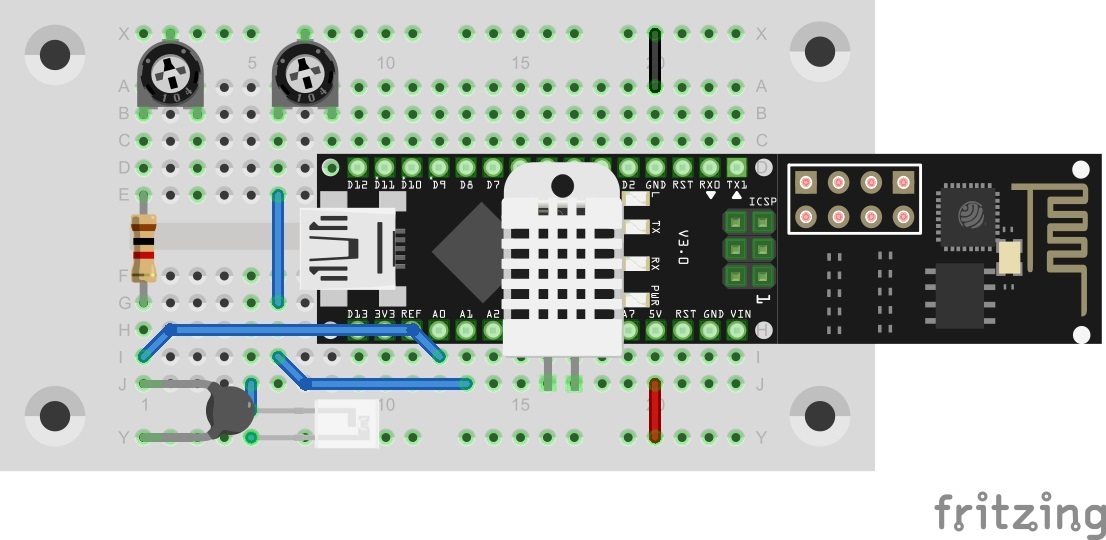
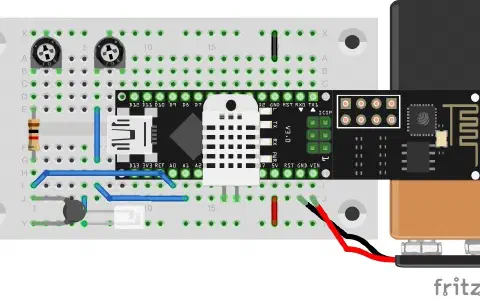
Today’s layout is a bit fiddly. Especially at the point where the potentiometer on the right of the image sits, it touches the NanoESP. But that’s not really a problem as long as the contact on the left of the image is plugged firmly into the board.

The sketch: A16_P18_Climate.ino
/*
  TCP-Server Climate with server send events
  Change SSID and PASSWORD.
*/

#include <NanoESP.h>
#include <NanoESP_HTTP.h>
#include <SoftwareSerial.h>
#include "Websites.h"

#include <math.h>

//#define SSID "YourSSID"
//#define PASSWORD "YourPassword"

#define LED_WLAN 13

#define TEMP A0
#define LIGHT A1
#define HUMIDITY A4
#define GND A5

#define DEBUG true

NanoESP nanoesp = NanoESP();
NanoESP_HTTP http = NanoESP_HTTP(nanoesp);

void setup() {
  Serial.begin(19200);
  nanoesp.init();

  //! Only if you want to change the ACCESPOINT configuration
  //nanoesp.configWifi(ACCESSPOINT, "NanoESP", "");

  //! Only if you use a new Network
  // nanoesp.configWifi(DUAL, SSID, PASSWORD);

  //Dual Mode
  nanoesp.configWifiMode(DUAL);
  //delay(1000);

  // Wait till Connected to WiFi
  if (nanoesp.wifiConnected())digitalWrite(LED_WLAN, HIGH); else Serial.println(F("Error WLAN Connect"));

  //Start TCP Server
   if (nanoesp.startTcpServer(80))    Serial.println(F("TCP Server Activ")); else   Serial.println(F("TCP Server Error"));

  //Print IP in Terminal
  Serial.println(nanoesp.getIp());
}

int streamId = -1;
byte errorCount;

void loop() {
  String method, ressource, parameter;
  int id ;

  if (http.recvRequest(id, method, ressource, parameter)) {

    Serial.println("New Request from id :" + String(id) + ", method: " + method +  ", ressource: " + ressource +  " parameter: " + parameter);

    if (ressource == "/") {
      http.sendFromFlash(id, index, sizeof(index));
      nanoesp.closeConnection(id);
    }

    else if (ressource == "/eventclimate") {                   //new server send events connection
      if (http.sendStreamHeader(id)) {                         //send stream header as response
        streamId = id;                                         //this id belongs to the sse-client
        sendStreamData(streamId,"msg", "Connection established");   //send first message
      }
    }

    else {
      http.sendFromFlash(id, error404, sizeof(error404));
      nanoesp.closeConnection(id);
    }
  }

  if (streamId > -1) { //there is a stream client
    if (!sendStreamData(streamId, "hum", String(getRF()))) errorCount++; else errorCount = 0; //send server send event data
    if (!sendStreamData(streamId, "light", String(getLight()))) errorCount++;else errorCount = 0; //send server send event data
    if (!sendStreamData(streamId, "temp", String(getTemp()))) errorCount++;else errorCount = 0; //send server send event data

    if (errorCount > 6){ //client is disconnected if more than 6 transmissions were faulty
      nanoesp.closeConnection(streamId);
      streamId = -1;
      errorCount = 0;
    }
  }

}

boolean sendStreamData(int connectionId, String event, String data) {
  //Serial.println(String (connectionId) + " - "  + event + " - " + data);
  return nanoesp.sendData(connectionId, "event: " + event + "\n" +  "data: " + data + "\n\n");
}

int getRF() { //get Humidity, source: http://www.elektronik-labor.de/AVR/Rmessung.html#rx2
  long U, R;
  double F;

  pinMode(HUMIDITY, INPUT);       //  Ddrb.3 = 0      'Eingang
  digitalWrite(HUMIDITY, HIGH);   //  Portb.3 = 1     'Pullup ein
  U = analogRead(HUMIDITY);       //  U = Getadc(3)
  digitalWrite(HUMIDITY, LOW);    //  Portb.3 = 0     'Pullup Aus
  pinMode(HUMIDITY, OUTPUT);      //  Ddrb.3 = 1 'Nierohmig

  pinMode(GND, INPUT);            //  Ddrb.4 = 0      'Eingang
  digitalWrite(GND, HIGH);        //  Portb.4 = 1     'Pullup ein
  U += analogRead(GND);           //   U = U + Getadc(2)
  digitalWrite(GND, LOW);         //  Portb.4 = 0     'Pullup Aus
  pinMode(GND, OUTPUT);           //  Ddrb.4 = 1 'Nierohmig. entladen

  U = U / 2;
  R = 3500 * U;                 //'R=35k*(U/1023-U)
  U = 1023 - U;
  R = (U > 0) ? R / U : 999999;     //alternativ writing to: if(U>0) R = R/U; else R=999999;
  R = R - 450;                      //- interner Bahnwiderstand 0,45 k

  //Calculate Humidity
  F = R / 280;
  F = log(F);                                                //ln f !!!
  F = F * 8.9;
  F = 100 - F;
  F = round(F);

 // Serial.println(String(R) + "Ohm     " + String(F) + "%");
  //delay(500);
  return F;
}

double getTemp() {
  //Source: http://playground.arduino.cc/ComponentLib/Thermistor2
  double Temp;
  int RawADC = analogRead(TEMP);
  Temp = log(10000.0 * ((1024.0 / RawADC - 1)));
  //         =log(10000.0/(1024.0/RawADC-1)) // for pull-up configuration
  Temp = 1 / (0.001129148 + (0.000234125 + (0.0000000876741 * Temp * Temp )) * Temp );
  Temp = Temp - 273.15;            // Convert Kelvin to Celcius
  // Temp = (Temp * 9.0)/ 4.7 + 32.0; // Convert Celcius to Fahrenheit

  Temp = round(Temp*10);
  Temp = Temp/ 10;
  return Temp;
}

int getLight() {
  int vLight = analogRead(LIGHT);
  return vLight;
}
(The former Arduino Create embed is no longer available; the code is taken from the download of all sketches.)
After you upload the programme, you can now open the website. You see three values that are represented as text and as bars. You can now calibrate the values somewhat with the potentiometers. The temperature value, especially, should be compared to a thermometer and adjusted. That’s the only way to ensure that the information on the website is more or less accurate.
AT+CIFSR
+CIFSR:APIP,"192.168.4.1"
+CIFSR:APMAC,"x❌x❌x:x"
+CIFSR:STAIP,"192.168.0.152"
+CIFSR:STAMAC,"x❌x❌x:x"
OK
New Request from id :0, method: GET, ressource: / parameter:
New Request from id :0, method: GET, ressource: /browserconfig.xml parameter:
New Request from id :0, method: GET, ressource: / parameter:
New Request from id :0, method: GET, ressource: / parameter:
Verbindung ist da, Anfragen im Monitor auch, aber die Seite zeigt keine Werte