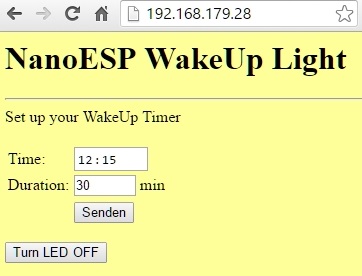
Today’s project deals with a well-known lamp from Phillips, the Wake Up Light. This is an alarm clock that, instead of making a loud noise, slowly increases the brightness. This creates a type of sunrise, and one wakes up in a natural manner.
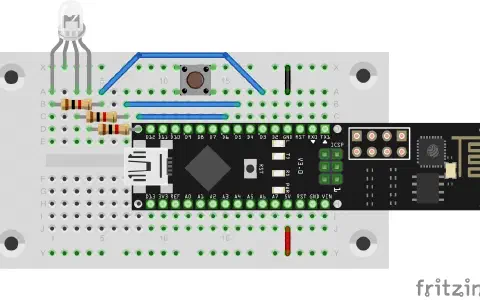
Behind today’s door is another potentiometer, which is important for tomorrow’s test. The following layout is required today:
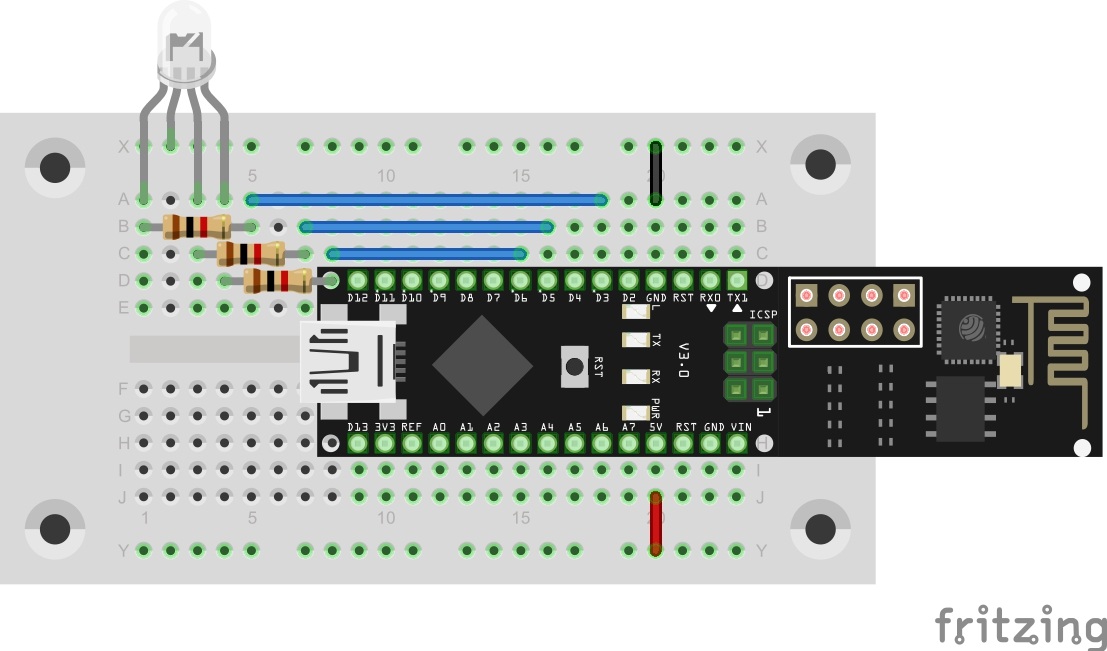
The sketch: A16_P17_WakeUpLight.ino
/*
  TCP-Server: Wakeup light
  Change SSID and PASSWORD.
  RGB-Led (common cathode) on Pins 3,5,6
*/

#include <NanoESP.h>
#include <NanoESP_HTTP.h>
#include <SoftwareSerial.h>
#include "Websites.h"

#include <math.h>
#include <Time.h>

#define SSID "YourSSID"
#define PASSWORD "YourPassword"

#define LED_WLAN 13

#define RED 3
#define GREEN 5
#define BLUE 6
#define GND 4

#define BUTTON 7

NanoESP nanoesp = NanoESP();
NanoESP_HTTP http = NanoESP_HTTP(nanoesp);

//String timeServerIP = ; // time.nist.gov NTP server address
String ntpServerName = "195.145.119.188";//"time.nist.gov";
const int NTP_PACKET_SIZE = 48; // NTP time stamp is in the first 48 bytes of the message
byte packetBuffer[NTP_PACKET_SIZE]; //buffer to hold incoming and outgoing packets

int alarmHour = 0, alarmMinute = 2;
bool alarm;
byte cRed = 0, cBlue = 0, cGreen = 0;

unsigned long previousMillis = 0;        // will store last time a msg was send
unsigned long interval = 78; //

void setup() {
  Serial.begin(19200);
  nanoesp.init();

  pinMode(RED, OUTPUT);
  pinMode(GREEN, OUTPUT);
  pinMode(BLUE, OUTPUT);

  pinMode(GND, OUTPUT);
  digitalWrite(GND, LOW);

  pinMode(BUTTON, INPUT);

  //Only Station Mode for TimeSync
  nanoesp.configWifiMode(STATION);
  //delay(1000);

  // Wait till Connected to WiFi
  if (nanoesp.wifiConnected())digitalWrite(LED_WLAN, HIGH); else Serial.println(F("Error WLAN Connect"));

  //Start TCP Server
  if (nanoesp.startTcpServer(80))    Serial.println(F("TCP Server Activ")); else   Serial.println(F("TCP Server Error"));

  //Print IP in Terminal
  Serial.println(nanoesp.getIp());

  setSyncProvider(getNtpTime);
  Show_Time();
}


time_t getNtpTime() {
  //convert to time_t , Paramter: connectionId, ServerAdress, Timezone
  return (time_t)getNTPpacket(4, ntpServerName, 2);
}

void loop() {
  String method, ressource, parameter;
  int id ;

  if (http.recvRequest(id, method, ressource, parameter)) {

    Serial.println("New Request from id :" + String(id) + ", method: " + method +  ", ressource: " + ressource +  " parameter: " + parameter);

    if (ressource == "/") {
      http.sendFromFlash(id, index, sizeof(index));
      nanoesp.closeConnection(id);
    }

    if (ressource == "/settimer") {
      if (parameter != "") {
        //timer=02%3A03&
        String sHour = parameter.substring(parameter.indexOf('=') + 1, parameter.indexOf('%'));
        String sMin = parameter.substring(parameter.indexOf('A') + 1, parameter.indexOf('&'));

        String sDuration = parameter.substring(parameter.indexOf('&') + 1);
        sDuration = sDuration.substring(sDuration.indexOf('=') + 1, sDuration.indexOf('&'));

        alarmHour = sHour.toInt();
        alarmMinute = sMin.toInt();
        int iDuration = sDuration.toInt();
        interval *= iDuration;

        Serial.println("Timer: " + String(alarmHour) + ":" + String(alarmMinute) + "   Duartion: " + String (iDuration) );
        Show_Time();

      }
      nanoesp.closeConnection(id);
    }


    if (ressource == "/turnoff") {
      alarm = false;
      cRed = 0; cBlue = 0; cGreen =0;
      analogWrite(RED,cRed); analogWrite(BLUE,cBlue);analogWrite(GREEN,cGreen);
    }

    else {
      http.sendFromFlash(id, error404, sizeof(error404));
      nanoesp.closeConnection(id);
    }
  }
  else {
    if (hour() == alarmHour) {
      if (minute() == alarmMinute) {
        if (!alarm) alarm = true;
      }
    }

    if (alarm) wakeUp();
  }
}

void MorningAlarm() {

  Serial.println("Alarm: - turn lights off");
}


void wakeUp() {
  if (millis() - previousMillis >= interval) {
    previousMillis = millis();
    if (cRed == 0) Show_Time();
    if (cRed < 255) {
      cRed++; analogWrite(RED, cRed );
    }
    else {
      if (cGreen < 255) {
        cGreen++;
        analogWrite(GREEN, cGreen);
      }
      else {
        if (cBlue < 255) {
          cBlue++;
          analogWrite(BLUE, cBlue );
          if (cBlue == 255) Show_Time();
        }
      }
    }
  }
}


// prepare an NTP request to the time server and send to the given
bool sendNTPpacket(int id, String address)
{
  // set all bytes in the buffer to 0
  memset(packetBuffer, 0, NTP_PACKET_SIZE);
  // Initialize values needed to form NTP request
  // (see URL above for details on the packets)
  packetBuffer[0] = 0b11100011;   // LI, Version, Mode
  packetBuffer[1] = 0;     // Stratum, or type of clock
  packetBuffer[2] = 6;     // Polling Interval
  packetBuffer[3] = 0xEC;  // Peer Clock Precision
  // 8 bytes of zero for Root Delay & Root Dispersion
  packetBuffer[12]  = 49;
  packetBuffer[13]  = 0x4E;
  packetBuffer[14]  = 49;
  packetBuffer[15]  = 52;
  //
  // if we need a cr/lf
  //
  packetBuffer[NTP_PACKET_SIZE    ]  = 0x0D;
  packetBuffer[NTP_PACKET_SIZE + 1]  = 0x0A;
  // all NTP fields have been given values, now
  // you can send a packet requesting a timestamp:
  if ( nanoesp.sendRaw(id, packetBuffer, NTP_PACKET_SIZE)) return true;
  return false;
}

long getNTPpacket(int id, String address, int timeZone) {
  unsigned long secsSince1900;
  byte          offset = 40;

  if (!nanoesp.newConnection(id, UDP, address, 123)) Serial.println ("no connection ntp server"); //NTP requests are to port 123
  delay(100);
  if (!sendNTPpacket(id, address)) {
    Serial.println("No time request send");
    return 0;
  }
  nanoesp.setTimeout(2000);
  if (nanoesp.find("+IPD,")) {
    int vid = nanoesp.parseInt();
    nanoesp.find(",");
    int len = nanoesp.parseInt();
    //Serial.println(String(len));
    byte buffer[len];

    nanoesp.find(":");
    nanoesp.readBytes(buffer, 48);

//    for (int i = 0; i <= NTP_PACKET_SIZE; i++) {
//      Serial.print(buffer[i], HEX);
//    }

    // convert four bytes starting at location 40 to a long integer
    secsSince1900 =  (unsigned long)buffer[offset + 0] << 24;
    secsSince1900 |= (unsigned long)buffer[offset + 1] << 16;
    secsSince1900 |= (unsigned long)buffer[offset + 2] << 8;
    secsSince1900 |= (unsigned long)buffer[offset + 3];

    nanoesp.find("OK\r\n");
    nanoesp.closeConnection(id);

    //   return secsSince1900 + timeZone * SECS_PER_HOUR;                    // NTP  Date
    return secsSince1900 - 2208988800UL + timeZone * SECS_PER_HOUR;         // UNIX Date
  }
  else {
    Serial.println("no time recieved");
    nanoesp.closeConnection(id);
    return 0;
  }
}

void Show_Time()
{
  String shour, sminute, ssecond;

  Serial.print("Date: ");
  Serial.print(day());
  Serial.print(".");
  Serial.print(month());
  Serial.print(".");
  Serial.println(year());


  if (hour() <= 9) shour = "0" + String(hour()); else shour = String(hour()); // adjust for 0-9
  if (minute() <= 9) sminute = "0" + String(minute());  else sminute = String(minute());
  if (second() <= 9) ssecond = "0" + String(second());  else ssecond = String(second());
  Serial.println( "Time: " + shour + ":" + sminute + ":" + ssecond );
}
(The former Arduino Create embed is no longer available; the code is taken from the download of all sketches.)
After the set-up, you can download the programme and upload it to the board. After the installation, open the browser and enter the IP address of the board. On the page that now appears, you can select a time at which the wake-up process should start. You can also set the duration. In the standard setting, it’s 30 minutes. When the time is reached, the LED begins to light up red weakly at first. It slowly becomes brighter, and then the green LED mixes in, which creates a yellow tone. Finally, the blue LED also lights up, which results in a white with which the entire bedroom is brightened.

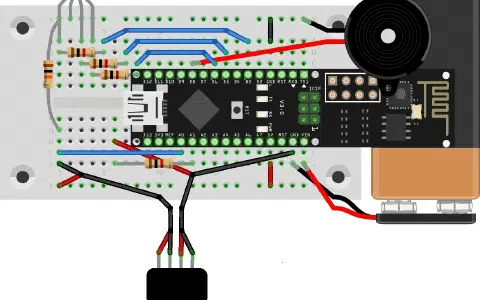
….hm… - meine RGB-Led schaltet nicht ein…
Mal sehen, was da los ist…
Grüße, Michael