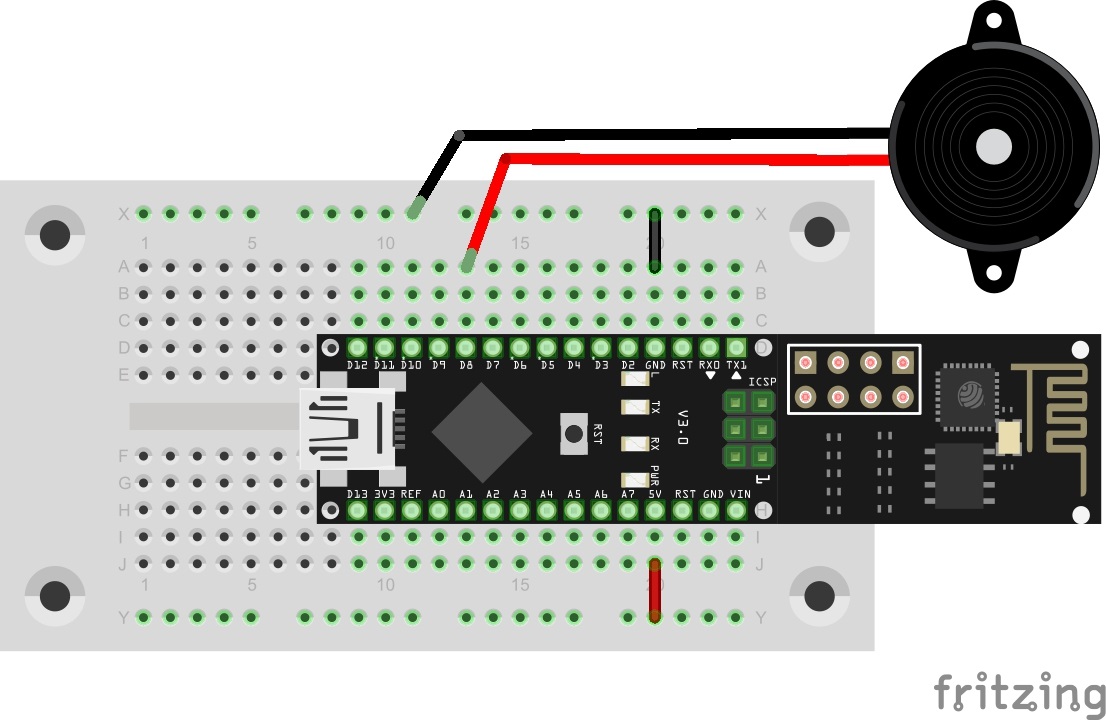
Behind today’s door is a piezo sound transducer. It’s possible to generate sounds with it, which will become clear in today’s test. Today you’re building a type of piano that can be used via a website. See the following picture for the layout:

The sketch: A16_P16_WebserverPiano.ino
/*
  TCP-Server Piano
  Change SSID and PASSWORD.
*/

#include <NanoESP.h>
#include <NanoESP_HTTP.h> //special library for http-connection
#include <SoftwareSerial.h>
#include "Websites.h" //websites in a special file as progmem

#define SSID "YourSSID"
#define PASSWORD "YourPassword"

#define LED_WLAN 13

NanoESP nanoesp = NanoESP();
NanoESP_HTTP http = NanoESP_HTTP(nanoesp);

void setup() {
  Serial.begin(19200);
  nanoesp.init();

  //! Only if you want to change the ACCESPOINT configuration
  //nanoesp.configWifi(ACCESSPOINT, "NanoESP", "");

  //! Only if you use a new Network
  // nanoesp.configWifi(DUAL, SSID, PASSWORD);

  //Dual Mode
  nanoesp.configWifiMode(DUAL);
  //delay(1000);

  // Wait till Connected to WiFi
  if (nanoesp.wifiConnected())digitalWrite(LED_WLAN, HIGH); else Serial.println(F("Error WLAN Connect"));

  //Start TCP Server
  if (nanoesp.startTcpServer(80))    Serial.println(F("TCP Server Activ")); else   Serial.println(F("TCP Server Error"));

  //Print IP in Terminal
  Serial.println(nanoesp.getIp());
}

void loop() {
  String method, ressource, parameter;
  int id;

  if (http.recvRequest(id, method, ressource, parameter)) { //Incoming request, parameters by reference

    Serial.println("New Request from id :" + String(id) + ", method: " + method +  ", ressource: " + ressource +  " parameter: " + parameter);

    if (ressource == "/") {
      http.sendFromFlash(id, index, sizeof(index));
      nanoesp.closeConnection(id);
    }

    else if (ressource == "/dataonly") {  //only data is recieved on this url, no need to send a website
      nanoesp.closeConnection(id);
    }

    else {
      http.sendFromFlash(id, error404, sizeof(error404));
      nanoesp.closeConnection(id);
    }

    if (parameter != "")      //the request included parameters
    {
      String strTone;
      if (method == GET)  strTone = parameter.substring(6); else   strTone = parameter.substring(5); //get note values
      noTone(8);
      tone(8, strTone.toInt(), 200);    //play note for 200ms
    }

  }
}
(The former Arduino Create embed is no longer available; the code is taken from the download of all sketches.)
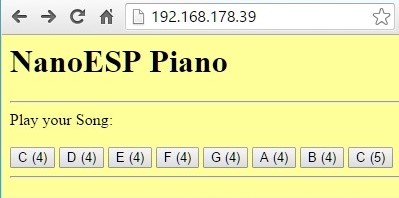
When you’ve uploaded the programme, you can open the board’s website using the IP address in the browser. Today it doesn’t matter whether you connect to the board through your home network or the access point, since no external data is loaded. On the website you find a few buttons with which you can trigger a tone when you press them. The transfer is really fast. However, you should give the board a quarter of a second to play the tone before you send another tone. Otherwise, the note sounds very strange. But try to play one of the classics of the beginner songs: All My Ducklings. The notes are:
C D E F G G A A A A G A A A A G F F F F E E G G G G C
34 comments
Comments are closed. These comments were posted on the former WordPress site (mostly in German).
Kennt sich eigentlich jemand mit Blynk so gut aus, dass er mir erklären kann, warum jedes Projekt ein eigenes AUTH TOKEN benötigt ("…Auth Token is a unique identifier which is needed to connect your hardware to your smartphone. Every new project you create will have its own Auth Token.") Das erscheint mir etwas merkwürdig, da doch bei der Blynk-App immer nur ein Projekt gleichzeitig laufen kann und das AUTH TOKEN wird ja schliesslich durch das Einbinden in das ARDUINO-Programm (*.ino) fest mit dem IoT-Bord verknüpft, so dass es insgesamt eigentlich keinerlei Zuodnungsprobleme geben dürfte. Seltsam, nicht wahr?
Selbst wenn ich direkt spannung 3V drauf gebe nix, müsste dann eigentlich nicht was zu hören sein ?
Hat vieleicht noch jemand ne IDEE ?
if (ledState == LOW) {
ledState = HIGH;
tone(8, 400, 1500);
} else {
ledState = LOW;
noTone(8);
}
Wenn es bei 100 von 1000ten funktioniert ist etwas im Argen.
Auch wenn der serielle Monitor mit beiden IP-Adressen funktioniert kommt kein Ton raus. ESP blinkt, aber der 'Nano' und die 20ig Pizo's sagen nix. Auch ein passiver Buzzer an Pin 8 nicht. Das hier erwähnte 'Testprogramm' funktioniert.
Enttäuschend.
Nun zum heutigen "Piano"; Also dieser Piezzo Schallwandler ist echt schwer in das Board rein zubekommen. Mit ner Zange und sanften Druck gings dann rein. Klingt aber eher nach 56k Modem als an ein Piano (Neue Projekt Idee? :D)
Versteh aber noch nicht so ganz, warum ich mich zwar zu meinen Repeater bzw. über den Gastzugang ins WLAN anmelden kann, aber nicht direkt ins normale WLAN direkt vom Router. Einziger Unterschied den ich bisher festgestellt habe war die SSID. Mal die nächste Tage testen :/
if (method == GET) strTone = parameter.substring(6); else strTone = parameter.substring(16); //get note values
C:\Dokumente und Einstellungen\familie\Eigene Dateien\Arduino\webserver_piano\webserver_piano.ino:9:62: fatal error: Websites.h: No such file or directory
#include //websites in a special file as progmem
^
compilation terminated.
exit status 1
Fehler beim Kompilieren für das Board Arduino Nano.
hatte das Problem auch ganz am Anfang, dann hat es bei den nächsenprojeckten gefunzt und jetzt wieder nicht
Weiß jemand hier eine Antwort?
Danke im foraus
hat jemand eine Idee, woran es liegt, dass ich die Websites im Browser nicht sehe? Mac Mini mit Sierra10.12.2 Das Board mit Access Point und Wlan bekommen eine IP und im seriellen Monitor sehe ich auch den request mit id 0 ….. Ich kann das Board unter beiden Ip Adresse anpingen. Es kommt aber keine Site, egal ob über das WLAN oder den Access Point. Bis Tag 15 hat alle problemlos geklappt. Allerdings hat auch schon der erste Tag mit dem "Osterei" nicht hingehauen.
hat jemand eine Idee warum ich die Internetseiten nicht aufrufen kann? (Mac Mini mit Sierra 10.12.2 und Safari). Das Board ist sowohl im Access Point Modus als auch im Wlan zu sehen und die IP kann ich anpingen . Der serielle Monitor gibt den Request aus, aber es kommt keine Site. War schon am Tag mit dem "Osterei" so. Der Rest lief dann problemlos, aber die Webserver Geschichten laufen einfach nicht. Habe auch schon den Zugriff vom iPhone und iPad getestet, gleiches Resultat. Firewall ist aus.. Wäre dankbar für Tips
Bin zufrieden, aber was macht der Parameter?
Zu lesen hier: https://www.arduino.cc/en/Tutorial/StringSubstring
Die Ausgabe im SerialMonitor war 'New Request from id :0, method: POST, ressource: /dataonly parameter:
+IPD,0,8:tone=330'
Also von vorne angefangen zu zählen und 15 war dann die richtige Position. Ich weiss leider nicht warum bei anderen nach dem letzten Doppelpunkt mit zählen angefangen wird.
Response Header parsing failed. Response Data:
3C 48 54 4D 4C 3E 3C 48 45 41 44 3E 0A 3C 6C 69 6E 6B 20 72 65 6C 3D 22 . ..
4E 61 6E 6F 45 53 50 20 50 69 61 6E 6F 0A 3C 2F 74 69 74 6C 65 3E 0A 3C NanoESP Piano….NanoESP Piano..Play your Song:…C (
34 29 3C 2F 62 75 74 74 6F 6E 3E 0A 09 3C 62 75 74 74 6F 6E 20 6F 6E 63 4)..D (4) ..E (4) ..F
20 28 34 29 20 3C 2F 62 75 74 74 6F 6E 3E 0A 09 3C 62 75 74 74 6F 6E 20 (4) ..G (4) .
09 3C 62 75 74 74 6F 6E 20 6F 6E 63 6C 69 63 6B 3D 22 72 65 74 75 72 6E .A (4) ..B (4) ..C (5) ….
66 75 6E 63 74 69 6F 6E 20 73 65 6E 64 46 6F 72 6D 28 76 61 6C 75 65 29 function sendForm(value)
20 7B 0A 20 20 76 61 72 20 78 68 72 20 3D 20 6E 65 77 20 58 4D 4C 48 74 {. var xhr = new XMLHt
74 70 52 65 71 75 65 73 74 28 29 3B 0A 20 20 78 68 72 2E 6F 70 65 6E 28 tpRequest();. xhr.open(
27 50 4F 53 54 27 2C 20 22 2F 64 61 74 61 6F 6E 6C 79 22 2C 20 74 72 75 'POST', "/dataonly", tru
65 29 3B 0A 0A 20 20 78 68 72 2E 73 65 6E 64 28 22 74 6F 6E 65 3D 22 2B e);.. xhr.send("tone="+
76 61 6C 75 65 29 3B 0A 20 20 72 65 74 75 72 6E 20 66 61 6C 73 65 3B 20 value);. return false;
2F 2F 20 50 72 65 76 65 6E 74 20 70 61 67 65 20 66 72 6F 6D 20 73 75 62 // Prevent page from sub
6D 69 74 74 69 6E 67 2E 0A 7D 0A 3C 2F 73 63 72 69 70 74 3E 0A 0A 3C 2F mitting..}…….
Hat bei mir geklappt!
Hat bei mir geklappt!
RPI-Nutzer
Serieller Monitor:
Error WLAN Connect
TCP Server Activ
Die IP ist 192.168.178.55 aus Fritz-Box ersichtlich
ping okay
Die Webseite erscheint in allen Browsern
Aber " … ressource: /dataonly: parameter:"
es wird kein tone-Wert von 262 bis 523 übermittelt.
Was ist falsch?