In the last days, we mostly dealt with the UDP protocol with which data can be sent out simply and directly. In the next few days, we will deal with the TCP (Transmission Control Protocol). TCP only permits one connection at a time between precisely two computers. It is mostly used online for browsing on websites.
Behind today’s door, there is another resistor with 1 kΩ (brown, black, red). As with all other parts: keep it safe, even though you are not using this part today yet.
The program: Day8_TCPBrowser
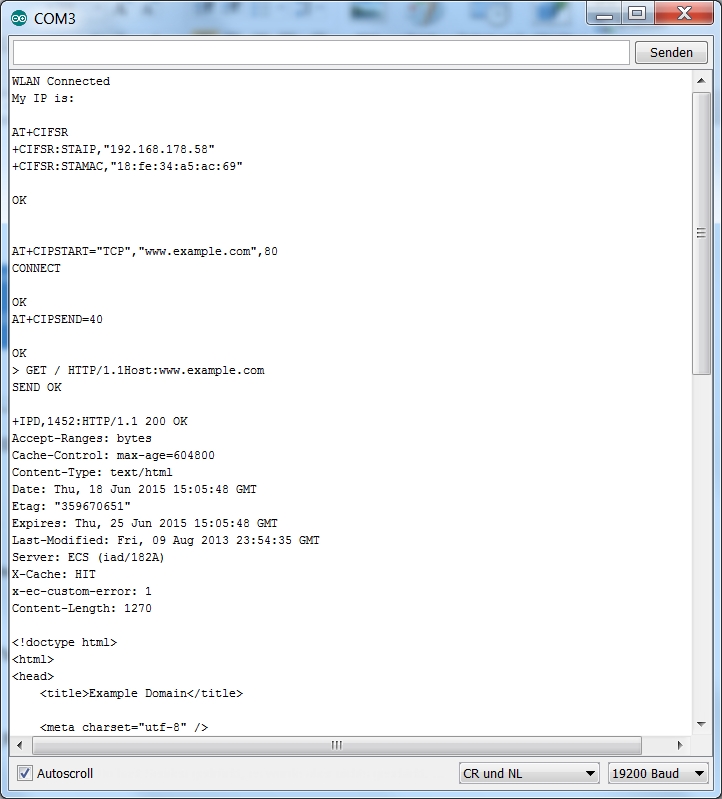
The program’s function is similar to the SoftwareSerial program of the first day, but among others, it connects to the WLAN independently at start-up. This saves you a lot of typing and you can start more quickly. Do not forgot that you need to enter your home network’s data into the program. Then enter the following command line in the serial monitor:
AT+CIPSTART=“TCP“,“www.example.com“,80
This command establishes a TCP connection to the website www.example.com. Port 80 is the standard port for HTTP-queries. After confirmation of the connection with OK, you can enter the next command, which you already know:
AT+CIPSEND=40
You want to send a message through the connection you have just established, after all. When you are asked to enter a text with >, first enter
GET / HTTP/1.1
and then push Enter. Enter does not appear in the Serial Monitor, but the module has received it. Then the message continues with
Host:www.example.com
followed by two times Enter. A long text is returned. The first part is the response of the server, containing some information for the browser. The text after <!document html> is the website that you can also see when you call the page www.example.com directly - but purely textbased. A browser would now interpret this text and present it in a form that we understand.

Gruß
Roland