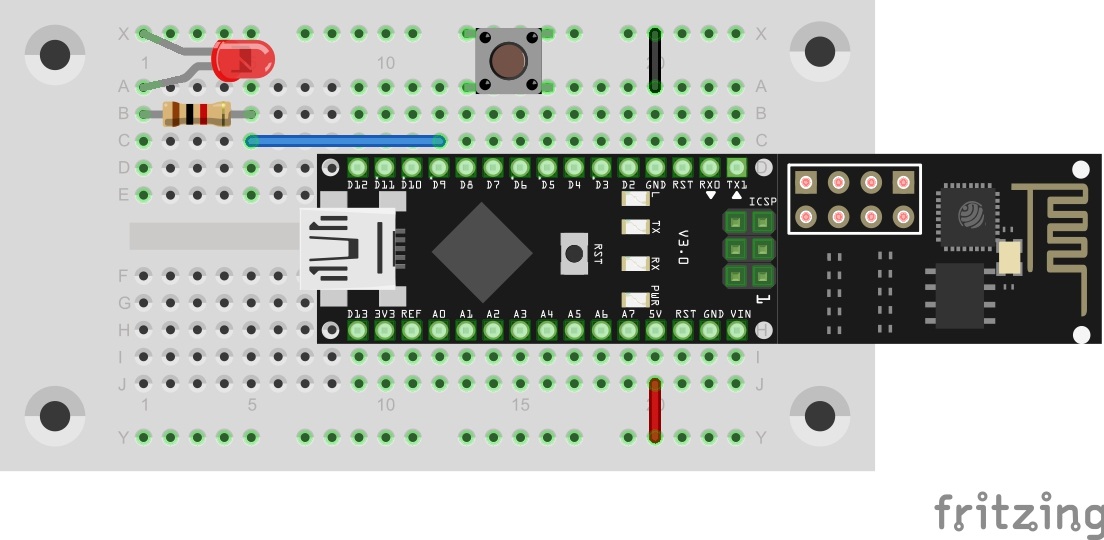
In yesterday’s program, the first commands were evaluated by the controller. Today’s program maintains this function but can also additionally send a command into the network independently.

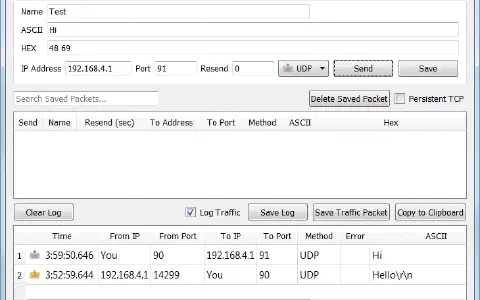
You will find a button behind today’s door. It is used as a simple sensor here. Connect it to the controller as shown in the setup image.
The program: Day6_UDPSwitch
! Attention: Some MAC-Users reportet a bug in the PacketSender-Software. This bug doesn’t allow you to change the ports. If you have problems with this bug you can change the ports in the Arduino program. All you have to do for todays project is to change the line 83 from
succes &= sendCom(“AT+CIPSTART="UDP","192.168.4.255",90,91”, “OK”);
to
succes &= sendCom(“AT+CIPSTART="UDP","192.168.4.255",5505,5506”, “OK”);
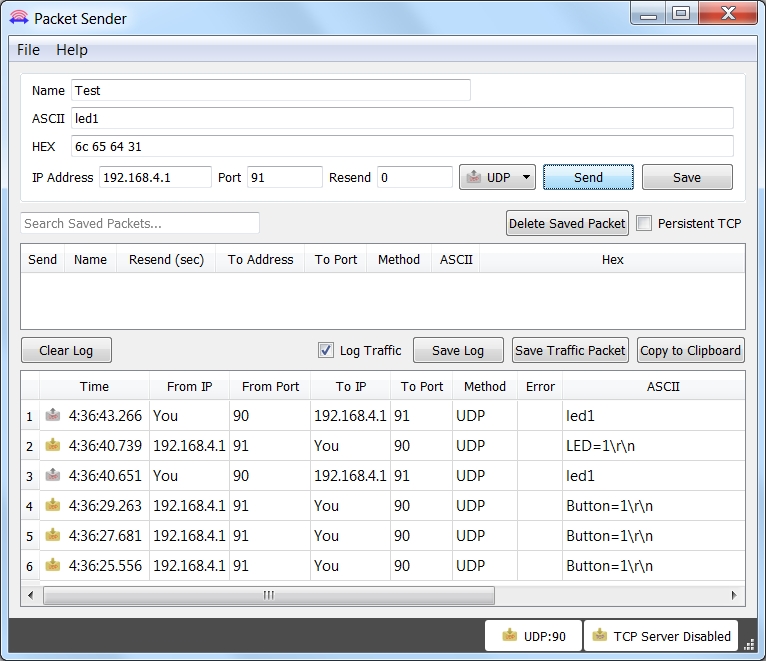
The program continues to evaluate the incoming signals. Additionally, the button is continually queried. When the user actuates it, the controller sends the text
Button=1
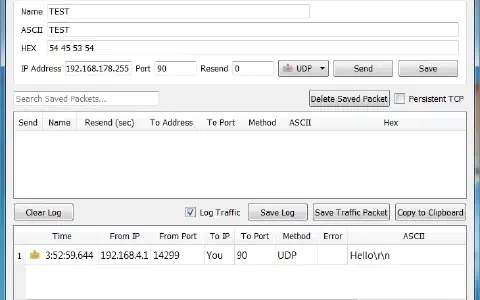
to the network. All devices connected to the module with a UDP server on port 90 can receive the command. For a building automation project, a server would receive the status message, e.g. of a motion sensor, and then reset the command led=1 to activate the light.
70 comments
Comments are closed. These comments were posted on the former WordPress site (mostly in German).
Hab die Multicast Adresse auf mein Netz angepasst, jetzt geht alles.
Heute geht gar nichts…
Dann in Zeile 83 statt 192.168.4.255 die 192.168.4.2 eingetragen und alles klappt tadellos.
Was ist "auf mein Netz angepasst?"
Warum gibt es dieses fremde comment in die dritten Zeile der "ControllESP"-Teil:
succes &= sendCom("AT+CIPSEND=" + String(Msg.length() + 2), ">"); //+","192.168.4.2",90", ">");
Vielleicht hat das etwas zu tun mit das beschriebene Problem…
Somebody care to explain how this should work anyway? Is the switch pulling D8 to GND and should that have the effect?
Thanks
Meine Finger schreiben automatisch 192.168.2.
Broadcast ist der Oberbegriff.
Multicast ist meines Wissens Broadcast im Subnetz.
Broadcast im engeren Sinne übers Subnetz hinaus, also z.B. 192.168.255.255 oder sogar 255.255.255.255.
// succes &= sendCom("AT+CIPSEND=" + String(Msg.length() + 2), ">"); // geht nicht mit multicast für Androids
succes &= sendCom("AT+CIPSEND=" + String(Msg.length() + 2) + ","192.168.4.2",5505", ">"); // geht, kein multicast
Dein Beispiel gefolgt, und alles funktioniert (mit Mac).
// succes &= sendCom("AT+CIPSEND=" + String(Msg.length() + 2) + ","192.168.4.2",5505,5506", ">"); // geht, kein multicast
// succes &= sendCom("AT+CIPSEND=" + String(Msg.length() + 2) + ","192.168.4.2",90,91", ">"); // originale Ports
// succes &= sendCom("AT+CIPSEND=" + String(Msg.length() + 2) + ","192.168.4.2",5505", ">"); // geht, kein multicast
// succes &= sendCom("AT+CIPSEND=" + String(Msg.length() + 2) + ","192.168.4.2",90", ">"); // originales Port
Bei CIPSEND natürlich nur den Zielport.
Now all works - both with broadcast and direct.
Not sure what was wrong before. I find I have to press the switch quite firmly - even though it clicks it does no always register apparently.
Wie man Eingabe oder Ausgabe in ein Terminalfenster umlenkt stand ja schon beschrieben - ich fand das jedoch recht mühsam, weil ich ja dann zwei Terminalfenster brauche und zwei mal das Passwort für sudo eingeben muss.
Um sowohl Ein- als auch Ausgabe ins selbe Terminalfenster umzulenken, kann man folgenden Befehl verwenden:
sudo socat UDP-RECV:90,crnl!!UDP-SENDTO:192.168.4.1:91 STDIO
Einen schönen zweiten Advent wünsche ich allen Mitstreitern!
Christian
Zu Android UDP-Sender / Receifer habe ich eine Bemerkung.
Die ersten Versuche des Adventskalenders führte ich unter Windows 10 durch. Dies funktionierte problemlos bis es zum UDP-Protokoll kam. Ab da blockte die interne Firewall.
Die Anfrage der Firewall ob ich "PacketSender" uneingeschränkten Zugriff auf das Internet gewähren möchte beantwortete ich mit "ja". Nun funktionierte die Kommunikation vom Packet-Sender zum Board.
Vom Board zum PacketSender gab es weiterhin Probleme.
Diese hätte ich durch weitere Einstellungen an der Firewall bestimmt lösen können.
Ich entschloss mich jedoch dazu das Programm PacketSender auf meinem Netbook zu installieren.
Es läuft unter dem Betriebssystem "Debian Jessie".
Jessie hat nach einer Standardinstallation keine Firewall aktiviert.
Mir fiel auf das die PacketSender Version für Debian den gleichen Bug hat wie die für Macs.
Also Ports wie für Macs beschrieben ändern.
Sonst waren bisher keine Änderungen am Code für den Arduino nötig.
Es funktioniert also auch Multicast.
Das betätigen des Tasters wird jedes Mal zuverlässig erkannt und auf dem seriellen Monitor sowie als Rückmeldung im PacketSender angegeben.
Nun zu UDP Sender/Receifer unter Android.
Ich nutze ein älteres Samsung-Smartphone unter Android 4.1.
Dort habe ich die oben genannte App installiert. Bis zum heutigen Tag waren alle Versuche damit durchführbar.
Folgendes funktioniert auch heute:
LED einschalten mit Rückmeldung
LED ausschalten mit Rückmeldung
Folgendes funktioniert nicht:
Bei Betätigung des Buttons erfolgt nur eine Rückmeldung
im seriellen Monitor.
Jedoch nicht im "UDP Sender/Receifer" auf dem Handy.
(Um überhaupt Rückmeldungen zu empfangen muss im "UDP Sender / Receifer" übrigens "Read Timeout" auf z. B. 2 Sekunden gestellt werden. Standardmäßig wartet das Programm nicht auf Rückmeldungen)
Dies kann nicht am Code für das Arduino-Board liegen. Denn unter Debian empfange ich ja alles.
Meine Diagnose ist das "UDP Sender/Receifer" in der jetzigen Version für Android 4.1 nur auf eine Antwort lauscht wenn der Befehl zum Board auch über dieses Programm gesendet wird.
Was geht, ist über Settings Knopf im Windows Hauptmenu, dann Network & Internet, dann Manage WiFi Settings, dann das Netzwerk wählen und Forget betätigen (englisches W10). Anschliessend beim Neuverbinden Privates Netzwerk wählen.
Alternativ neuen Namen wählen in dem Beispiel.
void serialDebug() {
while (true)
{
if (esp8266.available())
Serial.write(esp8266.read());
if (Serial.available())
esp8266.write(Serial.read());
}
}
void debug(String Msg)
{
if (DEBUG)
{
Serial.println(Msg);
}
}
erstmal einen schönen zweiten Advent!
Ich habe euch den Source-Code nochmal umgeschrieben damit ihr den NanoESP auch im Heimnetzwerk benutzen könnt also ihr bindet den NanoESP ins Heimnetzwerk ein, genauer genommen in euer WLAN, ich müsst nurnoch bevor ihr den Code hochladet eure SSID, PASSWORT und den REMOTEHOST(Euren Empfänger) im Code anpassen.
Hier zum Download: https://www.dropbox.com/s/k4rz368236bhwdx/Day6_UDPSwitchButtonLEDWithoutAP.zip?dl=0
:D Mal sehen wer morgen schneller dran ist!
Ich habe ne Frage. Wenn man auf den Button drückt soll dan die LED angehen oder so etwas?
Bei mit passiert da nichts. Der Paket Sender registriert einfach das ich den Button gedrückt habe, aber sonst passiert nichts.
Am heutigen Tag wird einfach gezeigt daß das Board auch per WLan eine Meldung an den PacketSender schicken kann.
Da du die Meldung empfängst funktioniert bei dir alles bestens.
Bei jedem Drücken des Buttons invertierst du den Wert dann (d.h. aus 0 wird 1 und umgekehrt), speicherst ihn wieder in der gobalen Variable und schickst ihn an den LED-Port:
…
int ledValue = 0; // speichert den LED-wert
void setup() {
…
In der loop-Funktion:
…
if (!digitalRead(SWITCH))
{
debug("Button=1");
sendUDP("Button=1");
ledValue = !ledValue; // invertiere den aktuellen led-wert
digitalWrite(LED, ledValue); // schicke den led-wert an den port
while (!digitalRead(SWITCH)) {}
}
}
//—————————————–Config ESP8266————————————
…
solange der Taster gedrückt wird steht das Programm und kann keine Kommandos für das Aus-/Einschalten der LED empfangen. Hier ein Vorschlag für eine Änderung der Routine loop() (man beachte das static!):
static boolean pressed = false;
if (!digitalRead(SWITCH))
{
if (!pressed)
{
debug("Button=1");
sendUDP("Button=1");
pressed = true;
}
}
else
{
if (pressed)
{
debug("Released");
sendUDP("Released");
pressed = false;
}
}
Schönen Restsonntag noch.
Die unter Hälfte wird für die Ausgabe von Text im Seriellen Monitor benutzt.
wir haben dasselbe Prblem wie du.
Wir können die LED ein und ausschalten (mit Befehlen im Packet Sender) aber ohne den Button. Im Packet Sender sehen wir aber die Befehle für die LED und die Nachrichten des Buttons.
Wie hast du es gelöst? Muss denn die LED auf Knopfdruck leuchten?
https://nurdspace.nl/ESP8266#AT_Commands ist ja mal ein Anfang, aber schon arg knapp. Ausführlicher habe ich nur was chinesisches gefunden (und ich meine wirklich chinesisch, nicht fachchinesisch).
Hat jemand eine Idee wie man das machen könnte?
mfg
http://bbs.espressif.com/viewtopic.php?f=46&t=286
Zuunterst der Anhang 4A-ESP8266 AT Instruction Set_v0.22.pdf
Gruss Röbi
das ist genau das was ich gesucht habe.
Vielen Dank
was den Softwareteil betrifft geht das genau so wie bei der LED.
Zum Hardwareteil muss ich ein bisschen raten. Ich nehme mal an, dass das UKW Radio mit ein paar Milli-Ampere auskommt. Dann kannst du einen kleinen NPN-Transistor (z.B. 2N2222) als Schalter verwenden. Basis über einen 1K Widerstand auf eine Portausgang des NanoESP, Kollektor auf GND und Emitter an den Minus Anschluß des Radio. Der Plus Anschluß kommt auf die benutzte Stromversorgung. GND vom NanoESP und Minus der Stromversorgung vom Radio müssen natürlich auch verbunden werden.
Habe versucht das mal "hinzumalen", siehe Bild.
Ganz vereinfacht dargestellt:
Die IP-Adresse 192.168.4.255 ist keinem PC zugeteilt. Wird eine Nachricht an sie gesendet, wird sie an alle PCs verteilt. So bekommt wirklich jeder die Botschaft.
Also muss die IP entweder genau die des Computers sein, oder halt die 255 am Ende um an alle zu senden. :)
Ich hoffe das war einigermaßen verständlich. Sonst gerne fragen :)
das funktioniert an sich perfekt (danke dafür!),
nur hat die Kommentarfunktion wieder diese typografischen
Anführungszeichen bei
debug(„Button=1“);
sendUDP(„Button=1“);
drausgemacht.
Die müssen im Prog durch die Anführungszeichen mit ersetzt werden, sonst gibts nen Kompilierungsfehler…
Die müssen im Prog durch die Anführungszeichen mit Shift+2 ersetzt werden, sonst gibts nen Kompilierungsfehler…
Die Kommentarfunktion frisst auch spitze Klammern grrr…
Dann habe ich umgestellt auf ein Odys Wintab 10. Hier klappt die Verbindung zum NanoESP schnell und auch Packet Sender funktioniert problemlos.
Das Schalten der LED klappte immer. Allerdings bekam ich nach dem Schaltvorgang keine Rückmeldung im Packet Sender. Und auch die Rückmeldung vom Button kam nur sehr selten. Daraufhin habe ich auch die IP Adresse im Code umgestellt. Nun bekomme ich auch alle Rückmeldungen im Packet Sender. Die Rückmeldung vom Button kommt aber etwas verzögert.
Konkret:
in der loop() Funktion hinter:
int setLed = esp8266.parseInt();
die Zeile:
ledValue = setLed;
einfügen, dann wird der aktuelle Zustand der LED übernommen.
Ansonsten: Alles perfekt!
Viel Spaß an alle Bastler.
Gruß Rainer
Diese Information ist z.B. im Buch zum Franzis Arduino Lernpacket zu finden.
Ich habe folgendes Problem:
Bereits seit Tag 2: Google Ping scheint mein ESP-Board nicht richtig zu funktionieren. Ich kkonnte mich an Tag 2 nicht mit meinem Wlan verbinden. Durch Erstellen eines Hotspots über mein Smartphone hat dies dann jedoch funktioniert, Google sowie mehrere andere Seiten konnnte ich trotzdem nicht anpingen. Der quadratische Chip gegenüber des USB-Anschlusses wird bei mir nach Anschließen des Bords über USB innerhalb vonn 90 Sekunden so warm, dass man sich daran verletzen kann.
den Beitrag findest du, wenn du z.B. oben im Hauptmenü auf WiFi-Board klickst. Dort findest du alle Beitrage speziell zum Board und u.A. auch den gesuchten Artikel.
Einwandfrei!
Un das ist auch das Schöne an diesem Kalender, dass eigentlich jeder ein bisserl was dazu beitragen kann.
Der Eine mit Fragen und Anregungen und der Andere mit Umsetzungen und Erweiterungen.
Ich hatte schon etwa 20 Zeilen Code gelegt, um die LED auch mit dem Button an- und ausschalten zu können, und dann entnervt aufgegeben. Und ihr macht das mit ein paar Zeilen und dann auch noch mit gedrückt halten und via UDP ausschalten…
Hut ab, funktioniert klasse!
Ist aber nur eine grobe Schätzung.