With the last test in this Advent, we get really Christmasy. We’re building a reusable gift box with which you can delight your relatives. Every time someone opens the present, the contents are lit up in an individual colour, and a Christmas sound plays.
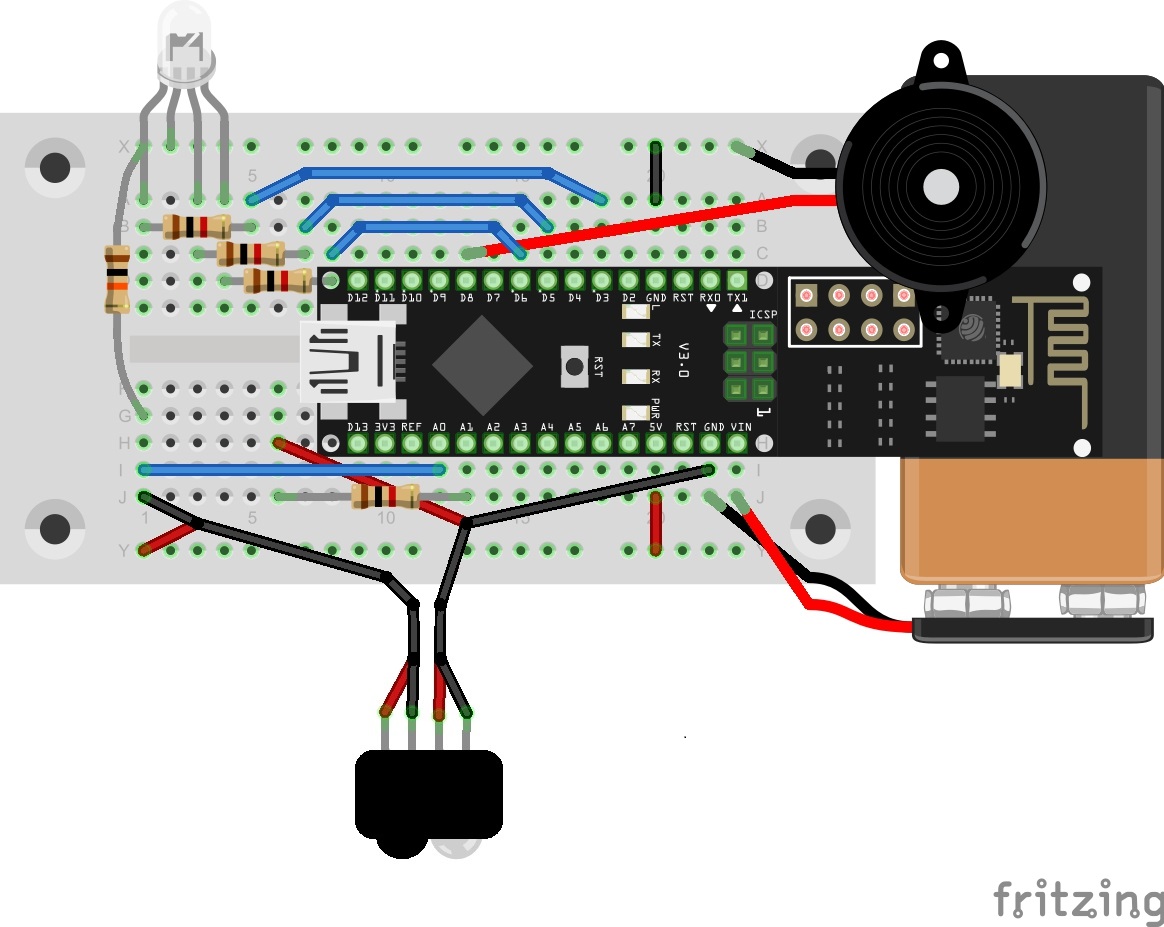
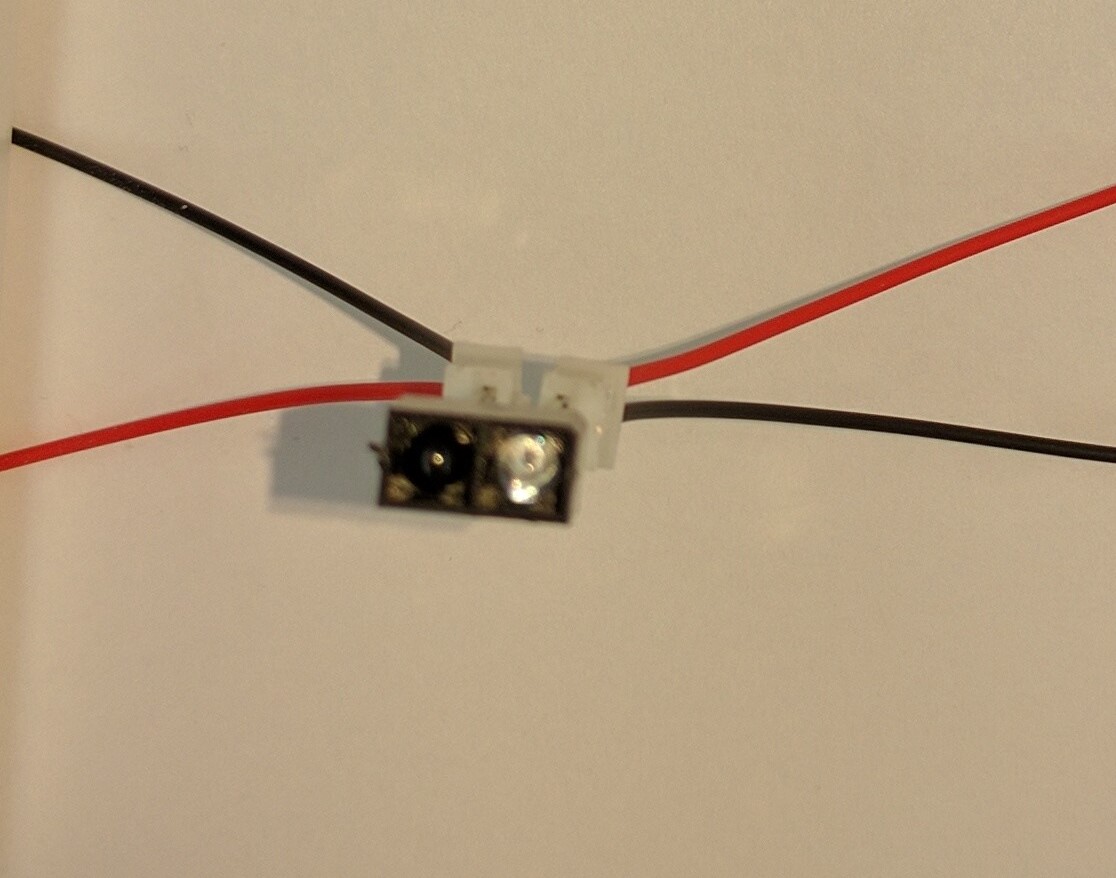
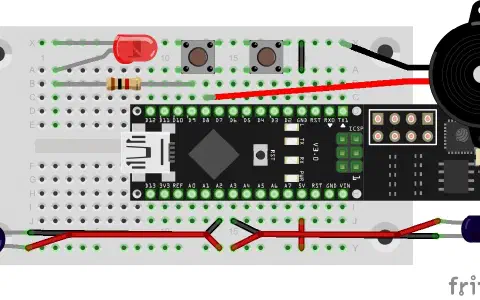
Behind today’s door is a retro-reflective sensor. This is actually two components, an IR transmitter diode and a phototransistor. It’s not very easy to see which way the elements have to be connected in terms of polarity. For this reason, it’s best if you connect the photoelectric sensor with the connection cables according to the example shown. Then you won’t be able to switch the polarity as easily.
Today’s layout contains many components, so it all looks a bit confusing at first glance. In addition to the retro-reflective sensor, which serves as a sensor to detect the opening of the package, the RGB LED and the piezo sound transducer are used.

The sketch: A16_P24_MQTT_Present.ino
/*
  MQTT Present
  Change SSID and PASSWORD.
*/

#include <NanoESP.h>
#include <NanoESP_MQTT.h>
#include <SoftwareSerial.h>

#include <RGBLED.h>
#include <RGBColor.h>

#include "pitches.h"
#include "songs.h"

#define SSID "YourSSID"
#define PASSWORD "YourPassword"

#define LED_WLAN 13
#define DEBUG true

#define RED 3
#define GREEN 5
#define BLUE 6
#define GND 4
#define BUTTON 7

#define PIEZO 8

#define IR A1
#define PHOTO A0

NanoESP nanoesp = NanoESP();
NanoESP_MQTT mqtt = NanoESP_MQTT(nanoesp);

RGBLED rgbLED = RGBLED(RED, GREEN, BLUE, 0, 3, 0);

String ip, mqttId;

RGBColor newColor = RGBColor(0, 0, 0);
RGBColor offColor = RGBColor(0, 0, 0);
int curSong;
bool isOpen = true;

mqtt_msg opened = {"", "Opened", 0, true};

void setup() {
  pinMode(RED, OUTPUT);
  pinMode(GREEN, OUTPUT);
  pinMode(BLUE, OUTPUT);

  pinMode(GND, OUTPUT);
  digitalWrite(GND, LOW);

  pinMode(IR, OUTPUT);

  Serial.begin(19200);

  nanoesp.init();

  //Station Mode
  nanoesp.configWifiMode(STATION);

//  nanoesp.configWifiStation(SSID, PASSWORD);

  if (nanoesp.wifiConnected()) {
    Serial.println(F("Wifi Connected"));
    digitalWrite(LED_WLAN, HIGH);
  }
  else {
    Serial.println(F("Wifi not Connected"));
  }


  //Print IP in Terminal
  nanoesp.getIpMac( ip,  mqttId);
  Serial.println("My IP: " + ip);

  //Print MQTTid in Terminal
  mqttId.replace(":", "");
  Serial.println("My MQTT ID: " + mqttId+"\n");

  if (mqtt.connect(0, "broker.fkainka.de", 1883, mqttId)) {
    Serial.println(F("Connected to Broker"));

    Serial.println(F("My personal Topic is:"));
    Serial.println("NanoESP/" + mqttId + "/\n");

    if (mqtt.subscribe(0, "NanoESP/" + mqttId + "/present", 2, newPresent)) Serial.println(F("Subscribed to present")); else Serial.println(F("Error Subscribe to present"));
  }
  else {
    Serial.println(F("error connecting"));
  }
  setSongs();
}

void loop() {
  int id, len;

  if (nanoesp.recvData(id, len)) {
    mqtt.recvMQTT(id, len); //auto hanlder mit Funktionen
  }

  mqtt.stayConnected(0);

//Present opened?
  if  (!isOpen) {
    if (checkIsOpen()) {
      isOpen = true;
      Serial.println("Open");
      mqtt.publish(0, &opened);
      rgbLED.crossfade(newColor);
      play(curSong);
    }
  }
  else { //Present closed?
    if (!checkIsOpen()) {
      isOpen = false;
      Serial.println("Closed");
      rgbLED.crossfade(offColor);
    }
  }
}


bool checkIsOpen()
{
  int high; int low;

  digitalWrite(IR, HIGH);
  delay(1);
  high = analogRead(PHOTO);
  digitalWrite(IR, LOW);
  delay(1);
  low = analogRead(PHOTO);

  digitalWrite(IR, HIGH);
  delay(1);
  high += analogRead(PHOTO);
  digitalWrite(IR, LOW);
  delay(1);
  low += analogRead(PHOTO);

  if (high > (2 * low)) {
    return false;
  }
  else {
    return true;
  }
}

String oldTopic;

void newPresent(String value) {
  Serial.println("New Present for " + value);
  if (opened.topic != "") {
    mqtt.unsubscribe(0, opened.topic + "/color");
    Serial.println(F("Unsubscribed old color"));

    mqtt.unsubscribe(0, opened.topic + "/song");
    Serial.println(F("Unsubscribed old song"));
  }

  opened.topic = "NanoESP/" + mqttId + "/present/" + value;
  mqtt.subscribe(0, opened.topic + "/color", 2, gotnewColor); Serial.println(F("Subscribed new Color"));

  // Recieve retained msg before subscribing next
  int id, len;
  for (int i = 0; i <= 250; i++) {
    if (nanoesp.recvData(id, len)) {
      if (mqtt.recvMQTT(id, len)) {
        break; //auto hanlder mit Funktionen
      }
    }
    delay(10);
  }
  mqtt.subscribe(0, opened.topic + "/song", 2, gotnewSong); Serial.println(F("Subscribed new Song"));
}


void gotnewColor(String value) {
  Serial.println("New color: " + value);

  value = value.substring(value.indexOf('(') + 1); //255,23,226)
  int red = value.substring(0, value.indexOf(',')).toInt();

  value = value.substring(value.indexOf(',' ) + 1); //23,226)
  int green = value.substring(0, value.indexOf(',')).toInt();

  value = value.substring(value.indexOf(',') + 1); //226)
  int blue = value.substring(0, value.indexOf(')')).toInt();

  newColor   = RGBColor(red, green, blue);

  //for direct change
  //analogWrite(RED, red); analogWrite(GREEN, green); analogWrite(BLUE, blue);
}

void gotnewSong(String value) {
  Serial.println("New Song: " + value);
  curSong = value.toInt();
}

void setSongs() {
  //Configuration for songs, you may change some songs
  int numTunes = 5;

  tunes[0] = {weWish, weWishDurations, sizeof(weWish) / sizeof(int), 80, N_C6, N_C5};
  tunes[1] = {alleJahre, alleJahreDurations, sizeof(alleJahre) / sizeof(int), 80, N_C6, N_C5};
  tunes[2] = {jingleBells, jingleBellsDurations, sizeof(jingleBells) / sizeof(int), 60, 784, 523};
  tunes[3] = {firstNoel, firstNoelDurations, sizeof(firstNoel) / sizeof(int), 60, 523, 262};
  //tunes[3] = {oHolyNight, oHolyNightDurations, sizeof(oHolyNight) / sizeof(int), 100, 659, 262};
  tunes[4] = {whatChild, whatChildDurations, sizeof(whatChild) / sizeof(int), 100, 587, 247};
  tunes[5] = {weThreeKings, weThreeKingsDurations, sizeof(weThreeKings) / sizeof(int), 100, 587, 294};

}

void play(int tuneNum) {

  int randomOffset = random(32);

  int numNotes = tunes[tuneNum].numCount;
  int tempo = tunes[tuneNum].tempo;
  for (int thisNote = 0; thisNote < numNotes; thisNote++) {

    int freq = pgm_read_word_near(tunes[tuneNum].melody + thisNote) * 2;
    int noteDuration =   tempo *  pgm_read_byte_near(tunes[tuneNum].durations + thisNote);

    if (freq > 0) {
      int n = (map(freq, tunes[tuneNum].low, tunes[tuneNum].high, 1, 31) + randomOffset) % 31 + 1;
      tone(PIEZO, freq, noteDuration);

    } else {
      // REST
      delay(noteDuration);
    }

    delay(noteDuration);

    // to distinguish the notes, set a minimum time between them.
    // the note's duration + 30% seems to work well:
    int pauseBetweenNotes = noteDuration * 0.30;
    delay(pauseBetweenNotes);

    noTone(PIEZO);
  }
}
(The former Arduino Create embed is no longer available; the code is taken from the download of all sketches.)
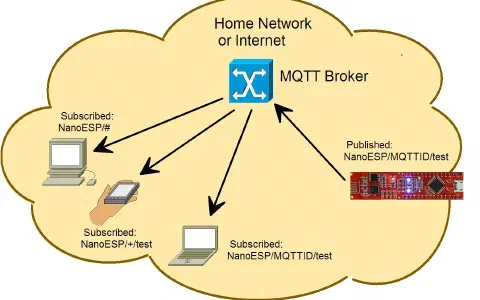
After you have loaded today’s programme on the controller, go once more to the http://www.hivemq.com/try-out/ site and connect to the broker broker.fkainka.de. Once you’re there, you can now begin to dedicate one topic each to the persons to whom you want to give gifts according to the following model:
NanoESP/MyMQTTiD/present/person/color
NanoESP/MyMQTTiD/present/person/song
where you replace “MyMQTTiD” with your personal ID and “person” with the person to whom you want to give the present. In the topic “color,” publish a colour according to the pattern you already know, rgb(X,X,X), and in the topic “song” publish a number between 0 and 5, which stands for a predefined song. Both messages must be equipped with the Retain flag. For three persons, for example, it would look like this:
| Topic | Value | Retain |
| NanoESP/mqttId/present/mother/color |
rgb(255,255,0) | X || NanoESP/mqttId/present/mother/song |
2 | X || NanoESP/mqttId/present/father/color |
rgb(0,0,255) | X || NanoESP/mqttId/present/father/song |
1 | X || NanoESP/mqttId/present/sister/color |
rgb(255,0,255) | X || NanoESP/mqttId/present/sister/song |
4 | X |
Now you can switch between these persons by publishing the person in the topic
NanoESP/MyMQTTiD/present
If you enter “sister” there, for example (pay attention to exact spelling), the settings for your sister are loaded and are used when the box is opened. After the gift has been removed, put the next one in, close the box again and load the next setting by publishing the next person. For test purposes, you can hold the sensor in front of a white sheet of paper, which simulates the closing of the box. The sensor must thereby be shielded from the residual daylight. When you take the paper away, the box is recognised as opened. See the website for instructions on precisely how to build the box.
26 comments
Comments are closed. These comments were posted on the former WordPress site (mostly in German).
frohe Weihnachten wünsche ich euch allen.
Nehmt wieder den Broker broker.fkainka.de, bei mir funktioniert es jetzt. Ich war da falsch unterwegs.
Für die vielen Topics habe ich mir eine Textdatei angelegt, vereinfacht etwas die Eingabe.
Justieren muss ich noch die Lichtschranke, scheint mir sehr empfindlich bei einfallendem Licht.
Mal sehen ob das heute nachmittag auch noch klappt.
collect2.exe: error: ld returned 5 exit status
exit status 1
Fehler beim Kompilieren für das Board Arduino Nano.
danke im voraus für hilfe
und fröhliche weihnachten
Der ESP8266 zieht gehörig Strom; ein 9V-Block reicht da nicht lange.
Frohes Fest.
Anschluss wie im Bild oben, kann man das irgendwie durchmessen?
jetzt klappt es, hatte doch vergessen auch NanoESP/18fe34cfa972/present zu subcriben. Mit drei Leuten muss man also 7 subscriptions haben.
sogar der sensor tuts.
Ist bei mir auch so.
Das war das letzte X-Mas Kalender Experiment für dieses Jahr. Nicht immer lief alles glatt, die Bauelemente passen teilweise nicht oder wackeln. Manchmal haben die genutzten Serverdienste lang gebraucht um die Daten zu senden. Manchaml war ein bisschen Raten, wie es geht, notwendig, so wie eben heute. Die Quellcodes haben auch Fragmente ungenutzten Codes drin, der beim Lesen und Nachvollziehen auffällt und erst einmal verwirrt. Eigentlich ein bisschen Schade für die Vorfreude auf, bzw. Freude an Weihnachten.
Ein Wunsch an den Weihnachtsmann, bzw. Autor; Wenn es 2017 noch einmal einen solchen Kalender gibt wäre es super die Schwachstellen auzubügeln und es passt mit der ungetrübten Vorfreude auf Weihnachten.
Weiß jemand warum die Programme zu Beginn mit WPA2 nicht funktionierten? Die letzten Programme die das Thema MQTT betraffen funktionierten Problemlos mit der WPA2 Verschlüsselung (auch WPA/WPA2 Mix). Kann mir das bis jetzt nicht erkläten.
Grüße,
Hans
Im Monitor War auch zu lesen,dass der Song und die Farbe changed wurde. Aber immer nur ein Lied und kein Leuchten.
Es gibt keine Erklärungen zu irgendwas, seit dem ersten Tag.
Aber diese „Anleitung“ ist einfach nur mehr Lächerlich.
Es gibt keine Erklärung zum Code, vor allem die Änderungen die noch zu machen sind, es sind auch sonst keine Erklärungen enthalten die auf das eigentliche Projekt eingehen.
Es sind einfach nur ein paar punkte die zum Projekt gehören quer aufgelistet, die zum Teil nicht Funktionieren z.B. der
„hivemq.com/try-out/“- Link Leitet mich zu MS-OneDrive.
Unter anderem sind die „fritzing“ Schaltpläne Fehlerhaft!!!(solltet ihr echt mal überprüfen(z.B. Tag 18 oder die Widerstände an den Verbraucher anpassen))
Bei solchen Produkten erwartet man eigentlich ein brauchbares
Tutorial.
Die Bauteile Rechtfertigen den Preis Jedenfalls nicht.
Auch ich hatte mir mehr Erklärungen erhofft und das zu Beginn auch geschrieben.
Aber das der Kalender sein Geld nicht Wert ist, finde ich etwas überzogen.
Versuch doch mal alle Bauteile des Kalenders einzeln zu kaufen, überlege dir 24 Experimente, entwickle den Code und die Schaltungen dazu, beschreibe die Experimente und dann sag mir was der Kalender kosten soll.
Wenn du das in einer besseren Qualität für weniger Geld schaffst, kaufe ich den nächsten Kalender bei dir :)
Ich habe mir schon mal die Mühe gemacht die Bauteile zu suchen.
http://iot.fkainka.de/forum/topic/bauteilliste-kalender-2016#post-1990
Ich weiß natürlich auch, dass es die Teile in großer Stückzahl in Asien günstiger gibt.
Aber die Entwicklung und das Testen der 24 Versuche kosten auch Zeit (=Geld). Außerdem würde keiner von uns den Aufwand aus reiner Menschlichkeit und Freude betreiben wenn er damit nicht etwas Geld verdienen könnte. Was ich für legitim halte. Ich glaube der Author wird sicher nicht Reich dadurch.
Obwohl ich die Qualität mancher Bauteile für Grenzwertig halte, kann man für den Preis nicht viel mehr erwarten.
Insgesamt hatte ich mir nicht nur mehr Erklärungen zu den Bauteilen und der Software erhofft/gewünscht, sondern auch mehr sinnvolle aufeinander aufbauende IOT Anwendungen oder zumindest wie teilweise beschrieben Ideen wofür das praxisrelevant eingesetzt werden kann.
Der Kalender wirkt leider ein bisschen zusammengewürfelt, es fehlt oft der rote Faden. An einem Tag werden Bauteile angesteckt oder Software hochgeladen, um sie am nächsten Tag komplett durch etwas anderes zu ersetzen und dann einige Tage später wieder zurück zu bauen. Es wird alle paar Tage was komplett anderes gemacht, angefangen bei dem WLAN, über die App (Blynk), den Webserver, den MQ Broker und am Ende steht man da mit einer IOT Geschenkbox als krönendem Abschluss? O.o
Das war für mich enttäuschend, weil ich bis zum Schluss gehofft hatte, dass es ein großes Ganzes wird.
Den nächsten Kalender werde ich vermutlich auch nicht mehr kaufen, weil der Mehrwert (Lerneffekt/Nutzen) bei diesem Kalender zu gering ist. Der Kalender beschränkt sich leider darauf Bauteile zu stecken, Code kopieren, hochladen, Fehler suchen und sich Fragen wie man das später in der Praxis tatsächlich einsetzen kann. Erinnert mich an Malen nach Zahlen. Das hängt sich auch keiner in die Wohnung.
Das mag noch ok sein für einen Adventskalender, wenn auf der Verpackung nicht stehen würde:
"Ganz nebenbei erwerben Sie auf spielerische Art nützliches Hardware- und Programmierwissen."
Das lässt sich sicher verargumentieren, aber was in Summe bleibt ist ein fader Beigeschmack. Ich könnte noch Stunden damit verbringen darüber zu schreiben was man an dem Kalender verbessern sollte, aber leider werde ich nicht dafür bezahlt.
Fazit:
We got what we paid for!
Weiterempfehlen kann ich ihn leider nicht mehr.
Ich kann mir gut vorstellen, dass der Autor vor ein paar Problemen stand: die (meisten?) Leute wollen mehr unterhalten werden, als lange Anleitungen lesen. Sie wollen ein schnelles Erfolgserlebnis und keine stundenlangen Versuche ausarbeiten (in der Adventszeit hat sowieso kaum einer Zeit) usw. Dann hat der eine schon Erfahrungen mit einem Arduino, der andere ist schon mit C überfordert, der nächste kennt alle Schaltungen aus dem Efef, der andere kann die Ringe der Widerstände nicht auswendig, ein Netzwerker ist auch nicht jeder uvm.
Für mich war der Kalender ein netter Einblick. Viel mehr habe ich eigentlich inhaltlich nicht erwartet (und hätte es zeitlich in der Adventszeit auch nicht aufbringen können). Die Ansatzpunkte kann ich nutzen, tiefer in die Materie einzusteigen.
Nur an der Qualität der Bauteile muss echt ein wenig gefeilt werden. 10 EUR mehr, aber dafür ein besseres Breadboard müssten drin sein.