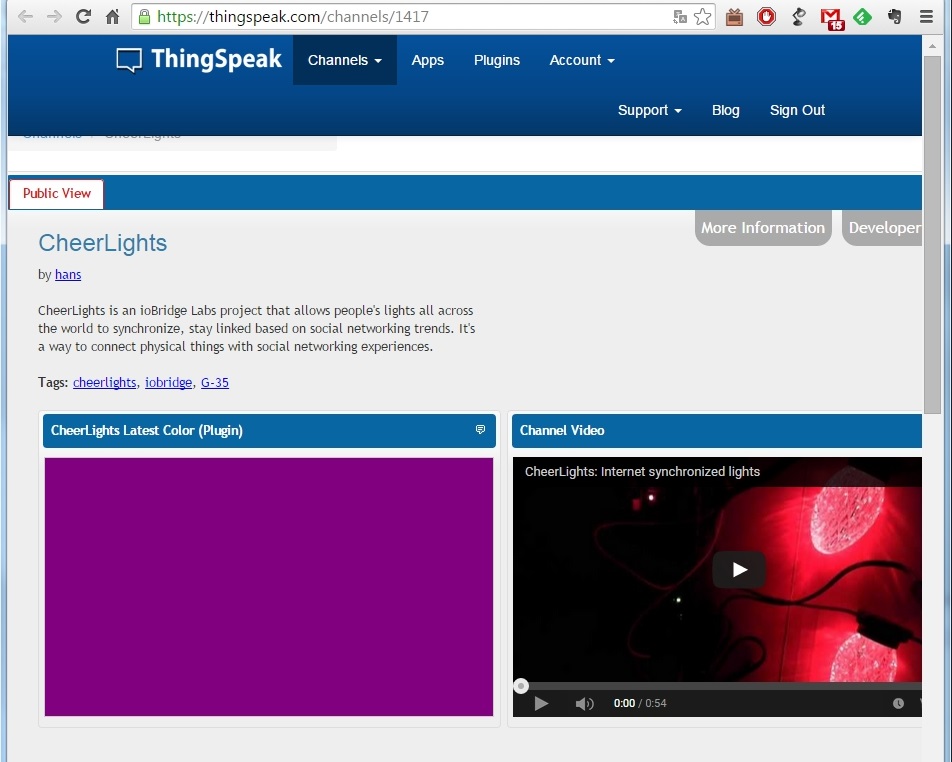
Today’s experiment is based on a project by Hans Scharler that is called Cheerlights. The idea is globally linked lights that can be simultaneously controlled via Twitter commands. It is a good example of the world growing closer and closer together with the Internet.
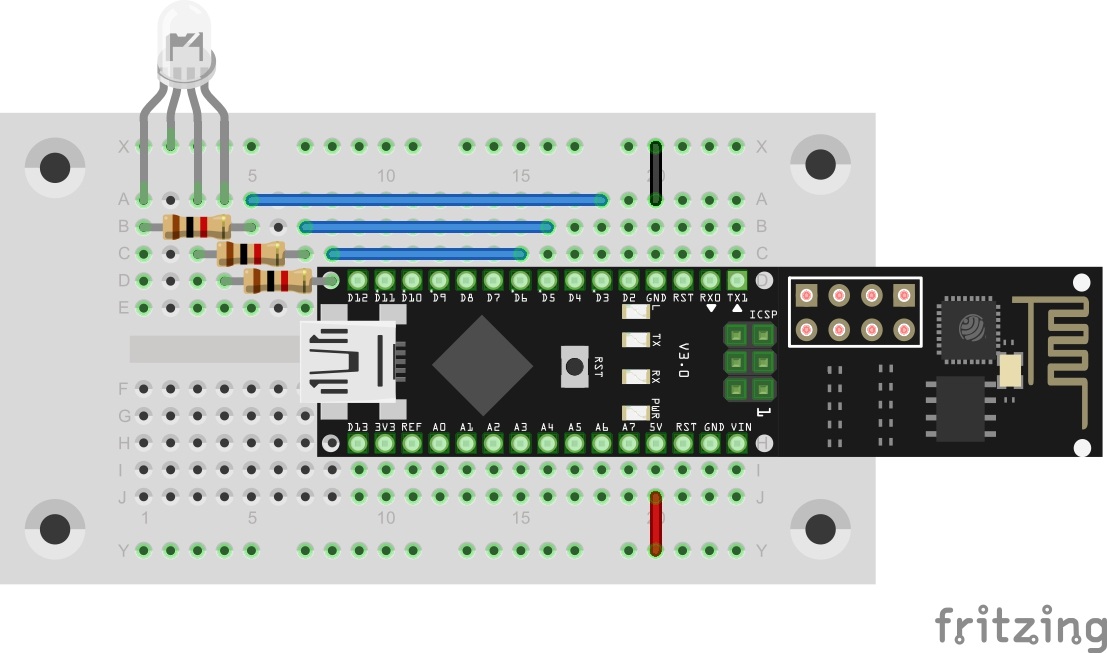
Behind today’s door, you will find a fourth extension cable with which the RGB-LED can also be placed aside. This can be particularly practical if, for example, you want to hide the board in the Christmas tree while the RGB-LED decorates the top of the tree.
The program: Day23_CheerLights
For today’s program, you do not need to make any dedicated ThingSpeak changes. This project has a public channel that you can find under the link
https://thingspeak.com/channels/1417

On that page, you will also always find the current colour and further information on the project.
The programme also needs the Crossfade-Library by Radek Wierzbicki (source: https://github.com/radekw/Arduino/tree/5f24ce7c8db9dfbb5252b59824c3217d851b3a3c). For practical reasons, a copy of the Library version used is enclosed in the sketch folder. It must be copied into the libraries folder of your sketchbook folder. The library permits quick and easy definition of colours and also ensures that the LEDs will slowly change to another colour (this is called fade).
If you upload the program now, the current colour of the LED is displayed after a few seconds. You can now write a Twitter message and thus change your and also the colour of all other Cheerlights users. The message must contain a #Cheerlights, @Cheerlights or just the keyword Cheerlights and also have one of the pre-defined colours behind the keyword. The pre-defined colours include:
red, green, blue, cyan, white, warm white, purple, magenta, yellow, orange, pink
A possible tweet is:
Testing my #cheerlights project on my #NanoESP with the colour blue #ThingSpeak #IoT
or a similar message. This way, you can recolour the world.
28 comments
Comments are closed. These comments were posted on the former WordPress site (mostly in German).
Kombination von Tag 23 mit Tag 18, funktioniert.
Leider geht das für Tag 24 nicht: Tone und IRremote vertragen sich nicht.
Beim Kompilieren gibts einen Fehler: Mehrfachdefinition von __vector_7.
Beide wollen den gleichen Timer 2 verwenden.
Der Atmega328 sollte gemäss Datenblatt 3 Timer enthalten; in Tone.cpp wird aber nur Timer 2 als verfügbar angegeben.
Weiss jemand, welche Timer im Pretzelboard wozu verwendet werden?
Frohe Festtage und schöne Cheerlights wünsche ich allen. jz.
#cheerlights white
Für morgen: Es gibt neben unserer Familie sicherlich noch andere, die am Heiligabend etwas außer Haus unternimmt, damit das Christkind ungestört die Geschenke unter den Baum platzieren kann. In der Vergangenheit wurden bei uns schon mal (von uns Eltern unbemerkt) Videokameras im Dauerbetrieb installiert, die das Christkind überführen sollten. Da hatte dann zum Glück die Akkulaufzeit etwas dagegen und die Enttarnung der Nachbarin fand nicht statt.
Ich werde morgen die Wohnung etwas abdunkeln und den Twitteralarm von Tag 21 installieren. Mal schauen, ob uns unterwegs der Tweet dann darüber informiert, dass jemand da war. Zuhause werden wir dann sehen, ob es das Christkind war oder doch ein Einbrecher.
Ganz ausgefeilt könnte man noch eine Kamera installieren, die das Signal bekommt, den Aufnahmemodus zu starten :-).
if (esp8266.find("\r\n\r\n")) { … }
Woran kann das liegen?
¯\_(ツ)_/¯
Unter Windows wird als Zeilenende meist \r\n verwendet.
Unter Unix ist nur \n üblich.
Bin aber kein Unix/Linux-Kenner.
IRremote (zumindest in der mitgeliferten Version) benutzt einen fest definierten Timer, für den Nano eben den Timer 2.
Ohne das ich irgend was ausprobiert habe, es sollte reichen, wenn man den Timer bei IRremote fest auf Timer 1 ändert. Ich glaube, dass der in IRremote (genauer in IRremoteInt.h) der verwendete Timer einstellbar ist.
Wenn Du das getestet hast, lass uns das Ergebnis wissen.
// define which timer to use
//
// Uncomment the timer you wish to use on your board. If you
// are using another library which uses timer2, you have options
// to switch IRremote to use a different timer.
…
// Arduino Duemilanove, Diecimila, LilyPad, Mini, Fio, etc
#else
//#define IR_USE_TIMER1 // tx = pin 9
#define IR_USE_TIMER2 // tx = pin 3
#endif
Also einfach
#else
#define IR_USE_TIMER1 // tx = pin 9
//#define IR_USE_TIMER2 // tx = pin 3
#endif
und es könnte gehen (wenn es nur am verwendeten Timer liegt).
Aber das Board zieht Saft wie Zunder. Ich habe schon 2 9V Bloecke leer ziehen lassen :-)
Fuer Cheerlights haelt der 9V Block 4h.
Supi :-)
Fuer Cheerlights haelt der 9V Block 4h. -
's Board haengt jetzt wieder am Laptop.
Bei Auswahl yellow leuchtet sie rot.
Die scheint wohl defekt zu sein, oder ist das bei euch auch so?
Zeilen 205 und 206 in IRemoteInt.h ändern.
Nicht benötigten Code in Day24_Christmas.ino entfernen oder auskommentieren, sonst bleibt zu wenig dynamischer Speicher.
Dann funktioniert die IR Ansteuerung meines Aldi-RGB-LED-Strips (NEC Protokoll) auch mit Day24.
Die Commands muss ich nochmals testen mit dieser Version.
Im Serial Monitor erscheinen zusätzliche Leerzeilen; beim Commands-Empfang scheint etwas noch nicht ok zu sein.
Fröhliche Weihnachten!
Danke
ESP SEND ERROR: AT+RST
….
…..
….
Kann jemand mir hilfen?
Ich musste den Jingle im PROGMEM speichern, und zusätzlich getTalkBackCom() optimieren.
Der Lerneffekt war da und es hat wieder Spass gemacht.
Danke für den tollen Kalender!
(und Geduld für zusätzlichen Kommentar im Code des nächsten).
Hab alle möglichen Kombinationen probiert aber Farbwechsel gibts nur von anderen ausgelöst…
https://twitter.com/hashtag/cheerlights?src=hash
Farbe twittern z.B.
#cheerlights green
Farben siehe
https://thingspeak.com/channels/1417