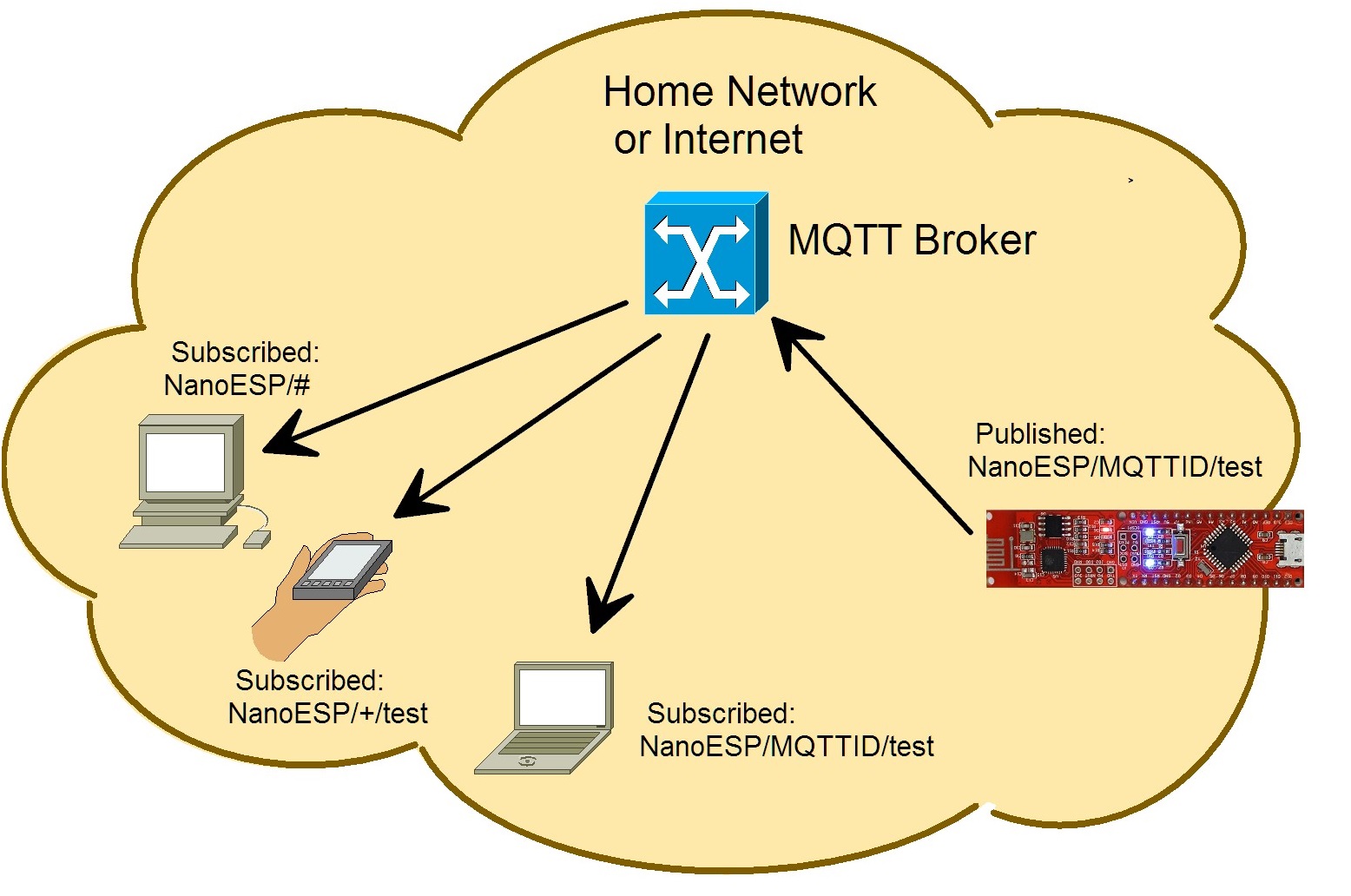
For the last days of this Advent, you’ll now become familiar with a subject that plays a large role in the realm of the IoT. We’re dealing with the messaging protocol MQTT, which was specially developed for the communication from machine to machine (M2M). The protocol is thus so brilliant because e.g. control data, measurement data or texts can be exchanged very easily and compactly. The overhead (data that’s transferred alongside the actual user data) is much lower than with HTTP and can be processed readily even by embedded devices, meaning microcontrollers like our NanoESP. At the same time, the controller doesn’t constantly have to establish a connection and query whether there’s been a change; instead, the connection is continually maintained and the client automatically gives information about changes.
A so-called broker forms the basis for the communication. A broker is a server application that processes all data. A device can now connect to the broker and “publish” messages, i.e. send them to the broker. Another device can “subscribe” to specific topics and then immediately receives a new message published to this topic delivered by the broker. So that you don’t have to set up your own broker, a public broker has been set up for you at the address broker.fkainka.de.

The topics are structured hierarchically, where subtopics are each separated with a slash. There are also so-called wild cards. With a “+” or “#” you can subscribe to multiple topics at the same time. Publishing with the wild cards “#” or “+” isn’t possible, however. For example, the topics
MyHome/Kitchen/Temperature
MyHome/Bathroom/Temperature
can thus be received at the same time by subscribing to the topic
MyHome/+/Temperature
- The plus thereby always replaces only one topic level. The # replaces all at once. With the topic
MyHome/#
you thus receive all messages that are published in all subtopics of MyHome. The data that are published to a topic can be virtually anything, from pure texts to measurement values or simple 1/0 commands for switching a light.
The sketch: A16_P20_MQTT_Basics.ino
/*
  MQTT Basic functions
  Change SSID and PASSWORD.
*/

#include <NanoESP.h>
#include <NanoESP_MQTT.h>  //special library for MQTT
#include <SoftwareSerial.h>

#define SSID "YourSSID"
#define PASSWORD "YourPassword"

#define LED_WLAN 13
#define DEBUG true

NanoESP nanoesp = NanoESP();
NanoESP_MQTT mqtt = NanoESP_MQTT(nanoesp);

String ip, mqttId;

void setup() {
  Serial.begin(19200);
  nanoesp.init();

  //! Only if you use a new Network
  // nanoesp.configWifi(STATION, SSID, PASSWORD);

  //Station Mode
  nanoesp.configWifiMode(STATION);
  //delay(1000);

  // Wait till Connected to WiFi
  if (nanoesp.wifiConnected())digitalWrite(LED_WLAN, HIGH); else Serial.println(F("Error WLAN Connect"));

  //Print IP in Terminal
  nanoesp.getIpMac(ip,  mqttId);
  Serial.println("My IP: " + ip);

  //Print MQTTid in Terminal
  mqttId.replace(":", "");
  Serial.println("My MQTT ID: " + mqttId+"\n");

//if (mqtt.connect(0, "broker.hivemq.com", 1883, mqttId)) {  //connect to alternative broker
 if (mqtt.connect(0, "broker.fkainka.de", 1883, mqttId)) {  //connect to broker
    Serial.println(F("Connected to Broker\n"));

    Serial.println(F("My personal Topic is:"));
    Serial.println("NanoESP/" + mqttId + "/\n");

    if (mqtt.subscribe(0, "NanoESP/" + mqttId + "/test")) Serial.println("Subscribed to:\nNanoESP/" + mqttId + "/test\n");
    if (mqtt.publish(0, "NanoESP/" + mqttId + "/test", "Hello from my NanoESP")) Serial.println("Published to:\nNanoESP/" + mqttId + "/test\n");
  }
  else {
    Serial.println(F("error connecting"));
  }
}


void loop() {
  int id, len;

  if (nanoesp.recvData(id, len)) {        //recv data
    String topic, value;
    if (mqtt.recvMQTT(id, len, topic, value)) {      //handle recvd data as mqtt data, parameters topic and value as reference
      Serial.println("New Message:\nTopic=" + topic + " Value=" + value+"\n");         //print message
    }
   }

  mqtt.stayConnected(0);        //keep the connection to broker alive
}
(The former Arduino Create embed is no longer available; the code is taken from the download of all sketches.)
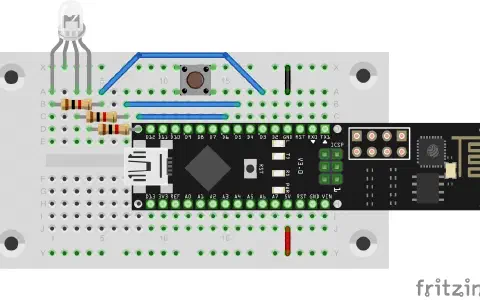
Behind today’s door is a button. In the test, we primarily want to make a couple of dry runs on the subject of MQTT. So load today’s programme to the board and open the serial monitor. After a short time, you’ll see more or less the following messages:
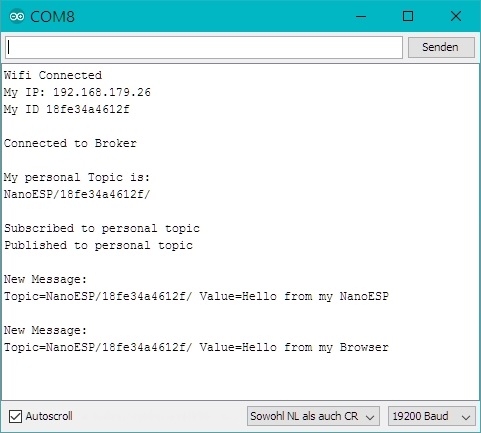
The board has thus connected first to the WLAN and then to the online broker. So that the many different users don’t fall into the queue, a special structure must be maintained. You can therefore write only in subtopics of the form NanoESP/MyMQTTiD/… , where you have to replace MyMQTTiD with the ID that you receive from the board, displayed on the serial monitor. For today, that means that everything is written to the individually adapted topic NanoESP/MyMQTTiD/test.
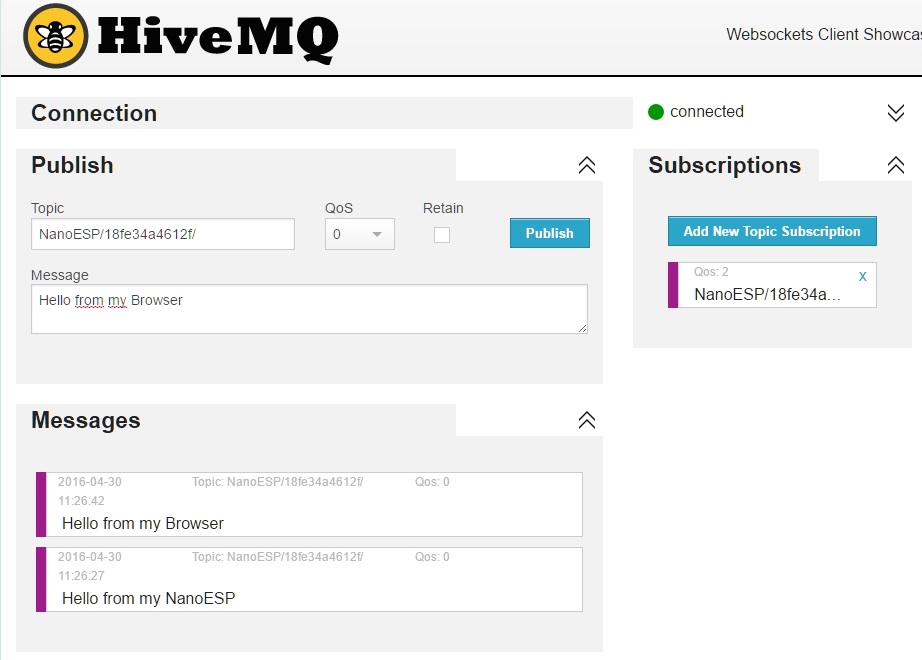
So that you can also see what you’re writing in a topic, we use an online tool from the company HiveMQ on the computer. With this tool, you can likewise connect to the broker and subscribe to your personal topics or write to them. Now go to the page www.hivemq.com/try-out/ and click there on “Try the websocket client”. Now you first have to establish a connection to the broker by entering the address broker.fkainka.de in the menu option “Connection” under “Host.” The port and the ClientID can remain the same, and the other parameters are also correct. Click “Connect.” If everything worked, the text “connected” appears next to a green dot at the top right and you have the option in other areas to publish in a topic or to subscribe to a topic.
First click on “Add New Topic Subscription” and enter NanoESP/MyMQTTiD/test in the topic field, where you replace MyMQTTiD with the ID from the serial monitor. Now reset the NanoESP by pressing the Reset button on the board. After a short time, you should receive the message “Hello from my NanoESP” in the browser under the “Messages” item. You can also send a message to the board by going into the topic field NanoESP/MyMQTTiD/test under “Publish” and entering any message you choose, like “Hello from my Browser,” under “Message”. Now you receive the message displayed on the serial monitor. So the communication is up.
es gelingt mir zwar eine message von HIVMQ zu senden (taucht im arduino monitor auf) aber die message vom Nano taucht nicht auf (in MQ).