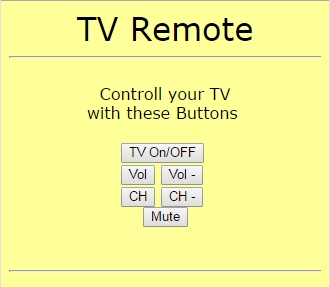
Yesterday, you built a receiver for infra-red remote controls. Today, you are building the remote control itself. More precisely, you will build a universal remote control that you can operate by computer or Smartphone and with which you can operate your TV or other devices whenever you misplace the original remote control.
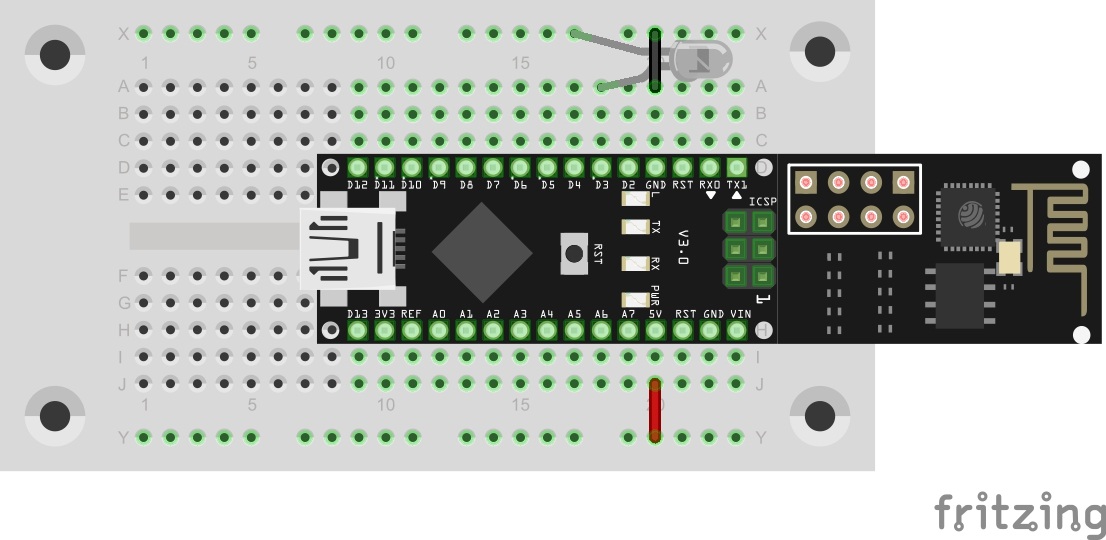
For this project, you need the component behind today’s door: the IR diode. It looks like a simple LED, but it sends light in the invisible infra-red range. The IR-signals are visible to a digital camera, however. The structure of today’s experiment is shown in the figure. Don’t be surprised that the IR-LED is not given a dropping resistor. The effective dropping resistor is the On-resistor of the port, at approx. 30 Ohm. Because of this, the current through the diode is quite high, but the impulses sent are so short that the diode will not take damage.
The program: Day18_IrRemote
Before the program can work, you need to make some adjustments again. If you read out and used the codes for Power, Volume up, Volume down, Channel up, Channel down and Mute yesterday, you can simply enter these codes into the irCommand array in sequence. Otherwise, install yesterday’s programme again and read out the matching codes. Of course, you may use entirely different codes as well. The labels on the website will not match then. In addition to the codes, you also need to enter the protocol used in the variable irProtokoll if your remote control is supported. Last, you need to enter the length of the signal to be sent. Determine it by multiplying the digits of the hex code by four. Example: My code for Power was 0x20DF10EF. 0x is simply the sign for a hex code, which leaves 20DF10EF and thus an eight-digit hex code. 8•4 = 32, i.e. in the example program, the variable irLen means 32. A similar calculation is needed for a code with another length.
Once you have entered all codes and parameters, and of course also your WLAN data, you can upload the program. The website of the board now contains six buttons that are labelled accordingly. When you push one of the buttons, a message should appear on the Serial Monitor and your TV or other device should react to the signal correctly. If not, you may need to get closer or check if the IR diode sends anything at all. An LED connected with the wrong polarity would be one possible reason why a project is not working as desired.

Vorsicht bei Erweiterung des Programms: bei Speicherüberschreitung hängt das Programm.
Abhilfe: nicht benötigte Funktionen entfernen oder auskommentieren.
Ursache: "literals", also Text in Anführungszeichen, benötigen dynamischen Speicher; sie werden vom generierten Code automatisch kopiert (analog zum PROGMEM webtext). Dies ist bedingt durch die Prozessorarchitektur.
Hohe Frustrationstoleranz ist gefordert: wenn das Gerät nicht reagiert, hat man keine Chance der Ursache auf den Grund zu gehen, ausser man hat z.B. ein zweites NanoESP mit Tag 17 am laufen.