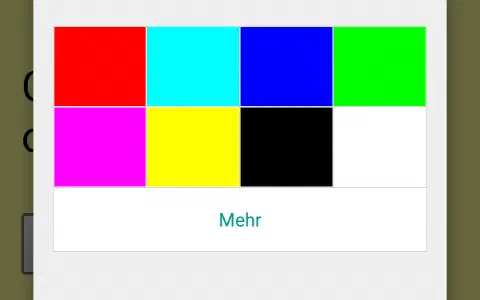
Today’s project permits controlling the controller by remote control. You can change the colour of the RGB-LED with buttons you can choose on an infra-red remote control, and change the background colour of the website right along with it.

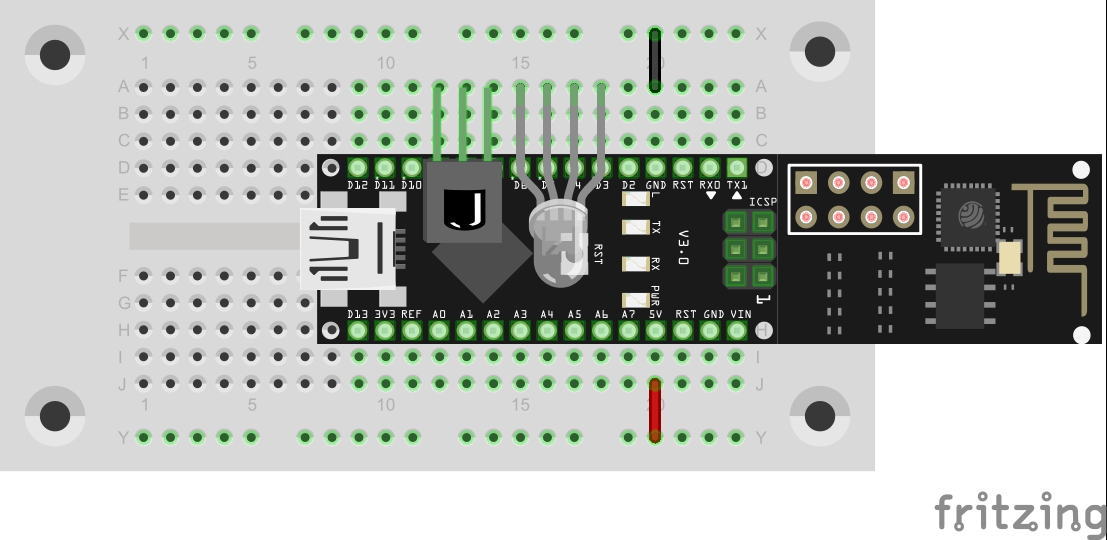
Behind today’s door, you will find the important part of today’s project, i.e. the infra-red receiver module. You can connect the module without a cable as shown in the figure below. The program sets the corresponding pins so that the module is supplied with power.
The program: Day17_IRmodul
Today’s program once again uses an external library: the IRremote-Library by Ken Shiriff. A copy of the version used by me is again enclosed in the Sketch folder and only needs to be copied into the library folder of your Sketchbook.
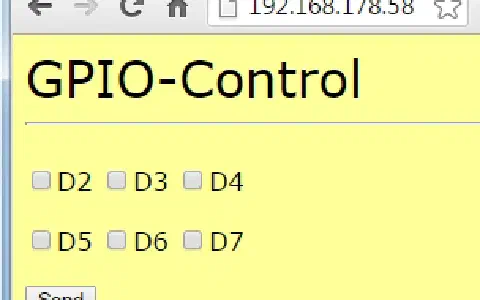
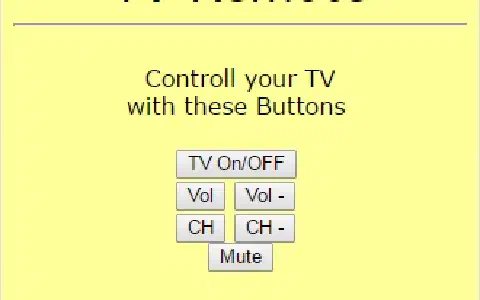
After uploading the program, you should start the Serial Monitor. Find a remote control and point it at the module. When you push a button, you should have the value of the signal output as a HEX code and the type of the protocol as a number in the monitor. When the type is displayed as -1, the protocol has not been recognised. There may be several failed attempts before a command is properly decoded. Just try out a bit or try another remote control. Once you have found a working one, select six buttons (best take Power, Volume up, Volume down, Channel up, Channel down and Mute). Now copy the codes for the six commands in the program behind the six #define irComX (do not forget the 0x before the hex code). The commands of an LG-TV remote control are pre-defined there. If you have entered the codes correctly, you can upload the program again. You can use the buttons defined by you to change the colour of the RGB-LED now. When updating the board page, you will also see that the colour has changed.
52 comments
Comments are closed. These comments were posted on the former WordPress site (mostly in German).
…aber erst mit der 4. Fernbedienung.
Das IR-Modul wollte weder die FB vom Samsung-TV, noch vom Panasonic BD-Player, noch die vom Denon-Receiver. Immer Type=-1, trotz vieler Versuche…
Mit der vom Pioneer-Receiver gings dann. ;-)
Anschließend funktionierte es perfekt: POWER schaltet die LED an, CH- schaltet sie auf grün, CH+ auf rot und VOL- auf gelb. VOL+ hat bei mir keine Wirkung und MUTE schaltet sie aus. Wenn ich nach dem umschalten die Webseite neu lade, erscheint sie jeweils in der entsprechenden Farbe.
die Fernbedienungen der Hersteller sind sehr unterschiedlich codiert. Bei mir brachte keine die LED zum Leuchten.
Lösung: Nutzt zunächst den seriellen Monitor und notiert euch die empfangenen Codes für die verschiedenen Tasten der FB. Ändert dann im Quelltext die irCom-Definitionen auf eure Werte ab. Beachtet dabei, dass nach dem 0x immer eine 8-stellige Zeichenfolge stehen muss. Gegebenenfalls muss also der ermittelte Code vorn mit Nullen aufgefüllt werden.
Anschließend den Quelltext neu hochladen und ;)
Mich würden die spezifikationen des IR-Moduls interessieren.
(Bandpass-Filter, Vin, Vout usw. )
Daher meine Frage: Was für ein Typ von IR-Modul ist im Kalender?
Ich würde vermuten ein TSOP 4836.
(Im Studium bauen wir derzeit etwas ähnliches als Projekt, aber nur mit dem ESP8266-Modul ohne vorgeschaltenen Arduino Nano.)
Lg
Auf meiner zweiten Arduino Installation wurde eben ein Update dieser Library installiert. Diese scheint mehr Fernbedienungen zu unterstützen, u.A. auch Samsung.
Auf meiner Erstinstallation ist das Update nicht erfolgt, warum weiss ich nicht, aber via Sketch->IncludeLibraries->Library Manager finde ich mindestens den Link für den Dowload.
Werde den heutigen und morgigen Versuch damit wiederholen.
Update sollte funktionieren, falls in den "Sketch Ordner"
C:\Users..\Documents\Arduino\libraries
kopiert,
ich hatte sie in
C:\Program Files (x86)\Arduino\hardware\arduino\avr\libraries
kopiert.
Die Werte ändern sich trotzdem. versuchsweise eingetragen -> hochgeladen
Funktioniert einwandfrei!!! (Samsung TV Fernbedienung)
Danke für dieses schöne Projekt!!!
Arduino: 1.6.6 (Windows 7), Board: "Arduino Nano, ATmega328"
C:\Program Files\Arduino\libraries\RobotIRremote\src\IRremoteTools.cpp:5:16: error: 'TKD2' was not declared in this scope
int RECV_PIN = TKD2; // the pin the IR receiver is connected to
^
exit status 1
Fehler beim Kompilieren.
#include
#include
#include
Trotzdem: "Fehler beim Kompilieren"
oder ist der Fehler mal wieder vor dem Monitor ;-) und ich mache irgendwas falsch beim kopieren?
C:\Users..\Documents\Arduino\libraries
siehe auch "Preferences" in Arduino IDE.
Was heißt irCom1-irCom6 was soll ich tun???????????
Ich habe als Fernbedienung eine von einem RGB LED Streifen genommen (Ergab für mich mehr Sinn).
Außerdem habe ich das Projekt noch um die Farbcodes für Cyan und Magenta erweitert.
Man hätte jedoch in der Projektbeschreibung erwähnen können, dass die RGB LED um 180 Grad gedreht (im Vergleich zum gestrigen Versuch) im Board steckt, da das meiner Meinung nach nicht unbedingt aus der Zeichnung hervorgeht.
Lies dir doch bitte die Beschreibung dieses Projekts durch…
Ich zitiere:
"Nach dem Upload des Programms sollten Sie den Serial Monitor starten. Suchen Sie eine Fernbedienung und richten Sie sie auf das Modul. Wenn Sie eine Taste drücken sollten Sie im Monitor den Wert des Signals als HEX-Code und den Typ des Protokolls als Zahl ausgegeben bekommen. Wenn als Typ -1 erscheint, wurde das Protokoll nicht erkannt. Es kann auch zu mehreren Fehlversuchen kommen bis ein Kommando richtig decodiert wird. Also probieren Sie einfach ein bisschen herum oder versuchen Sie eine andere Fernbedienung. Haben Sie ein passende gefunden dann wählen Sie sechs Tasten aus (am besten Sie nehmen Power, Lauter, Leiser, Kanal hoch, Kanal runter und Mute). Die Codes der sechs Kommandos müssen Sie nun im Programm hinter die sechs #define irComX kopieren (das 0x vor dem Hex Code nicht vergessen). Vordefiniert sind dort die Kommandos einer LG-TV-Fernbedienung. Wenn Sie die Codes richtig eingetragen haben, können Sie nun das Programm erneut hochladen. Mit den von Ihnen definierten Tasten können Sie nun die Farbe der RGB-LED verändern. Wenn Sie die Boardseite aktualisieren, werden Sie außerdem sehen, dass sich die Farbe verändert hat."
Mir ist dabei was aufgefallen: Die Masse einer Diode ist ja der kurze Draht. Warum ist es bei einer RGB Diode der lange?! Macht das Sinn :)
Das Projekt macht richtig Spaß allerdings sind die Aufbauanleitungen mehr als dürftig.
Kurstag3 war UDP-Send mit (Zeile 55)
succes &= sendCom("AT+CIPSTART="UDP","192.168.4.2",90", "OK"); //UDP-Server
heißt mit eigenen Worten:
ESP8266Modul hat zuvor über AT+CWSAP einen AcessPoint aufgebaut namens NanoESP..
Das Modul hat die IP: 192.168.4.1 (lt AT+CIFSR).. (Zwischenfrage)ist das Modul Sever oder Client?? ..der PC hat Adresse 192.168.4.2 Port90
An diesem Tag wird mittels UDP Protokoll unidirektional vom WLAN Modul nach PC, Port90 gesendet, angezeigt im PC-Progamm PacketSender.. nachvollziehbar!
!Was ich jetzt nicht versteh ist am Tag 4 bidirektionaler UDP Austausch:
succes &= sendCom("AT+CIPSTART="UDP","192.168.4.255",90,91", "OK"); //UDP Bidirectional and Broadcast
warum …”192.168.4.255”,90,91
warum 255 der PC hat 192.168.4.2 das Wlan-Modul hat 192.168.4.1
(AT+CIPMUX =0 !)
es wird neben PC-Port90 am Wlan Modul Port 91 aufgemacht!??
Ich hab alle AT-Dokus durchgeschaut (ESP8266 AT Instruction Set Version 1.4) nirgends fand ich 1) heißt 255 sowas wie Rundruf?? Warum 255..warum nicht
wie zuvor 192.168.4.2?…was bring 255???und 2) dass man auf diese Art Ports definiert aufmachen kann. Nix großes meine Frage aber für mich essentiell.. auch.. und etwas irritierend wenns dazu keinen Erklärung gibt.. und dass dan Standard für die nächsten Folgen wird.
Lg.sepp27
Wenn die library eingebunden ist, ist diese auch unter Sketch->Include Library zu sehen.
So wie ich es auf diesem Foto aufgebaut habe, geht es ohne Anpassung des Programms - Nachbau aber auf eigene Gefahr (wegen Kurzschlussgefahr)
Wenn man die RGB LED richtig rum reinsteckt und die richtige FB verwendet
Nach dem library update gehts auch mit Samsung FB.
Danke für den Tip :D
C:\Program Files (x86)\Arduino\libraries\RobotIRremote\src\IRremoteTools.cpp:5:16: error: 'TKD2' was not declared in this scope
int RECV_PIN = TKD2; // the pin the IR receiver is connected to
^
Fehler beim Kompilieren.
ich frage mich, was da los ist.
Funktioniert nicht!
D:\Eigene\Arduino\Day17_IRmodul\Day17_IRmodul.ino: In function 'void loop()':
D:\Eigene\Arduino\Day17_IRmodul\Day17_IRmodul.ino:72:29: warning: deprecated conversion from string constant to 'char*' [-Wwrite-strings]
if (esp8266.find("+IPD,"))
^
Meine Fernbedienung sendet interessanterweise jede Taste mit "ein" und "aus" - Flag, dass heißt zum Beispiel der erste Druck auf die Taste Rot erzeugt eine "77", drücke ich zum zweiten mal Rot sendet sie den Code "877".
Das hat mich auf die Idee gebracht, zum Einen die Tasten Rot, Grün und Blau zum Schalten zu verwenden und zum Anderen mit derselben Taste die Farben ein- und auszuschalten. D.h. ich schalte zum Beispiel Rot und Grün ein, und die LED leuchtet als Resultat dann Gelb. Und mit der Aus-Taste kann ich die LED ein- bzw. ausschalten.
Was jetzt interessanterweise nicht mehr funktioniert, ist die Webseite, die lief beim ursprünglichen Programm noch tadellos, aber jetzt kommt nur noch "Nicht verfügbar", sogar, wenn "nur" eine Standardfarbe leuchtet, die das ursprüngliche Programm auch erzeugt hätte.
Vielleicht lade ich nochmal das Originalprogramm hoch und gucke mir die Website im Quelltext an, mal sehen, ob ich das Ganze debuggt bekomme…;)
Grüße,
Aironout
Was ich schade an der Bibliothek finde, dass nicht die tatsächlichen RC5-Codes raus gebracht werden. Die bestehen nämlich aus einem Geräte- und einem Tastencode. Die meisten Tastencodes sind standardisiert. Wenn man nun den Gerätecode ausliest, hätte man theoretisch alle Codes für die Fernbedienung. Ich habe z.B. eine Fernbedienung mit einem Taster an der Seite, um den Gerätecode zu ändern. Die Tastencodes bleiben damit alle gleich.
http://iot.fkainka.de/day-0-alternative-zum-ausverkauften-adventskalender-spoiler-alert
Für meinen Geschmack sind sie bei Conrad etwas zu teuer. Beim Pollin gibt es z.B. Sharp GP1UM261XK (Achtung: etwas anderes Pinout, VCC in der Mitte und GND aussen, Pin3) mit 38 kHz im Zehnerpack für 1,95, wobei das nichtmal das günstigste Angebot ist. Dafür bekommst Du beim Conrad keine zwei.
Die Sharp GP1UM261XK habe ich heute getestet, funktionieren einwandfrei, man muß halt nur daran denken, die Pin-Definitionen im Sketch zu ändern, sonst hat man nur noch neun ;-) Die sind auch mit etwas Blech umwickelt, wenn's einen stört, kann man ds aber leicht entfernen, dann sehen die genau so aus wie die im Kalender.
Die Liste auf der von Klaus verlinkten Seite ist leider nicht ganz korrekt. Die Piezo-Summer Conrad 690635 sind viel kleiner als die im Kalender, richtig wären wohl die 710397 mit 27 mm Durchmesser.
Die Heißleiter sind bei C zwar auch nicht die billigsten, aber der Unterschied nicht so dramatisch. Die RGB-LEDs habe ich aber - ganz gegen meine Gewohnheit - doch mal per China Export bezogen. Mehr als ein Euro pro Stück ist mir echt zu happig und bei Amazon gibts die Tüte mit 100 Stück für weniger als 9 € - mit Versand durch Amazon, also sofort geliefert und keine 3 Wochen warten, wie bei CE sonst üblich, und auch kein Versandrisiko.