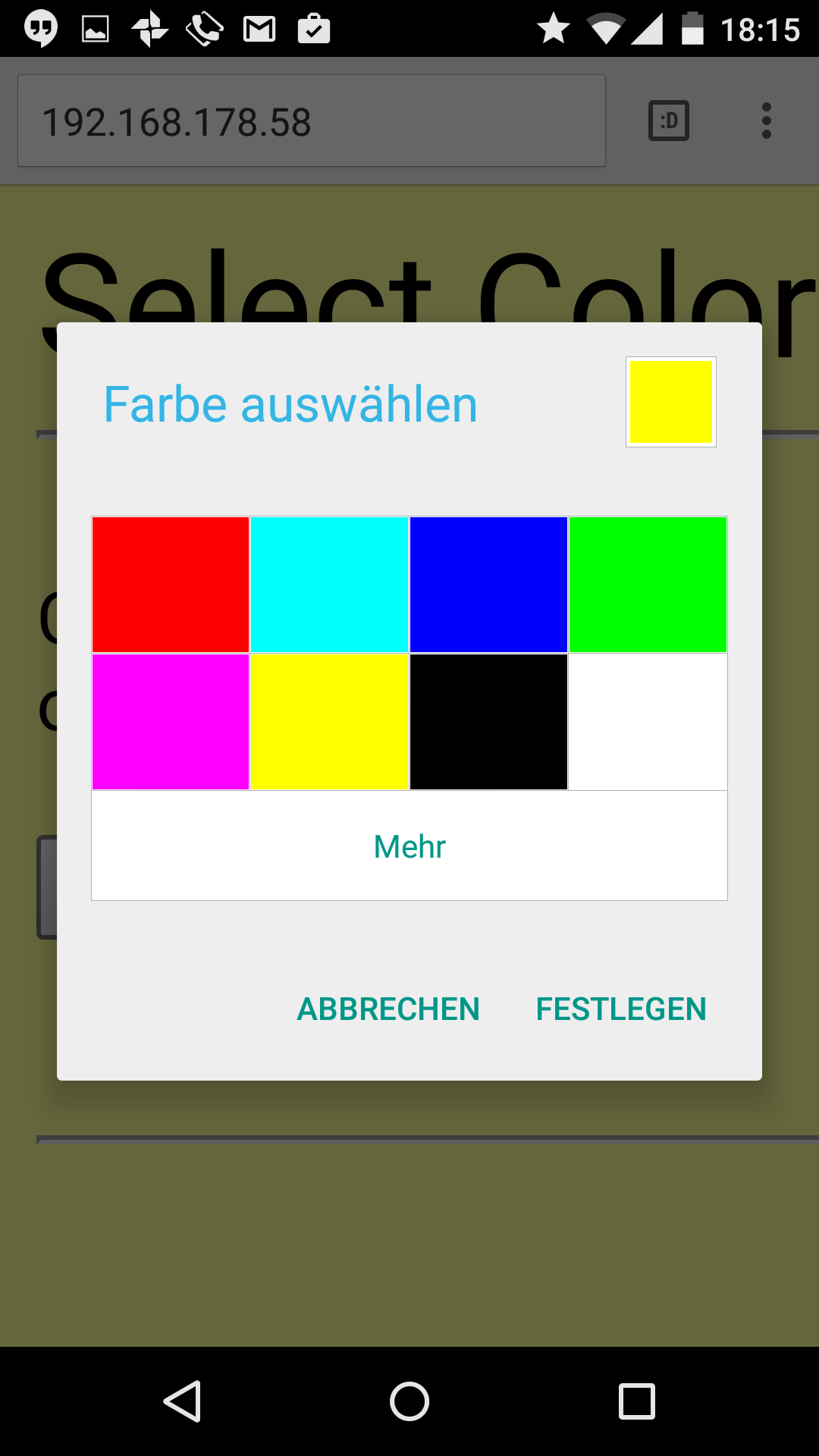
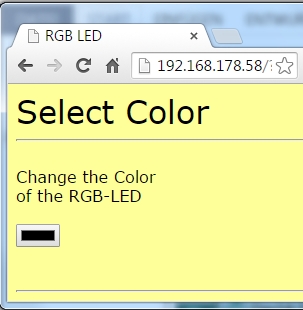
Today’s project is about controlling the RGB-LED by web server. A well-structured interface can be used to change the colour of the LED. The website has also been adjusted and should be easy to display even on Smartphones.
Behind today’s advent calendar door, there is another resistor, but this one is of 10 kΩ (brown, black, orange). You will need it for tomorrow’s experiment.
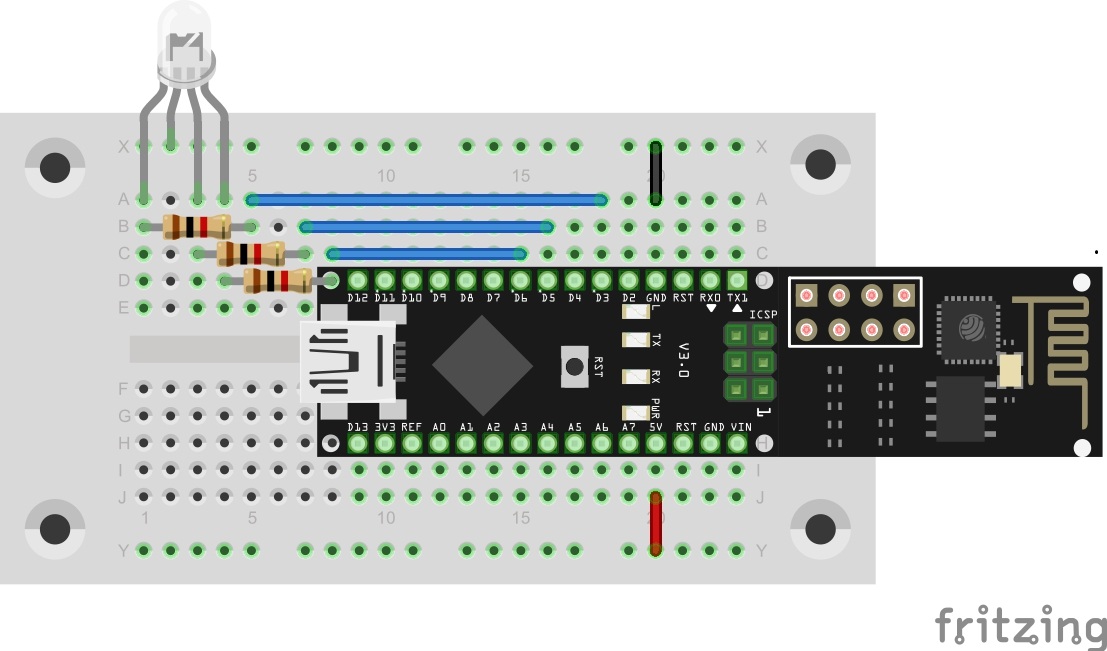
The structure of today’s experiment is like the one from day ten. The RGB-LED is connected to the PWM-capable pins D3, D5 and D6 with dropping resistors.
The program: Day14_TCPServerRGB
The transmitted website is again concealed in the Progmem variables site in binary form. Again, you can view the HTML page in the Sketch folder. After setting the WLAN data and uploading the programme, the website of the web server can be reached via the IP of the module. The page is designed similarly to the previous one in background colour and headline. However, there is a new element on the page, i.e. the HTML5element Colour Picker. It can be used to select a colour for the LED. Once you have confirmed the colour, the LED will display it. The display of the Colour-Picker element may differ strongly depending on the chosen browser.

51 comments
Comments are closed. These comments were posted on the former WordPress site (mostly in German).
Zuerstmal Programm laden, dann SSID und Password ohne eckige Klammern eingeben, dann hochladen und wenn das beendet ist den Serial Monitor starten.
Dadurch schaltet zunächst die WLAN Verbindung wieder ab und erneutert sich dann.
Dann trenne ich das Board und verbinde mit einem Powerbar über das USB Kabel. Das Board startet wieder und die zweite blaue Leuchte geht wieder an.
Jetzt kann ich mich über den Firefox unter meiner IP einloggen. Das funktioniert auch vom Handy aus.
Wähle ich dann eine Farbe so erscheint diese auf dem Board. Aber sowohl Firefox als auch über Handy bricht dann die Vrbindung ab. Ein mehrfacher Farbwechsel funktioniert nicht.
Warum eigentlich nicht?
Wer kann das erklären?
Nun ist hier des öfteren bemängelt worden, das die Sketche nicht vor Kommentar strotzen. Das stimmt, und es wäre für mich und viele Andere sehr hilfreich. Nun sieht man an den Kommentaren, dass es Manche hier aus der Gruppe "drauf hätten" diese Fleißarbeit zu übernehmen und das (oder den?) voll kommentierten Sketch hochzuladen. Unser großer Dank wäre Euch gewiss. Auch wenn einmal im Kommentar stehen würde "Weiß ich auch nicht, … oder dgl." kein Problem. Ich selbst habe so meine Probleme C zu verstehen und so wäre dies eine große Hilfe. Vielleicht klapp's, dann schon mal DANKE
Preis Lernpaket minus Preis Arduino Uno = etwas teures Handbuch. Experimentierzubehör mager.
http://www.linux-community.de/Internal/Artikel/Print-Artikel/LinuxUser/2011/02/Arduino-Lernpaket-von-Franzis
Das ganze (Webseiten, die überall gut aussehen) ist aber eigentlich nicht Thema unseres Adventskalenders. Zur Not geht es daher auch ohne Color Picker indem man im Browser die URL:
(IP Adresse)?rgb=#(Hex Wert der Farbe)
also zum Beispiel
192.168.178.47?rgb=#FF0000
eingibt.
Interessant. Auch wenn es nur mit dem Tipp von Hartmut funktioniert. So und durch umstöpseln der Pins konnte ich herausfinden, dass Pin D3 (rot) scheinbar kein Signal liefert. Board kaputt? Oder kann es an etwas anderem liegen?
Select Color
Change the Color
of the RGB-LED
[hier gibt es keine Farbe zu wählen bei mir]
War auch mein erster Gedanke.Ich tippe auf Safari und iPhone.
Hallo Markus, vielleicht hilft #ff0000 oder #00ff00 oder #0000ff oder Lesen.
LG
Viel Dank für die Hilfe.
Kann man dem Modul einen Namen zuweisen, über den man es im Browser aufrufen kann, anstatt über die IP-Adresse, die man ja nicht wirklich kennt, wenn das Modul autonom betrieben wird ?
ich habe das Beispielprogramm mal so überarbeitet, dass es den unten erwähnten jscolor Color Picker verwendet - jetzt klappts auch mitm iPhone/iPad prima :-)
https://www.dropbox.com/s/8ge8y5226qa24a6/Day14_TCPServerRGB_teeqemm.ino?dl=0
Viele Grüße,
Thomas
Es ist ärgerlich, wenn das Ziel so zum greifen nah scheint :D
Richtig ist, IP/LED
Die richtige IP-ADRESSE wird im Seriellen Monitor angezeigt.
Werde morgen mal beide Programme nebeneinander legen und vergleichen. Als Anfänger erhoffe ich mir so einen Lerneffekt.
Du müsstest also in der globalen Varibale site[] das Attribut value="#000000" an genannter Stelle einbauen und dann in der Funktion createWebsite(), wenn diese Variable in die Variable xBuffer umkopiert wird, den Wert #000000 durch den Wert hinter rgb= in der URL ersetzten (steht in der Funktion Loop() in der Variable hexstring).
Ich bin heute zu faul dazu (schau mal auf die Uhr).
Gruß
Hartmut
Ist wohl doch zu spät für mich heute.
Der Color Picker (das Element input mit dem Attribut type=color besitzt auch ein Attribute value und das ist die Farbe, die im Color Picker angezeigt wird. Dieses Attribut wird aber im Original-Programm nicht gesetzt und hat daher den default Wert value=#000000. Wenn nun Schwarz ausgewählt wird, so weigert sich anscheinend der Browser manchmal, diesen Wert zu senden, weil er sich sagt: Da hat sich doch nicht verändert, warum sollte ich das tun. (Browser denken nun mal und machen nicht immer das, was sie sollen.)
Ihr könnt das probieren, indem ihr in die globale Variable site[] an der passenden Stelle das Attribut value=#ff0000 einfügt. Dann geht auf einmal Rot nicht mehr zuverlässig.
Lösung: Das Programm von Klaus aus dem Forum in dieser Hinsicht besser funktionieren.
Workaround: Einfach value=#000001 setzten, das ist ein unwahrscheinlicher Wert für eine Auswahl mit dem Color Picker.
https://www.facebook.com/groups/967872949952771/
(IoT mit dem NanoESP)
Angelegt für weitere, weitergehende Experimente, Erfahrungsaustausch, Bilder, Videos…
Viel Spaß
Jens
Sonst sollte mann jedes mal die IP Adresse suchen.
Wenn Du es nur von einem Deinem Rechner aus machen willst, so mache den Eintrag doch in die lokale hosts Datei (bei Windows zu finden unter %windir%\System2\drivers\etc
Habe mal eine Verständnisfrage: NanoESP ist mit heimischem WLAN verbunden, Stromversorgung des NanoESP über 9V Block.
Laptop ist ebenfalls mit heimischem WLAN verbunden.
Das Aufrufen der html Seite über die IP des Boards, und die Bedienung der LED klappt problemlos.
Wenn ich aber von Außerhalb, über Internet über einen UMTS Stick auf die html Seite zugreifen will (nur IP des Boards in der Adresszeile), kommt die Meldung: "Seitenladefehler wegen Zeitüberschreitung".
Hat jemand eine Idee, was ich falsch mache?
Danke und Gruß, MC.
ESP SEND ERROR: AT+RST
ESP SEND ERROR: AT+CWMODE=1
ESP SEND ERROR: AT+CWJAP="A1-0C118F","DF7AF7360D"
ESP SEND ERROR: AT+CIPMODE=0
ESP SEND ERROR: AT+CIPMUX=0
Weiß jemand warum? an der Internetverbindung liegt es jedenfalls nicht, weil das Programm vom Vortag auch heute funktioniert.
Dein lokales Netz und das Internet sind durch den Router / Modem getrennt. Um den nanoESP vom Internet aus erreichen zu können, muss am Router "Port Forwarding" eingestellt werden. Du musst dann die öffentliche IP Adresse Deines Routers in den Browser eingeben und der leitet dass dann an den nanoESP weiter. Wie "Port Forwarding" eingestellt wird ist leider auf jedem Gerät anders geregelt. Hier hilft Handbuch lesen (wenn vorhanden) und / oder googeln…
Vielen Dank für die top Antwort! Da muss ich mal sehen, was mit meinem Router geht.
Ich hatte zuerst das Problem, dass die LED immer dunkel blieb, obwohl die Anfragen vom Browser beim nanoESP ankamen. Daher habe ich folgenden Code in die
setupProzedur eingebaut und konnte dann sehen, dass die LED bzw. deren Ansteuerung an sich funktioniert. Vielleicht hilfts ja noch jemandem weiter. Beim Laden des programms kommt erst die Meldung "Testing RGB LED" im SerialMonitor und die LED wird ausgeschaltet, falls sie noch leuchten sollte. Drei Sekunden später geht sie jeweils für zwei Sekunden in den Farben Rot, Grün und Blau an, so kann man auch sehen, ob sie richtig angeschlossen ist und nicht z.B. rot leuchtet, wenn sie blau leuchten soll. Schließlich geht sie nochmal für eine Sekunde aus und dann in mittlerer Helligkeit weiß an.`void setup() {
…
digitalWrite(LED_WLAN, HIGH);
/*
*/
debug("Testing RGB LED");
analogWrite(RED, 0);
analogWrite(GREEN, 0);
analogWrite(BLUE, 0);
delay(3000);
analogWrite(RED, 127);
delay(2000);
analogWrite(RED, 0);
analogWrite(GREEN, 127);
delay(2000);
analogWrite(GREEN, 0);
analogWrite(BLUE, 127);
delay(2000);
analogWrite(BLUE, 0);
delay(1000);
analogWrite(RED, 127);
analogWrite(GREEN, 127);
analogWrite(BLUE, 127);`
Funktioniert prima!
mfg
endlich mal ein einfaches und verständliches Testprogramm.Hat mir sehr geholfen.
Bei mir gehts nur mit Chrome und Safari.