Today’s project is an intuitive display of the current temperature. With a single look, you can guess at whether it is sensible to take along a warm jacket.

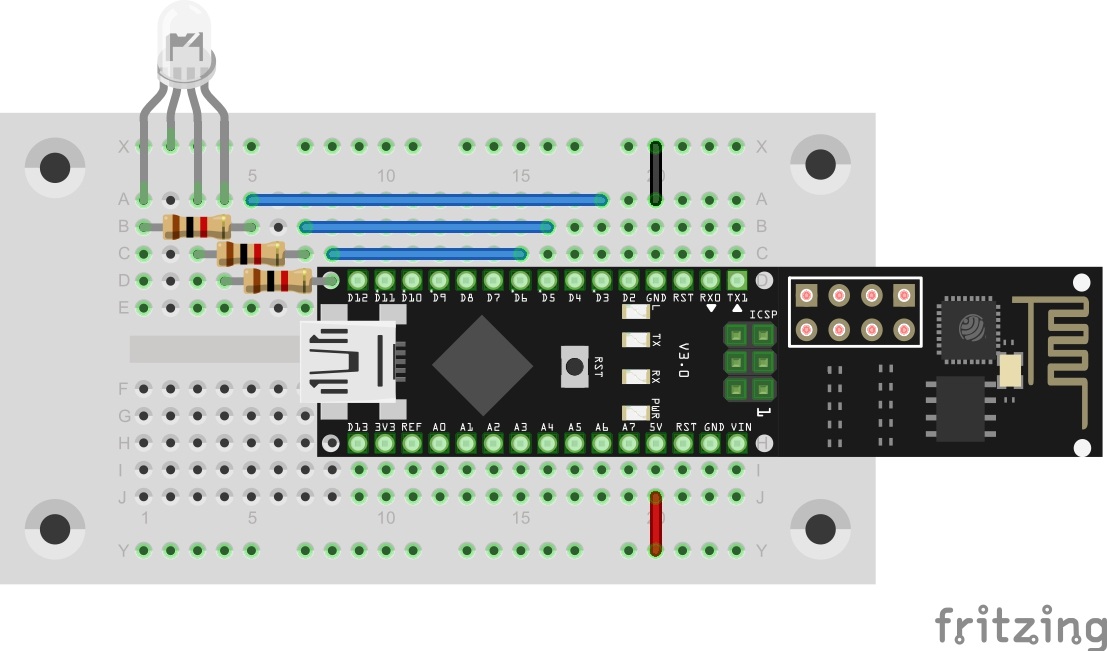
Behind today’s door, there is another LED. This is a special one. It is an RGB-LED. RGB means Red, Green, Blue, the LED actually is made up of several LEDs with a shared cathode connection. A combination of the different colours with different brightnesses permits presenting almost any colour. The LED can be connected to the PWM outputs D3, D5, D6 of the controller with dropping resistors.
The program: Day10_TCPWeatherUpdate
Today’s sketch is about querying a website again, but this time a weather site. Formerly the website was the well known site www.openweathermap.org, but due to changes in their API i had to create an other webservice, from which you can get the current temperatur. But this webservices source is still openweathermap.com. So the new weblink is:
On this page, you can get information on the weather in your town by varying the URL. In the program just enter the city you want to query in the source text behind CITY. As an example, I am using my home town Essen.
The link to the webservice would be:
http://temp.fkainka.de/?city=essen
The programme now reads the temperature from this page and shows the result in colour via the RGB-LED. At the same time, the value is output via the serial monitor. The temperature range used in the example program for display on the LED is -20°C to +40°C.

62 comments
Comments are closed. These comments were posted on the former WordPress site (mostly in German).
Danke, Daniel
#define GND 4
…
pinMode(GND, OUTPUT);
digitalWrite(GND, LOW);
Zum einen ist da eh nix angeschlossen und zum anderen gibt es doch einen extra GND-Pin. Wofür selbst einen machen?
In dem gedruckten Handbuch zum Adventskalender wird das Wetter von einer anderen Seite abgefragt, gibt es einen Grund, warum das ganze von openweathermap weg ging?
int i=-20;
int richtung=1;
void loop() {
//getTCP("temp.fkainka.de","/");
//Farbverlauf testen
/*rgbTemp(i,100);
i+=richtung;
if (i==40) richtung=-1;
if (i==-20) richtung=1;
delay(50);*/
int temp = getWeatherTemp(CITY);
rgbTemp(temp,100);
delay(600000); //600000
}
void rgbTemp(int val, byte bright) //Temparatur , Helligkeit
{
int green, blue , red ;
if (val = -20)
blue = map(val, -20, 10, bright, 0);
else blue = 0;
if (val >= 10 & val = -20 & val 10 & val <= 40) red = map(val, 10, 40, 0, bright);
else red = 0;
analogWrite(RED, red);
analogWrite(GREEN, green);
analogWrite(BLUE, blue);
}
der Grund ist, dass OpenWeathermap die API geändert hat, als das Handbuch schon gedruckt war. Deswegen habe ich erst einen alternativen Dienst verwendet. Dieser hat aber kurz vor Dezember dicht gemacht.
Deswegen musste eine eigene Lösung her. Der hier verlinkte Dienst arbeitet allerdings im Hintergrund wieder mit OpenWeathemap.
es gibt eine faule Möglichkeit die RGB-LED anzuschließen. Aus didaktischen Gründen wollte ich diese hier aber noch nicht vorstellen.
der "lange" Anschlussdraht ist die Kathode und muss mit GND verbunden werden (äußere Bahn). Ansonsten ist ein Wackelkontakt oft die Lösung.
Vielleicht hatte der Kollege Kainka die gemeinsame Kathode der RGB LED dort früher einmal angeschlossen, um sie über diesen Pin an- und auszuschalten. Jetzt liegt sie jedenfalls direkn an Masse.
Eventuell hatte er auch die RGB LED ohne Vorwiderstände direkt an 4 nebeneinanderliegende Anschlüsse der Boards angeschlossen, von denen dan einer natürlich an Masse liegen musste.
Im Moment hat die Konfiguration des Pin 4 jedenfalls keine Funktion.
Jetzt schaue ich der LED beim freundlicher werden zu…
Vielen Dank an den Autor!
Ich habe mal eine ganz minimale Version nur zum LED testen gemacht:
https://my.sofortcloud.com/public.php?service=files&t=f120f0f0a22d28787c00d7096bfb77a2
es gibt jetzt auch die Möglichkeit die Programme über das Forum direkt hochzuladen :)
Da kommt bei mir "false" zurück und die Schleife mit der Temparaturabfrage wird nicht ausgeführt.
Jetzt ist das Wetter für Köln grün! Grün = Hurrah, Ich brauch' keine Jacke? :-)
Change CITY, SSID and PASSWORD.
*/
#define SSID "[Deine WLAN-Daten]"
#define PASSWORD "[Dein Passwort]"
#define CITY "Eine Stadt deiner Wahl"
Kalter Ort: Sheya (Russland ca -20°C)
Warmer Ort: Kindu (Kongo ca. 24°C)
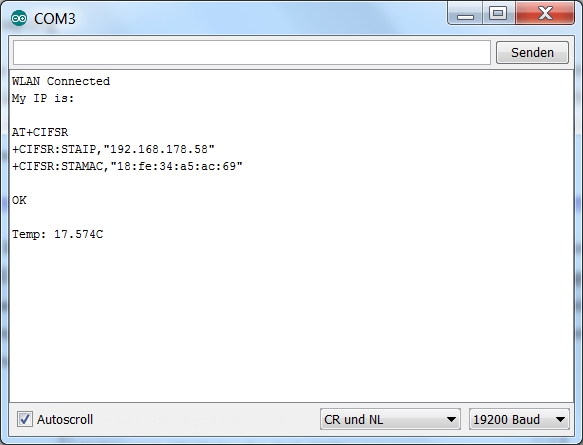
Der serielle Monitor sieht bei mir so aus:
WLAN Connected
My IP is:
AT+CIFSR
+CIFSR:STAIP,"192.168.0.114"
+CIFSR:STAMAC,"18:fe:34:a4:67:0d"
OK
ESP SEND ERROR: AT+CIPSTART="TCP","temp.fkainka.de",80
kann mir irgendwer weiterhelfen?
Danke im Voraus
Andreas
Anfangs ging es, nun nicht mehr.
Serverprobleme kann man bei dieser Seite wohl ausschließen, oder?
avrdude: stk500_recv(): programmer is not responding
Gegoogelt habe ich schon, verschiedene Treiber neu installiert, aber nichts klappt. Im Geräte-Manager taucht der ArduinoClon nicht auf, sondern nur USBSerial XY. Ich habe vorher aber auch nie rein geschaut, ob er dort auftaucht.
Ideen?
Zur Ergänzung: wenn ich den Arduino nach der Fehlermeldung einfach weiterlaufen lasse, kommt nach so ca. 5 - 10 Minuten wieder die Fehlermeldung:
ESP SEND ERROR: AT+CIPSEND=52
Nach weiteren 5 - 10 Minuten kommt wieder die erste Fehlermeldung:
ESP SEND ERROR: AT+CIPSTART=“TCP“,“temp.fkainka.de“,80
Irgendwie komisch…
Grüße Andreas
Wenn du es dann nochmal versuchst, müsste es klappen
Das Ding startet und die LED 13 beginnt zu leuchten, die RGB Led bleibt aber dunkel. Ebenfalls wird in der Konsole nur die halbe MAC Adresse angezeigt. Ich benutze Arduino IDE 1.6.4.
WLAN Connected
My IP is:
AT+CIFSR
+CIFSR:STAIP,"192.168.1.61"
+CIFSR:STAMAC,"18:fe:34:
hat jemand eine Idde an was das liegt?
Nach rumspielen und hier lesen funktioniert es mit folgenden Modifikationen:
int getWeatherTemp(String city)
{
int temp, humidity, clouds;
String Host = "www.temp.fkainka.de";
String Subpage = "/?city=" + city;
if (sendCom("AT+CIPSTART="TCP","" + Host + "",80", "OK"))
{
String getRequest = "GET " + Subpage + " HTTP/1.1\r\nHost:" + Host + "\r\n";
if (sendCom("AT+CIPSEND=" + String(getRequest.length() + 2), ">"))
{
esp8266.println(getRequest);
if (esp8266.find("+IPD"))
{
if (esp8266.find("\r\n\r\n"))
{
if (esp8266.find("Temp: "))
{
String vTemp = esp8266.readStringUntil(' ');
debug("Temp: " + vTemp + "C");
temp = round(vTemp.toFloat());
}
sendCom("AT+CIPCLOSE", "OK");
}
}
}
}
}
Ortsempfehlungen:
#define CITY "Miami" //warm
#define CITY "Moskau"
#define CITY "Kathmandu"
#define CITY "Honolulu" //warm
#define CITY "Hammerfest" //kalt
Danke Super gelöst.
Habe geich mal einige Orte ausprobiert.
Oimjakon Russland -49°C (LED ist aus)
Roebourne Australien 30°C (Grün-Orange)
Grüssle
Hoffe das hilft.
Lg Martin
Die Anzeige im seriellen Monitor geht nur bis
+CIFSR:STAMAC,"18:fe:3
Die LED schein zu funtionieren.
Warum ist die Anzeige nicht komplett ?
das hört sich nach einem Problem mit der SoftwareSeriellen an. Welche Arduino-Version benutzt du? Ím zweifel mal updaten.
Ansonsten kann es auch sein, dass du nicht das aktuelle Programm von genau dieser Seite hast? Es gab eine Änderung im Programm.
Und hast du etwas an Pin0/1 angeschlossen?
Ja, das steht da. Es ist nichts angeschlossen, das Board ist völlig nackt, nur das USB-Kabel hängt dran.
Habe es heute mal mit zur Arbeit genommen, um es auf einem anderen Rechner zu probieren. Dort habe ich leider das gleiche Problem. Ich denke nicht, dass ich in der IDE was aus versehen geändert habe.
Board: Arduino Nano
Prozessor: ATmega328
Programmer: AVRISP mkll
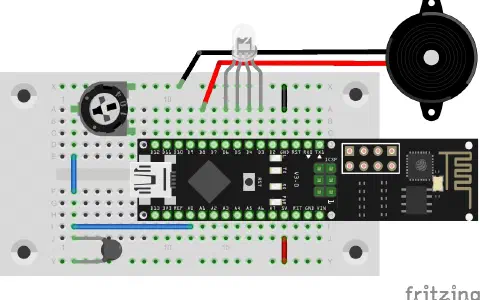
Die IP habe ich der App bekannt gemacht und Android kann auch wunderbar mit UDP sowohl als Server als auch Client umgehen. Dh. die App schickt und empfängt UDP Befehle. Das Board wertet die empfangenen Daten dann entsprechend aus.
Hätte anfangs gedacht das das Board mit dem Schieberegler und dem damit verbundenen hohen Datenaufkommen Probleme kriegt, da innerhalb kürzester Zeit sehr viele UDP Befehle einströmen. Aber das Board steckt das gut weg. Kein Ruckeln zu sehen.
Temp: -2.98 Debug: Found Set
+IPD,5:0
C
Nach den Änderungen die mir Martin angegeben hat, funktioniert es genauso - auch ohne LED-Anzeige.
Kann mir wer sagen, warum die LED nicht leuchtet (sie ist in Ordnung und richtig angeschlossen)
Grüsse Andreas
Noch ein Versuch:
Wenns jetzt wieder nicht funktioniert geb' ichs auf!
das Problem ist, dass der Controller die Temperatur nicht mittels parseInt() erkennt. Hast du etwas an der Zeile geändert? Und welche Aduino Version benutzt du?
Und benutzt du das Programm, das hier zu sehen ist? oder eine ältere Version?
das Thema scheint schwieriger zu sein. Am Besten ins Forum posten, damit man auch mehr als 5 Antworten geben kann.
Danke jedenfalls nocheinmal!
Tippe auf defekte Hardware
Und damit man alle Städte gleichzeitig abfragen kann , ein kleiner "switch in the loop".
Änderungen:
1===
// 2 gobal vabiable
int lauf = 0; // lauf variable fuer switch
String cityo = "Essen" ; // inti
2=== da der switch
void loop() {
//getTCP("temp.fkainka.de","/");
switch (lauf) {
case 0:
cityo = "Miami";
break;
case 1:
cityo = "Moskau";
break;
case 2:
cityo = "Kathmandu" ;
break;
case 3:
cityo = "Honolulu";
break;
case 4:
cityo = "Hammerfest";
break;
case 5:
cityo = "Sheya";
break;
case 6:
cityo = "Canberra" ;
break;
case 7:
cityo = "Rom";
break;
case 8:
cityo = "Wellington";
break;
case 9:
cityo = "Berlin";
break;
case 10:
cityo = "Kairo" ;
break;
case 11:
cityo = "Kindu";
break;
case 12:
cityo = "Oimjakon";
break;
case 13:
cityo = "Hamburg" ;
break;
case 14:
cityo = "Roebourne"; // Australia
break;
case 15:
cityo = "Recife";
break;
case 16:
cityo = "Manaus";
break;
case 17:
cityo = "Kuqa"; //china
break;
case 18:
cityo = "SCRM"; // Antarktis (king Gorge)
break;
case 19:
cityo = "NZSP"; // Antarktis Jack F Paulus Skiway
break;
}
lauf = lauf + 1;
if (lauf > 20)
{ lauf = 0 ;
cityo = "Essen";
}
//int temp = getWeatherTemp(CITY);
int temp = getWeatherTemp(cityo);
rgbTemp(temp);
delay(2000); //orginal 600000 mit mehr speed
}
3=====
Und dann noch die Ausgabe abändern , dass die city gedruckt wird.
debug("Temp: " + String(vTemp) + "C " + city);
4======
Das ist schon der Output.
Und wie herrlich die LED leuchtet. (alle Farben)
Ich bin heute vom day_10 richtig begeistert.